What is User Execution - Bitdefender TechZone
MITRE T1204 User Execution bypasses signatures through file-type pivots — macros, LNK, ISO, OneNote — and now fileless ClickFix, pasting PowerShell into the Run dialog. Bitdefender GravityZone Fileless Protection blocks the command with no file on disk.
User Execution is the MITRE ATT&CK technique class (T1204) where an attacker hands off payload execution to the victim. The human becomes the loader. It gets filed as a phishing problem and answered with user training, which is what makes it durable: the technique has changed file type four times since 2022 — macros, LNK, ISO, OneNote — and now runs with no file at all, as a command the user pastes into the Run dialog from their own clipboard. Nothing in that chain is a vulnerability. Every step is Windows working as designed.
User Execution Example
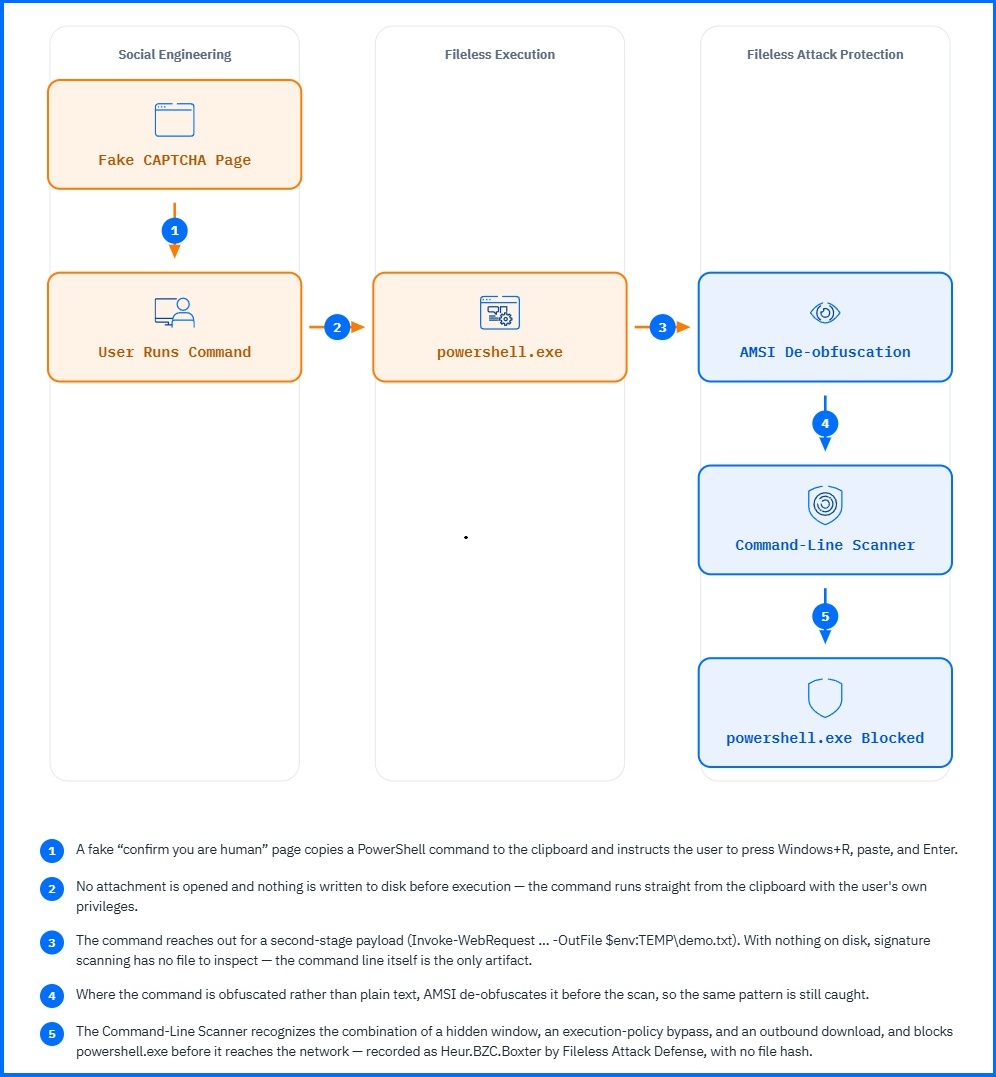
An employee receives an email from HR announcing a new company car benefit, awarded for completing this year's performance review, with vehicles allocated first-come, first-served before a Friday deadline. The link opens a verification page identical to the everyday 'confirm you are human' check. Clicking the box reveals a short instruction: press Windows+R, paste, and press Enter to finish the check. The clipboard contents are labeled a verification token. They are not — the click silently placed a PowerShell command on the clipboard. The employee pastes it into the Run dialog and presses Enter. No window opens. The command runs hidden, with the employee's own privileges, and reaches for a second-stage payload on an external server.
No signature matched, because there was nothing to match: no file was written to disk before execution, and powershell.exe is a trusted Windows binary. The tell was not a file but a behavior — powershell.exe launched by explorer.exe straight from the Run dialog, running with a hidden window, an execution-policy bypass, and a network request within seconds. A trusted binary, started by the shell, behaving like a downloader. It was blocked before it completed its first network connection.
 |
What User Execution Is
User Execution is not an exploit technique. It does not attack a software vulnerability — it abuses expected user behavior: opening an attachment, clicking a download link, following an on-screen instruction. Nothing is corrupted, tricked, or broken; the user simply does what the page or file asks, and the payload runs with whatever privileges that user session already has. The double-click isn't a mistake the system failed to catch — it's the system working exactly as designed.
That makes it cheap. Social engineering costs less than exploit development, a malicious link needs hosting rather than an exploit kit, and a flagged domain is rotated rather than rebuilt. No zero-day is consumed on a reconnaissance target. Clipboard execution shows where those economics lead: the 2025 Microsoft Digital Defense Report puts ClickFix at 47% of all observed initial access attacks in the past year, the single most frequent method, and it needs neither an exploit nor a file.
How User Execution Works
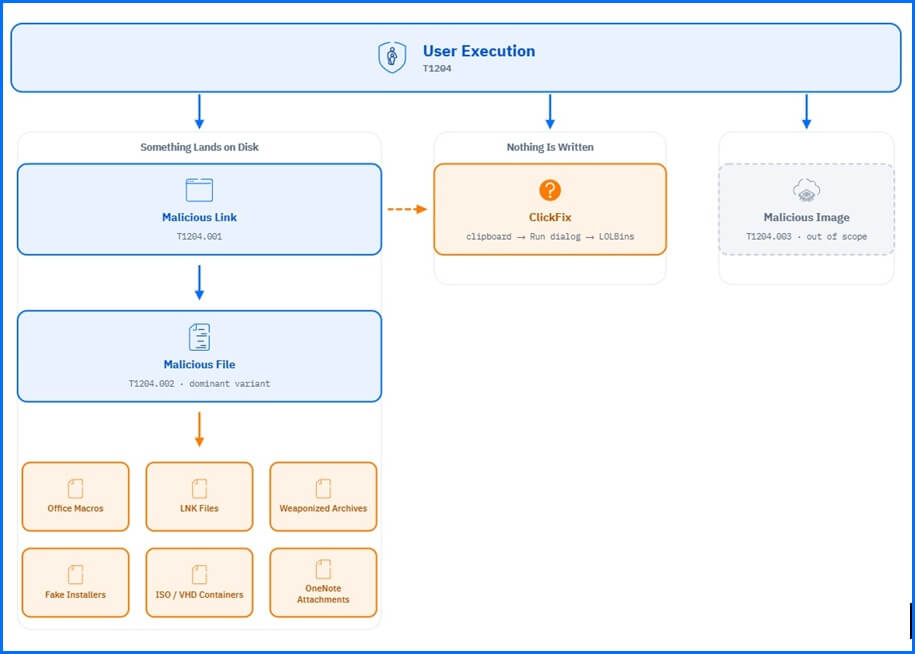
MITRE splits User Execution by what the attacker delivers: a link (T1204.001), a file (T1204.002), or a container image (T1204.003). Detection splits it differently. A link and a file end the same way — something lands on disk and the user opens it — so both are visible to anything that inspects files. ClickFix is mapped to T1204.002 as well, but nothing is ever written, and every file-based defense is blind to it.
 |
T1204.001: Malicious Link
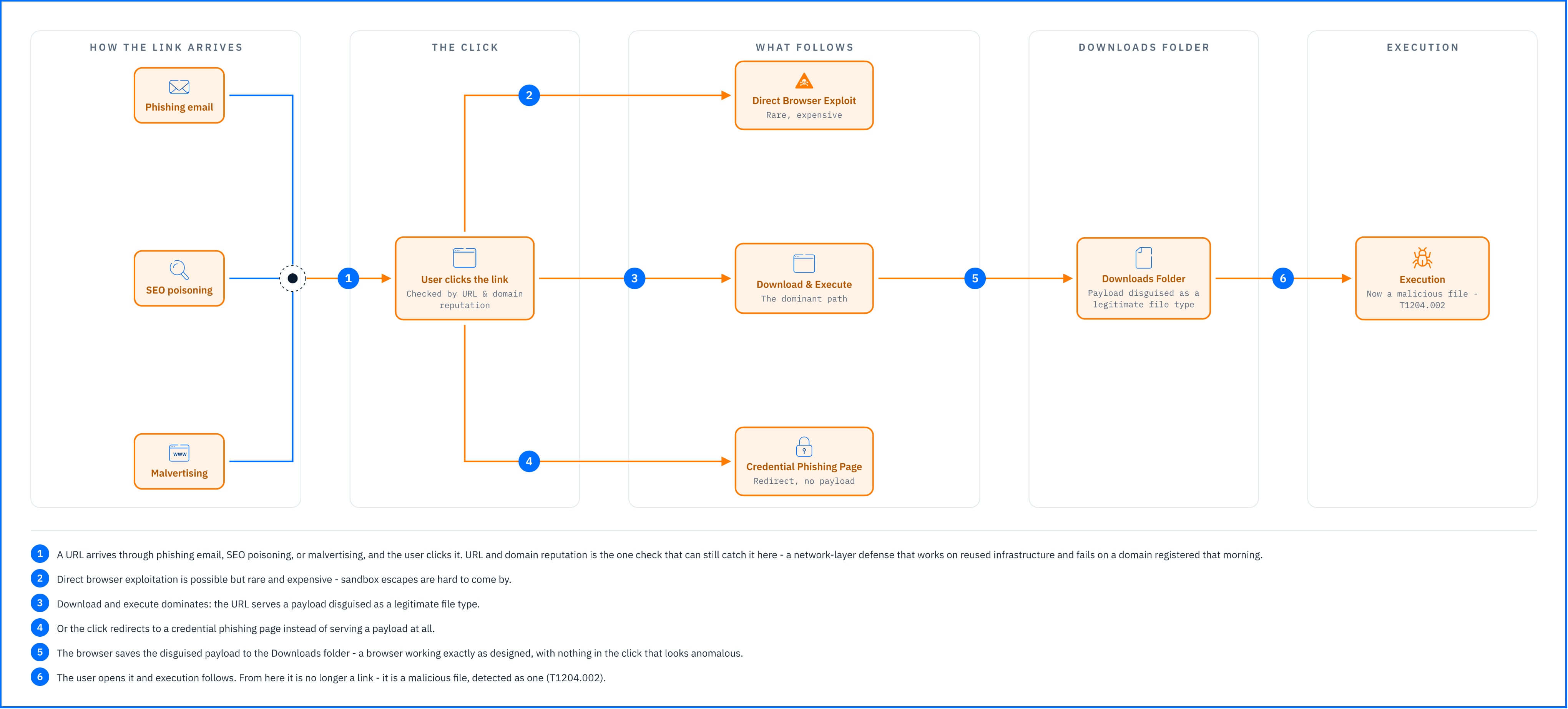
Mechanism. The user clicks a URL, and one of three things follows: direct browser exploitation, download and execute, or a redirect to a credential phishing page. Browser sandbox escapes are expensive and uncommon, so download and execute dominates. The URL serves a payload disguised as a legitimate file type, the browser saves it to the Downloads folder, the user opens it, and execution follows. This is User Execution chained with phishing link delivery (T1566.002). The links arrive through phishing email, SEO poisoning (attacker-controlled download sites ranked into search results), and malvertising (legitimate ad networks serving attacker-controlled redirects).
Why this is possible. A browser downloading a file the user asked for is the browser working correctly. Nothing in the click is anomalous, and the payload's disguise only has to survive a glance at a filename.
Detection angle. The link produces no endpoint signal — the detection window is between the click and the file open, and it belongs to the network layer. URL and domain reputation catches the delivery host before the payload is served, which works on reused infrastructure and fails on a domain registered that morning. Once the file lands, T1204.001 stops being a category of its own: what happens next is a malicious file, detected as one.
 |
Real-world example
A Meta malvertising campaign abusing TradingView's branding ran in July–August 2025, with at least 75 malicious ads reaching tens of thousands of EU users. Android users who clicked were redirected to a cloned TradingView page and prompted to download an .apk that dropped a packed crypto-stealing payload. Desktop users outside the target demographic received benign content — a deliberate evasion to keep automated analysis from ever seeing the payload.
T1204.002: Malicious File
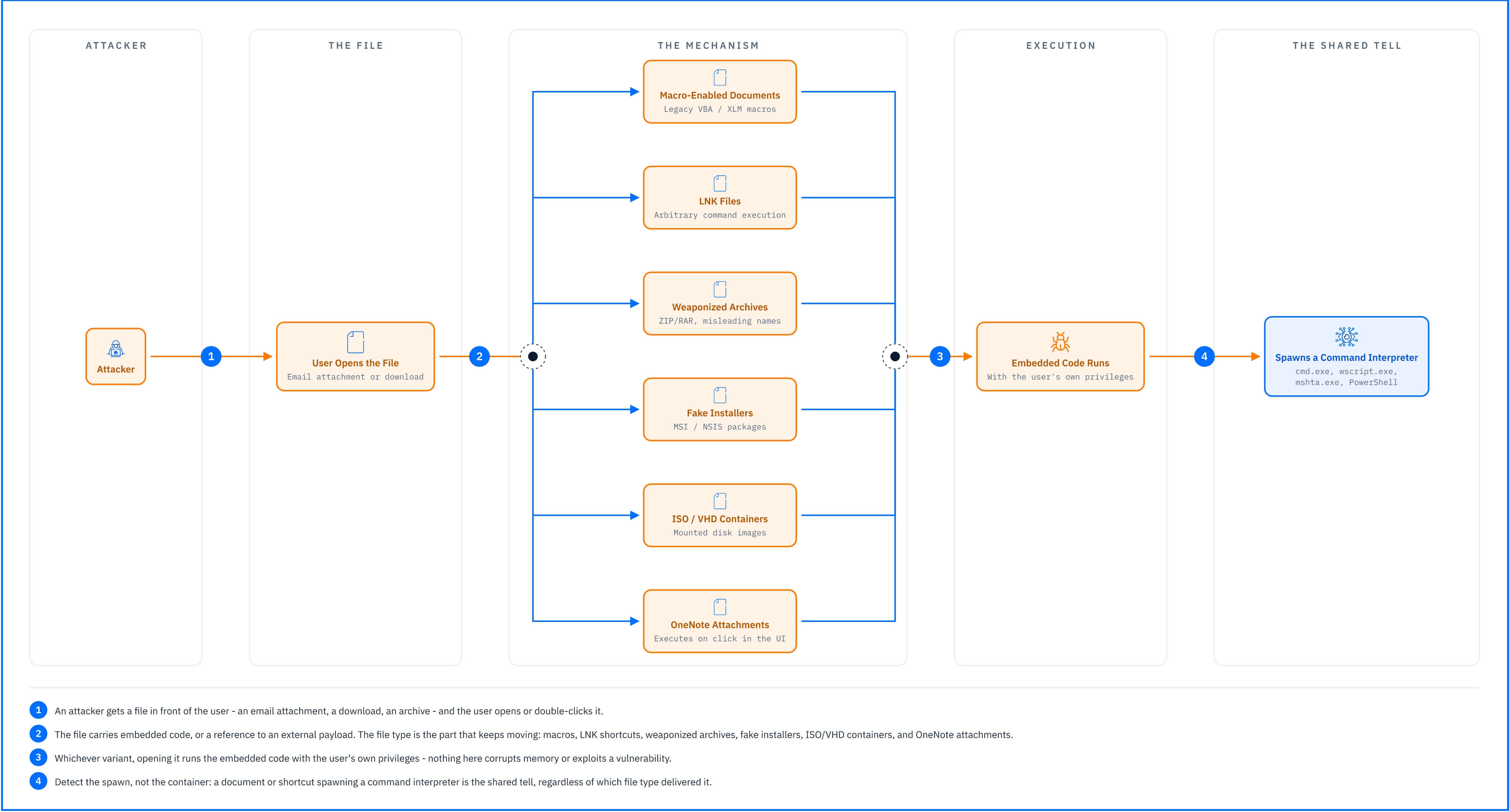
Mechanism. The user opens or double-clicks a file that carries embedded code — a macro, a script, an executable — or a reference to an external payload. This is the dominant variant, and the file type is the part that keeps moving:
Macro-enabled Office documents (legacy VBA macros, XLM macros).
Weaponized archives (ZIP/RAR containing executables with misleading names).
Fake installers (MSI, NSIS packages delivering payloads alongside or instead of legitimate software).
ISO/VHD container files (used to bypass Mark-of-the-Web before the 2022 Windows patch).
OneNote attachments (embedded files that execute when clicked inside the OneNote UI).
 |
Why Office Macros Lost Dominance
Office macros were the primary T1204.002 vector until April 2022, when Microsoft began blocking macros by default in Office files flagged with Mark-of-the-Web (MOTW) — an NTFS alternate data stream applied to files downloaded from the internet or received by email. Legacy VBA and XLM (Excel 4.0) macros both became significantly harder to deliver.
Attackers adapted in weeks. Emotet switched from macro-enabled Word documents to LNK files and later OneNote attachments. Qakbot shifted to ISO containers and LNK delivery. The technique class did not change; the file type did. That pivot is the reason this sub-technique cannot be detected by file type — each of the sections below is the same attack wearing a different extension.
LNK File Mechanics
Mechanism. A Windows shortcut (.lnk) is a binary format storing a target path, arguments, and metadata such as an icon and working directory. Double-clicking it launches the target with the specified arguments. The target can be any executable — cmd.exe, powershell.exe, mshta.exe — and the argument field can hold an arbitrary command chain: fetch a second stage, run it in memory, delete the .lnk.
Why this is possible. File Explorer shows the icon and the shortcut name. It does not show the target path or the argument string unless the user opens the Properties dialog. The user sees a document; the system executes a command line they were never shown.
Real-world example
Bitdefender Labs identified that Unfading Sea Haze, a threat actor operating in the South China Sea region, used spear-phishing emails containing ZIP archives as an initial access method. The archives contained LNK files disguised as regular documents, with the ZIP and the LNK sharing the same filename (for example, Data.zip containing Data.lnk). When the victim double-clicked the apparent document, the LNK executed malicious commands.
ISO/VHD Containers and MOTW Bypass
Mechanism. ISO and VHD files are disk images that Windows 10 and later mount as virtual drives on double-click. Until late 2022, files inside a mounted container did not inherit MOTW from it: the outer ISO carried the flag, the macro-enabled document inside did not, and the default-block policy never applied.
Why this is possible. MOTW is metadata on a downloaded file, not a property that propagated through a mounted filesystem. Microsoft closed this in November 2022 (KB5019959), and MOTW now propagates to files inside ISO/VHD containers. Unpatched Windows 10 and Windows Server 2019 remain exposed.
Real-world example:
Qakbot campaigns in 2021–2022 distributed ISO files via phishing emails. Each ISO contained a .lnk file and a malicious DLL. The .lnk executed the DLL via rundll32.exe. No MOTW on the inner files, no macro warning, no UAC prompt.
OneNote as a Delivery Vector
Mechanism. OneNote (.one) files can embed arbitrary files as attachments. Clicking an embedded file icon inside OneNote executes it directly.
Why this is possible. The outer .one file may carry MOTW, but the embedded file's execution path does not inherit it and no MOTW check happens at execution time. Attackers embed executables, scripts, or LNK files in pages styled to look like a document preview or an error message.
Detection angle. Every variant above defeats a different static control — the macro block, the MOTW check, the archive scan — and each was answered by changing the container. What none of them changes is what happens after the double-click: a document application or a shortcut spawns a command interpreter, and that interpreter reaches the network. Detect the spawn, not the container. The specific tells are an Office application spawning cmd.exe, wscript.exe, mshta.exe or PowerShell; a script interpreter running out of Downloads or a temp directory; and an LNK whose argument string runs long or whose icon does not match its target.
Real-world example
Bitdefender Labs researchers identified a phishing campaign active between January 13–20, 2023, in which threat actors impersonated Ultramar, a well-known Canadian fuel retailer. The campaign delivered malicious OneNote files — Invoice_32566.one and Invoice_76562.one — via malspam, with email bodies in both English and French to increase credibility. The embedded payload delivered AsyncRAT, a remote access trojan used to infiltrate victim devices without visible indicators.
ClickFix: Clipboard-Based Execution
Mechanism. Malicious JavaScript on a fake error page or CAPTCHA prompt writes a PowerShell command to the user's clipboard. The page instructs the user to open the Run dialog (Win+R), paste, and press Enter. The command uses Living-off-the-Land Binaries (LOLBins) — PowerShell, MSHTA, regsvr32 — to fetch and execute a second stage. The demonstration at the top of this article is a ClickFix attack.
Why this is possible. Windows lets JavaScript write to the clipboard through the Clipboard API, the same mechanism every copy-to-clipboard button on the web uses. The user supplies the execution themselves, so the process tree descends from explorer.exe — as trusted a parent as Windows has. And nothing is written to disk before execution, so the file creation event that most detection logic anchors on never occurs.
Detection angle. There is no file, no download, and no anomalous parent, which removes three of the four things a file-based defense looks for. What remains is the command line itself: PowerShell spawned by explorer.exe with an execution-policy bypass, opening a network connection within seconds. Event ID 4688 with command-line auditing, plus Sysmon Event ID 1, are what make it visible; without them this attack produces no usable telemetry at all.
ClickFix is most commonly mapped to T1204.002, treating the clipboard contents as a user-initiated script execution. Some platforms map it to T1059 (Command and Scripting Interpreter) for the clipboard-to-shell path, or track both.
Real-world example
Bitdefender documented a Middle Eastern campaign using ClickFix tied to a Lumma Stealer (a credential and cryptocurrency theft tool sold as a service to other criminal groups) distribution campaign. The attack began when a user visited a fraudulent site at hyundaimaintenance[.]com, which displayed a fake Cloudflare CAPTCHA. When the user clicked the verification checkbox, malicious JavaScript silently wrote a PowerShell command to the clipboard. Following the on-screen instructions, the user opened the Windows Run dialog, pasted the command, and pressed Enter.
T1204.003: Malicious Image
The user deploys a malicious container image in a DevOps or CI/CD environment. This sub-technique is significantly less common than T1204.001 and T1204.002 and targets organizations using container technologies. It is outside the scope of this article, which covers endpoint-based User Execution. For details, see MITRE ATT&CK T1204.003.
Common Mistakes and Misconceptions
“Training is the control that stops this”
Training is where most organizations put their User Execution budget, and it is the only control on this list that degrades. Awareness scores decay between sessions, and the attack is designed for the moment the user is not thinking about the training. ClickFix pages impersonate the Windows and browser interfaces the user has been taught to trust, and they arrive attached to time pressure — a download that will not complete, a service that will not load, a benefit that expires Friday. Every user has to be right every time; the attacker has to be right once.
The correct mental model: training changes how often the attack lands. It changes nothing about what happens when it does.
“The 2022 macro block solved this”
Microsoft's April 2022 default-block for internet-sourced macros was effective — for macros. The pivot took weeks: Emotet, Qakbot, and Agent Tesla all changed file type, to LNK files, ISO containers, and OneNote attachments, and the technique class went on unchanged. The correct mental model: the macro block closed a delivery shape, not a technique. Each control that closes one buys time and produces the next shape, which is why organizations that read it as a T1204.002 mitigation were exposed to every variant that replaced it — and are now exposed to a variant that uses no file at all.
“Antivirus catches malicious files before the user executes them”
Signature-based scanning inspects files at rest, at download or at write. It fires before the user acts, or not at all. User Execution is aimed at the interval after that: the payload is on disk, the scan has already returned its verdict, and the user is about to supply the execution. The correct mental model: static scanning is the first layer, not the last, and this technique is built for the gap behind it. Everything that identifies the attack happens inside that gap — what spawned from what parent, with what arguments, reaching where, how fast — and in the clipboard variant there is no file for a scanner to have an opinion about at all.
“User Execution and phishing are the same thing”
Phishing (T1566) is delivery: the email, the link, the fake login page. User Execution (T1204) is the moment the payload runs because the user acted. Neither requires the other — credentials are phished through a fake login form with no execution anywhere, and payloads run from a USB drive or an SEO-poisoned download with no email involved. The distinction decides who owns the detection: phishing is caught by inspecting content, senders, and URLs before anything reaches the endpoint; User Execution is caught by inspecting process behavior after the user has already decided. An organization with excellent phishing controls and no behavioral monitoring is covered for one and blind to the other.
What Reliable User Execution Signals Look Like
User Execution creates a detection window between the user acting and the payload running, and nothing below fires before it opens — until someone clicks, double-clicks, or pastes, nothing has happened but a file arriving. Each signal is rated against a standard Windows 10/11 endpoint with Sysmon deployed and command-line auditing enabled.
Signal | Reliability | Notes |
|---|---|---|
Office application spawning a command interpreter (cmd.exe, wscript.exe, mshta.exe, powershell.exe). | High | Legitimate Office workflows rarely spawn interpreters; approaches certainty when the child process opens a network connection within seconds of the document opening. |
PowerShell spawned by explorer.exe with an execution-policy bypass. | High | The ClickFix pattern, and the only signal that catches it; the Run dialog makes explorer.exe the parent, and no file is written before execution for a scanner to find. |
Script interpreter (wscript.exe, cscript.exe) running from a Downloads or temp directory. | Medium | Enterprise installers use VBScript and JScript wrappers too; rises when the interpreter connects to the network or writes to a Startup folder. |
LNK with an argument string over 200 characters, or an icon that does not match its target. | Medium | Legitimate administrative shortcuts exist; a .lnk showing a PDF icon while targeting cmd.exe is the stronger half, and reliability is high once it spawns an interpreter that reaches the network. |
Reliability High means the signal produces very few false positives on a standard Windows 10/11 endpoint. Reliability Medium means legitimate software triggers it and correlation or tuning is required.
No row above confirms an attack alone; the chain does. WINWORD.EXE spawns cmd.exe, which spawns powershell.exe with -EncodedCommand, which connects to an external IP within two seconds — that is a macro or embedded object running a download chain, and no single event in it says so. When one triggers, identify the file the user opened and correlate it against the email attachment event: which file, opened when, by which user. Inspect the command line for a hidden window, an execution-policy bypass, or base64, using script block logging (Event ID 4104) where the command line itself is obfuscated. Check whether the process wrote to a Startup folder or a registry Run key in the same window.
Mitigation
Every control below assumes the user will act. None of them depends on recognizing the file, because this technique class changes file type faster than signatures follow it — macros to LNK to ISO to OneNote to a clipboard with no file at all.
Enable Attack Surface Reduction rules. Block Office applications from creating child processes, and block script interpreters from launching out of downloaded or temp directories. These act on the execution pattern rather than the file type, so they survive the next pivot.
Disable PowerShell v2 on all endpoints. It lacks script block logging and script block inspection, and attackers invoke it specifically to evade both.
Enable command-line auditing and script block logging. Event ID 4688 with command-line arguments and PowerShell Event ID 4104 are both off by default, and every High signal above depends on one of them. Without these, the table above describes detections you do not have.
GravityZone Detection
User Execution arrives in two shapes, and GravityZone answers them at different depths. The file variants exist on disk before the user acts, so they can be judged before execution. The clipboard variant has no file at any point, so nothing can be judged until the command runs.
Extended Email Security, Content Control, and Network Attack Defense cover delivery: the attachment or archive in the mail, the fake verification page hosting the ClickFix lure, and the payload fetch that follows if the page loads anyway. All three depend on the sender, domain, or host being known — infrastructure stood up for a single campaign carries no reputation and falls to the layers below.
HyperDetect and Sandbox Analyzer judge the file itself rather than where it came from — machine learning before execution for payloads packed or rotated to defeat signatures, and detonation for the container formats the ISO and OneNote variants use. Neither has anything to inspect in a ClickFix attack, where the payload is a line of text in the clipboard.
Proactive Hardening and Attack Surface Reduction (PHASR) restricts LOLBins such as PowerShell and MSHTA in contexts where the user has no history of running them. In this ClickFix scenario it raises the PHASR.AnomalousPowershellExecutableDownload detection, and the PowershellDownloadsExecutable restriction blocks the download before it executes.
Fileless Protection is the layer that stopped the demonstration. With no file on disk, the Command-Line Scanner judged the only artifact there was — the pasted command, carrying a hidden window, an execution-policy bypass, and an outbound fetch — and blocked powershell.exe as Heur.BZC.Boxter, with no file hash. AMSI de-obfuscates script content before the scan, so the pattern is caught when the command is encoded rather than plain.
Process Protection judges' behavior at runtime rather than identity. Advanced Threat Control keys on the explorer.exe to powershell.exe ancestry and behaviors such as PowershellEnvDiscovery and SuspiciousSignedProcessExecution, which is what preserves coverage when the file type pivots again.
The Endpoint Sensor and GravityZone XDR tie the discrete actions into one incident: the XDR Graph tracing explorer.exe down to powershell.exe, mapped to User Execution (T1204) and PowerShell (T1059.001), with Historical Search exposing the full command line and Integrity Monitoring flagging the Startup-folder shortcut left behind.
Related Resources
Living off the Land Attacks, TechZone — explains the LOLBin techniques ClickFix and LNK-based chains rely on for payload delivery and evasion.
Unfading Sea Haze, Business Insights — forensic research on LNK-based spear-phishing used as a User Execution delivery mechanism.
FamousSparrow APT Targets Azerbaijani Oil and Gas Industry, Business Insights — case study on phishing-delivered payloads requiring user-initiated execution