What is ESXi Hypervisor CLI Abuse – Bitdefender TechZone
2026-10-05
Akira, Cactus, and RedCurl ransomware target ESXi infrastructure via stolen vCenter credentials, using native esxcli/vim-cmd commands to enumerate VMs, force-kill them in rapid succession, and encrypt VMDK files at scale. No malware binary runs on the hypervisor until encryption begins.
VMware ESXi hypervisors run the infrastructure that keeps enterprise applications, and when attackers compromise them, they use the hypervisor's own administration shell to destroy dozens of VMs at once. MITRE ATT&CK technique T1059.012 (Command and Scripting Interpreter: Hypervisor CLI) describes this pattern: threat actors abuse native ESXi utilities like esxcli and vim-cmd to enumerate VMs, shut them down, and stage encryption ultimately achieving data encryption at infrastructure scale. The technique works because ESXi hosts are trusted infrastructure with powerful built-in tooling.
ESXi Hypervisor CLI Abuse Example
You are reviewing logs after a hypervisor compromise and find nothing unusual: an administrator connected via SSH, ran standard VM management commands, and powered off several virtual machines before disconnecting. Every command in the session was a legitimate ESXi utility. The activity matches maintenance workflows you have seen before.
Two hours later, every VMDK file on the host is encrypted and the VMs will not start. The "administrator" was a ransomware operator, and the commands that looked like routine maintenance were the final stage of a multi-VM encryption campaign. No malicious binary was transferred during reconnaissance. No exploit payload ran against the VMs. The hypervisor's own administration layer was the weapon.
One signal would have flagged it: ESXi Shell enablement outside a maintenance window, alerted on in real time. The event was logged. Nobody had configured the correlation. This is living off the land at the hypervisor level.
What ESXi Hypervisor CLI Abuse Is
ESXi Hypervisor CLI Abuse is not an exploit technique. It does not attack vulnerabilities in the guest operating systems or the applications inside the VMs. It authenticates to the hypervisor as a legitimate administrator — with stolen credentials, a compromised vCenter account, or an AD-authenticated SSH session — and uses the same native utilities VMware ships for infrastructure management. The malicious behavior is not in the code; it is in the way attackers use trusted hypervisor tooling.
The economics are why hypervisors are worth the effort. Encrypting fifty VMDK files from a single shell session replaces deploying fifty agents across fifty machines: identical scope of impact, smaller attack surface, fewer detection opportunities. And the layer is under-instrumented in ways the endpoint tier is not — ESXi hosts rarely carry a resident agent, vSphere audit logs are rarely forwarded to a SIEM in real time, and the tooling the attacker needs is already installed, signed, and trusted by the operating system. One set of credentials, one shell connection, one encryption binary, dozens of workloads offline.
The distinction that matters for detection: every command in the session is a signed VMware utility behaving exactly as designed, so signature-based defenses produce no signal and there is nothing for them to have an opinion about. Detection depends entirely on context — who ran the command, from where, at what time, and in what sequence.
How ESXi Hypervisor CLI Abuse Works
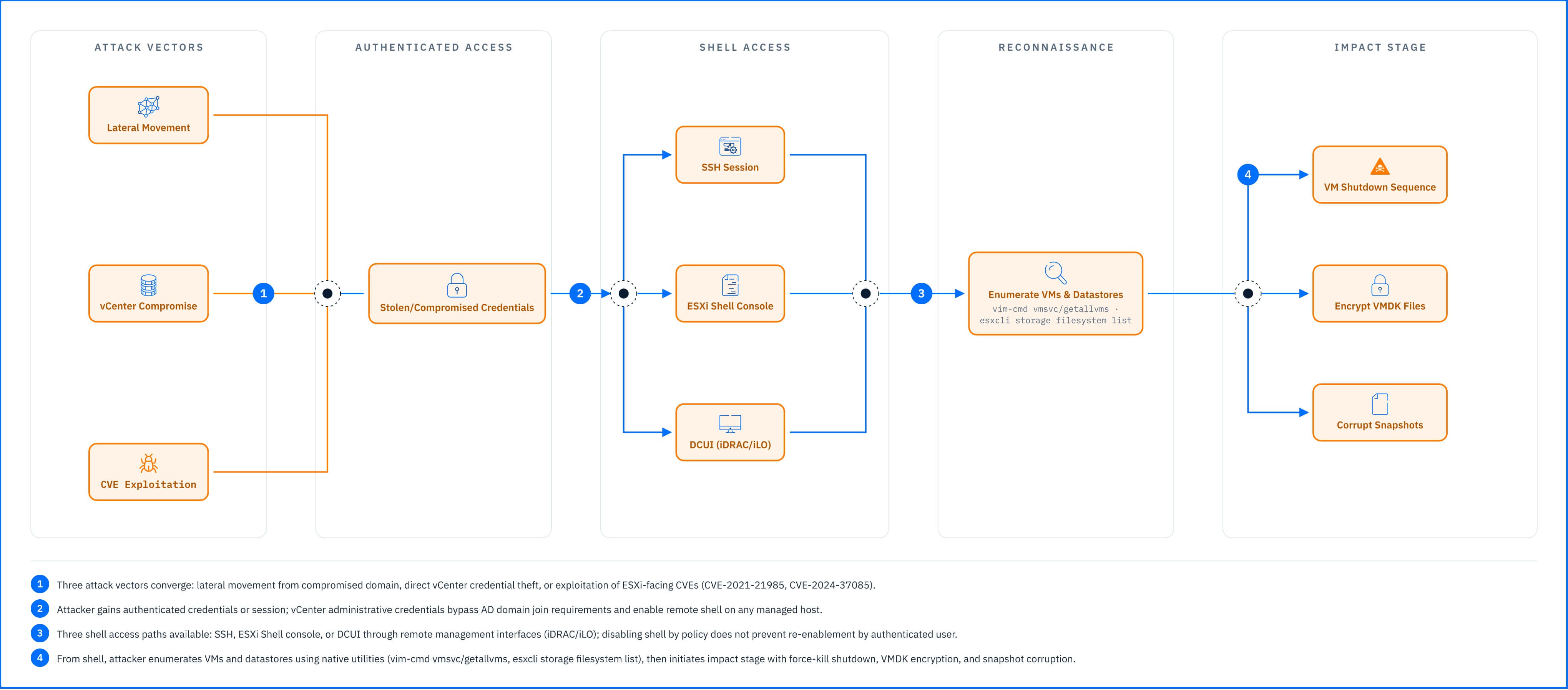 Fig. 1. ESXi attack flow: multiple credential vectors converge on shell access for native-command exploitation. |
How Attackers Reach the ESXi Shell
Mechanism. Attackers do not typically arrive at ESXi hosts through direct internet exposure. The common path is lateral movement from a compromised domain environment, or credential theft targeting vCenter. The second vector is exploitation of ESXi-facing management services. CVE-2021-21985, for example, allowed unauthenticated remote code execution via the vSphere Client, a direct pivot to shell access. ESXi-facing CVEs appear regularly in VMware security advisories and CISA's Known Exploited Vulnerabilities catalog.
The Active Directory path needs stating precisely, because it is commonly overstated. ESXi hosts can be joined to Active Directory directly, and in that configuration a compromised domain administrator account grants SSH access to those hosts. But AD domain join for ESXi is optional and not universal. Many environments use vCenter SSO with an AD identity source without joining ESXi hosts to the domain, and in that architecture domain administrator credentials alone do not grant ESXi shell access. vCenter administrative credentials are high-value regardless: an attacker holding them can enable ESXi Shell or SSH on any managed host remotely, whatever the AD configuration.
Why this is possible. Disabling the shell by policy does not remove it. For an authenticated user with sufficient privileges, enabling it is a single command, or a click in the vSphere Client. Interactive access is available through SSH, the ESXi Shell console, or the Direct Console User Interface, and DCUI is reachable through remote management interfaces such as iDRAC or iLO, so physical presence is not required either.
Detection angle. Enablement writes an event to hostd.log on the host, forwarded to vCenter's vpxd.log when the host is managed. The event exists in almost every compromised environment. What is usually missing is anything reading it inside the window where reading it would matter — which turns a real-time signal into a post-incident artifact.
Real-world example
Akira ransomware operators have targeted ESXi infrastructure through compromised vCenter credentials. Once authenticated, they enable SSH on the targeted hosts, transfer the encryption binary by SCP, and run the native-command sequence against the VM inventory. The session is indistinguishable from routine maintenance until the VMs fail to start. Akira is one of several ransomware families documented targeting hypervisor infrastructure in Bitdefender research, September 2024.
The Native Command Arsenal
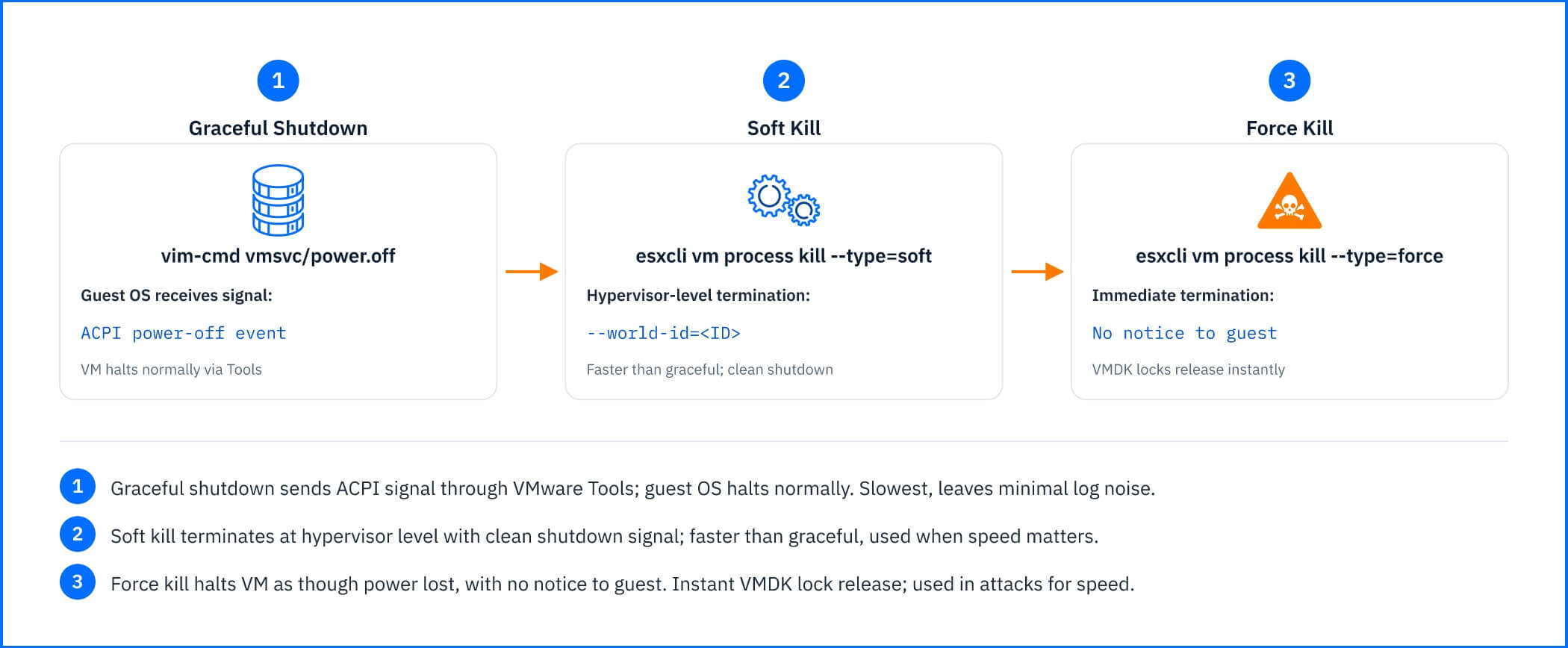 Fig. 2. ESXi VM termination methods: graceful shutdown to force kill, each addressing speed and guest awareness limitations. |
Mechanism. ESXi ships two primary command-line interfaces: esxcli, a modern structured CLI for host management, and vim-cmd, VMware's legacy command-line interface to the vSphere APIs. Both run with full hypervisor privileges, both are signed VMware utilities, and both are used daily by legitimate administrators. Attackers use the same commands for reconnaissance, VM manipulation, and impact staging. The table below maps each phase to its commands, artifacts, and detection difficulty.
Phase | Commands | Artifacts | Detection Difficulty |
|---|---|---|---|
VM enumeration | vim-cmd vmsvc/getallvms, esxcli vm process list | No persistent artifacts; session log in auth.log | Medium |
Datastore discovery | esxcli storage filesystem list | No persistent artifacts | Medium |
VM shutdown | vim-cmd vmsvc/power.off, esxcli vm process kill | vmkernel.log shutdown events | High when rapid/sequential |
VMDK discovery | find /vmfs/volumes/ -name "*.vmdk" | No persistent artifacts | Medium (high when correlated with shutdown) |
Encryption | ELF binary invocation | Encrypted VMDK files; binary in /tmp or transferred via SCP | High |
VM enumeration
The first objective is to map the inventory and locate the datastore paths. vim-cmd vmsvc/getallvms lists every registered VM with its datastore path, VMDK locations, and VM ID — the reconnaissance anchor, because it tells the attacker where every virtual disk lives. esxcli vm process list enumerates running VMs with their World IDs, ESXi's internal process identifier for a running VM and a prerequisite for force-kill. esxcli storage filesystem list enumerates mounted datastores, ESXi's storage abstraction, typically backed by VMFS volumes or NFS mounts.
Why this is possible. These are the standard commands. An administrator running them during capacity planning and an attacker running them during reconnaissance produce identical output and identical logs. Nothing distinguishes them.
VM Shutdown and Termination
ESXi locks VMDK files while VMs are running, to prevent simultaneous writes. Encrypting a locked VMDK corrupts the file or fails outright, so attackers stop the VMs first — which is what converts an inventory into a target list. ESXi offers three termination methods and ransomware scripts escalate through them:
vim-cmd vmsvc/power.off <vmid>; — graceful shutdown. The guest OS receives a signal through VMware Tools and halts normally; where Tools is absent or unresponsive this may behave as a hard stop. Used when time permits and guest-side log noise is worth avoiding.
esxcli vm process kill --type=soft --world-id=<ID> — soft termination through the hypervisor, allowing a clean shutdown. Preferred when graceful shutdown is too slow.
esxcli vm process kill --type=force --world-id=<ID> — forcible termination with no notice to the guest. The VM halts as though the physical server lost power and the VMDK locks release instantly.
Why this is possible. Force-kill exists because administrators genuinely need it. In documented campaigns, scripts enumerate the running VMs, iterate the World IDs, and escalate to force-kill in rapid succession; a host with fifty VMs clears in under a minute. Each shutdown is written to vmkernel.log — which is the point at which the attack becomes loud, and also the point at which almost nothing is listening.
Datastore and VMDK Discovery
With the VMs stopped, the attacker locates the disks. find /vmfs/volumes/ -name "*.vmdk" searches every datastore recursively and returns the full path to every virtual disk on the host. Additional targets include VMSS (suspend state), VSWP (swap), and VMSD (snapshot descriptor) files.
A note on snapshot recovery. Encrypting VMSD files disrupts snapshot management and prevents clean deletion or consolidation, but the snapshot disk data itself lives in delta VMDKs named <vmname>-000001.vmdk. Campaigns targeting snapshot recovery comprehensively encrypt those too. Encrypting VMSD metadata alone is disruptive but does not destroy snapshot data.
The chain ends with the encryption binary — typically an ELF executable built for ESXi's VMkernel-compatible userspace — iterating the discovered file list and encrypting in place. It is the only non-native component in the entire attack.
Detection angle. No command above is anomalous, and no phase produces a persistent artifact until the encryption stage, by which point the outcome is already decided. What the phases produce instead is an order: enumerate, stop, locate, encrypt, with no intervening administrative action and no change ticket. Detect the sequence, not the command. The specific tells are a kill sequence covering most VMs on a host with nothing between the kills, datastore enumeration followed immediately by recursive VMDK discovery, and find output redirected to a file — which indicates a script rather than a person.
Common Mistakes and Misconceptions
"My ESXi host isn't exposed to the internet, so I'm not at risk"
Internal placement does not prevent access when the attacker arrives with credentials rather than an exploit. The entry point is credential theft and lateral movement from an environment that is already compromised. The host's network position is irrelevant to an authenticated session. Segmentation reduces who can reach the host, not what a legitimate administrator can do once they are on it. It raises the cost of the pivot and changes nothing about the technique that follows.
"The ESXi Shell is disabled by default, so attackers can't use it"
Disabling the shell removes it from the default configuration, not from the host. Any authenticated user with sufficient privileges turns it back on in one command, and with vCenter credentials it can be enabled remotely on any managed host through the vSphere Client or the API. Shell disablement is a control on convenience, not on capability. It is worth doing — the enablement event is one of the few high-fidelity signals available - but its value is that it forces the attacker to generate that event, not that it stops them
"Ransomware on ESXi is just like ransomware on Windows"
The hypervisor context changes the arithmetic in both directions. One compromised host is dozens of encrypted VMs from a single session, and there is no agent inside ESXi watching for it. Recovery is worse too: restoring individual Windows machines from backup is a practiced workflow, while restoring datastores, re-registering VMs, and validating VMDK integrity across every workload on a host has more steps and more failure points. This is not endpoint ransomware that happens to run on a hypervisor. It is an infrastructure attack that uses the hypervisor's own management plane, and it should be planned for as one.
"ESXi hosts are infrastructure, not endpoints, so they don't need endpoint protection"
Being infrastructure is the reason they are targeted, not a reason they are safe. But the objection contains a true premise: agent-based endpoint protection genuinely does not apply, because it requires a resident agent inside an OS that will not host one. The answer is not an agent on the hypervisor but monitoring that operates outside the guest — real-time correlation of shell activity against VM state changes, and network analysis of the management segment.
What Reliable ESXi Hypervisor CLI Abuse Signals Look Like
The commands are legitimate, so every signal below is about context: timing, sequence, session origin, and what did not happen around it. Each is rated against ESXi 6.x through 8.x integrated with vCenter, with vSphere logs forwarded to a SIEM. Standalone hosts without vCenter produce far less centralized logging, and every rating below degrades accordingly.
Signal | Reliability | Notes |
|---|---|---|
ESXi Shell or SSH enablement outside a maintenance window | High | Enablement is infrequent in a managed estate and always deliberate; the event is in hostd.log and vpxd.log already. Baseline is an announced change with a ticket — anomalous is an unfamiliar account or source IP with neither, followed immediately by reconnaissance or shutdown. |
Rapid VM kill sequence covering most VMs on a host | High | Administrators space power-offs minutes apart and strongly prefer graceful shutdown; esxcli vm process kill escalating soft to force with no intervening commands has no maintenance equivalent. vmkernel.log records the force-kills. |
Datastore enumeration immediately followed by recursive VMDK discovery | Medium | Enumeration alone is routine capacity planning; the tell is the absence of any legitimate action after it. Rises to High when correlated with shutdowns in the same session, or when find output is redirected to a file. |
SSH session from an undocumented account or unfamiliar source IP | Medium | IP anomalies alone are noisy in dynamic infrastructure. The account is the stronger half — a service account not documented for interactive ESXi management has no reason to appear in SSH auth logs at all. |
Reliability: High means the signal produces very few false positives in a well-managed vSphere estate. Medium means legitimate administration triggers it and correlation is required before it is actionable.
No row above is the attack; the session is. The chain runs enablement, enumeration, shutdown, discovery, encryption, and only the first and third rows are loud. When one triggers, establish whether a change ticket covers the window; identify the account and whether it is documented for interactive host management; and pull the full session from auth.log to see what the command ran alongside.
Mitigation
Every control below accepts that the commands cannot be blocked, because the infrastructure runs on them. They work by narrowing who can open a session, and by making sure the events the attacker cannot avoid generating are read while they still matter.
Disable ESXi Shell and SSH by default on all hosts, enabling them only inside scheduled maintenance and disabling them immediately after. Use vSphere lockdown mode to prevent shell access even for root unless explicitly unlocked through DCUI, and enforce multi-factor authentication for SSH through PAM integration or centralized authentication.
Forward hostd.log, vmkernel.log, and vpxd.log to a SIEM, and alert on shell enablement, SSH service start, mass VM power-off, and authentication failures. This is the control the whole article depends on: the enablement event already exists in almost every environment that gets hit, and the difference between detection and post-incident review is whether anything was reading it within minutes rather than hours.
Harden vCenter credentials. Host-level access is most often gained through them. Enforce least privilege and MFA for vCenter SSO, limit the accounts holding ESXi administrative rights to those that genuinely need host-level management, audit permissions regularly, and rotate service account credentials.
Establish which authentication configuration you actually run. Hosts joined directly to Active Directory mean domain credential compromise translates straight into shell access; vCenter SSO with an AD identity source requires vCenter compromise as an intermediate step. The two have materially different exposure profiles, and hardening the wrong one is common.
Baseline administrative activity. Document which accounts have legitimate ESXi access, which jump hosts they connect from, and which commands they run during maintenance. Every Medium signal above becomes High against a documented baseline, and stays Medium without one.
Deploy monitoring that operates outside the guest OS: real-time correlation of shell activity against VM state changes, and network analysis of traffic to the management segment. ESXi will not host a traditional agent, so the coverage has to come from the layers around it.
GravityZone Detection
GravityZone answers this at two layers, and the boundary between them matters more than either. The hypervisor and infrastructure layer catches the technique. The guest VM layer, where most GravityZone coverage lives, does not see it at all.
Security Data Lake is the layer that answers the example above. With vSphere log sources configured as inputs it collects hostd.log, vmkernel.log, and vpxd.log alongside network and endpoint telemetry, and the correlation engine connects the shell enablement event to the VM kill sequence and datastore enumeration that follow it — one attack timeline rather than three isolated entries in three logs nobody opened. The correlation the example's defenders never configured is this one. See Security Data Lake, TechZone.
The GravityZone XDR Network Sensor, a virtual appliance on the management segment, monitors ESXi management traffic for session origins and lateral movement signals and feeds them to the XDR correlation engine. Its value here is independence: it sees the SSH session reaching the host whether or not the host's own logs are being ingested, which covers the standalone case where centralized logging is thin. See Network Sensor, TechZone.
Everything else in the stack protects the guests. Security for Virtualized Environments offloads antimalware scanning to a Security Virtual Appliance on the host, HyperDetect applies machine learning before execution inside the guest, Ransomware Protection watches guest file system activity and stages rollback copies, and Network Attack Defense inspects traffic reaching the guest.
All four are real coverage for the post-exploitation chain that runs inside a VM. None of them sees a shell command on the hypervisor, a VM power state change, or a datastore operation — the VMDK is encrypted from outside the OS whose file system they are watching. Coverage for this technique comes from the two layers above.
Related Resources
Why Hypervisors Are the New-ish Ransomware Target, Business Insights — analysis of the shift toward hypervisor-targeted ransomware and the strategic logic behind it.
Akira Ransomware: A Shifting Force in the RaaS Domain, Business Insights — documented ESXi targeting by Akira including CVE-2024-37085 exploitation and native-command abuse.
CACTUS: Analyzing a Coordinated Ransomware Attack on Corporate Networks, Business Insights — forensic case study of a dual Hyper-V and ESXi encryption campaign using precision esxcli commands.
RedCurl/QWCrypt Ransomware Technical Deep Dive, Business Insights — analysis of targeted hypervisor encryption with deliberate exclusion of network-routing VMs to limit operational noise.