Network Sensor – Bitdefender TechZone
2026-09-07
The Network Sensor Virtual Appliance runs in TAP mode to catch port scanning, RDP brute-force, exploitation, and C2 channels, making unmanaged devices visible and mapping their activity to MITRE ATT&CK for the GravityZone XDR Correlation Engine.
Not every device that carries an attack runs a security agent. Printers, IoT hardware, personal laptops, appliances that cannot take an agent: any of them can give an attacker a foothold, and from there the intrusion spreads machine to machine. Only by inspecting the traffic between machines can you discover the lateral movement and the command-and-control (C2) channels running. The Network Sensor gives Bitdefender GravityZone eyes on that traffic. Deployed as a virtual appliance on the monitored network, it extends detection to the devices every endpoint agent misses.
What the Network Sensor Collects and Detects
The Network Sensor Virtual Appliance (NSVA) works in TAP mode: it receives a copy of network traffic through a SPAN port. It analyzes traffic from any device communicating on the network, which makes unmanaged devices visible.
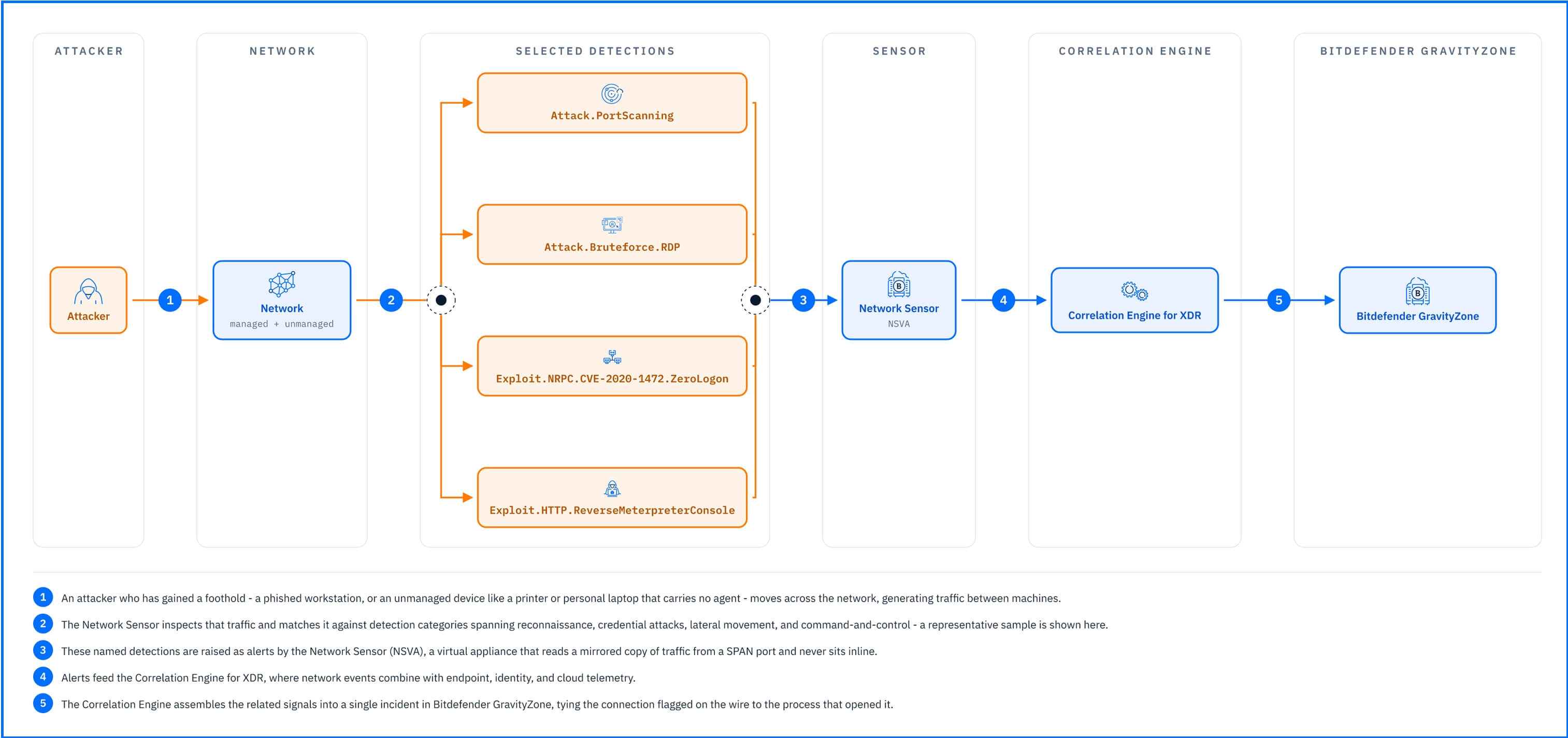 |
The sensor detections, mapped to the MITRE ATT&CK framework, reveal the attack lifecycle from network reconnaissance through stolen credentials and lateral movement to command-and-control traffic and data theft. The main detection categories:
Port scanning: custom and open-source scanning tools mapping the network and its devices, the way attackers choose where to move next, raise the Attack.PortScanning alert.
Brute-force attempts: repeated logins against a system as the attacker guesses working credentials; a password-guessing run against an exposed RDP service raises the Attack.Bruteforce.RDP alert.
Lateral movement within the organization: an attacker who has compromised one machine opening connections to others to extend the intrusion. Exploits carried over internal protocols raise alerts named after the protocol and the vulnerability, Exploit.Protocol.CVE-number, such as Exploit.NRPC.CVE-2020-1472.ZeroLogon for a crafted Netlogon login against a domain controller.
Command-and-control channels: a compromised machine communicating with infrastructure the attacker controls, receiving instructions or a remote operator's commands. A reverse shell opened from inside the network back to the attacker raises the Exploit.HTTP.ReverseMeterpreterConsole alert.
To see the network sensor detections in your environment, open Incidents -> Search and run the query other.sensor_name: network, which returns every event and alert the Network Sensor has triggered.
Everything the sensor detects feeds the Correlation Engine for XDR, where network events combine with endpoint, identity, and cloud telemetry; a connection flagged on the wire becomes part of the same incident as the process that opened it.
Network Vulnerability Scanner
Detection tells you what attackers are doing; the Network Vulnerability Scanner module tells you what they would find. You launch it by running a Risk scan task with the Network section. NSVA scans endpoints for open ports, identifies running applications, and detects known vulnerabilities (CVEs) associated with those applications. The scanner sees your network the way an attacker does, surfacing the vulnerabilities reachable over the network rather than just those present in your inventory. The results are available on the Findings, Vulnerabilities, Account risks, Resources, and Identities pages under the Risk Management section.
Vulnerability detection through the Network Sensor requires the BEST agent on the scanned device; the scanner does not report vulnerabilities for unmanaged devices.
The vulnerability scan itself looks like an attack to the endpoints receiving it, so exclude the appliance from scanning by enabling the Exclude NSVA IPs from scanning option in the endpoint policy, following our GravityZone and BEST Policy Configuration recommendations, to keep agents from blocking the scanner or raising alerts against it.
Detections in Practice
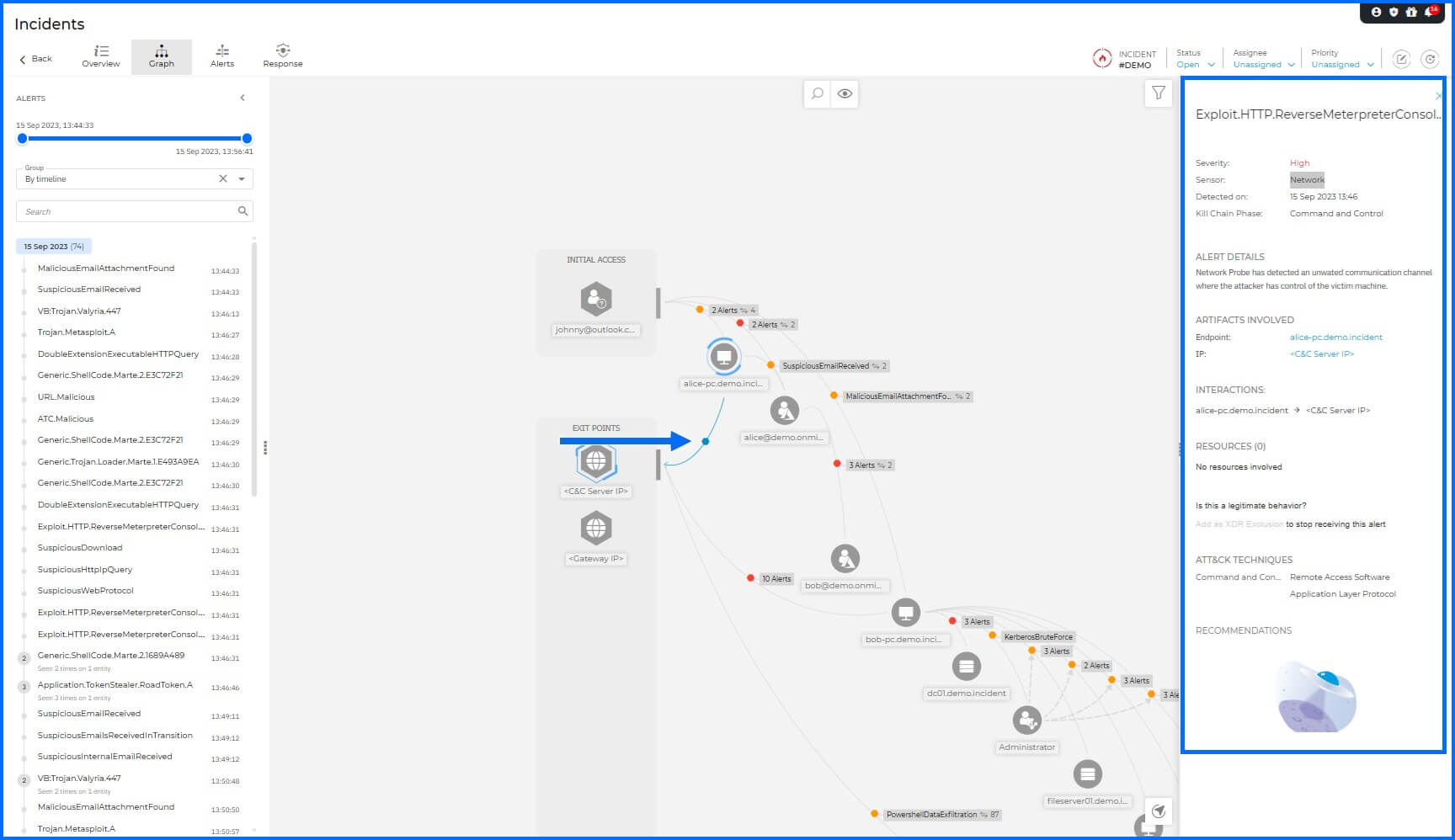
The GravityZone Demo Incident walks you through a complete ransomware attack chain, and the Network Sensor's detections mark its turning points. When the malicious attachment runs on the first workstation, the sensor raises the high-severity Exploit.HTTP.ReverseMeterpreterConsole alert: an unwanted communication channel giving the attacker control of the victim machine, the reverse shell back to the C2 server.
 |
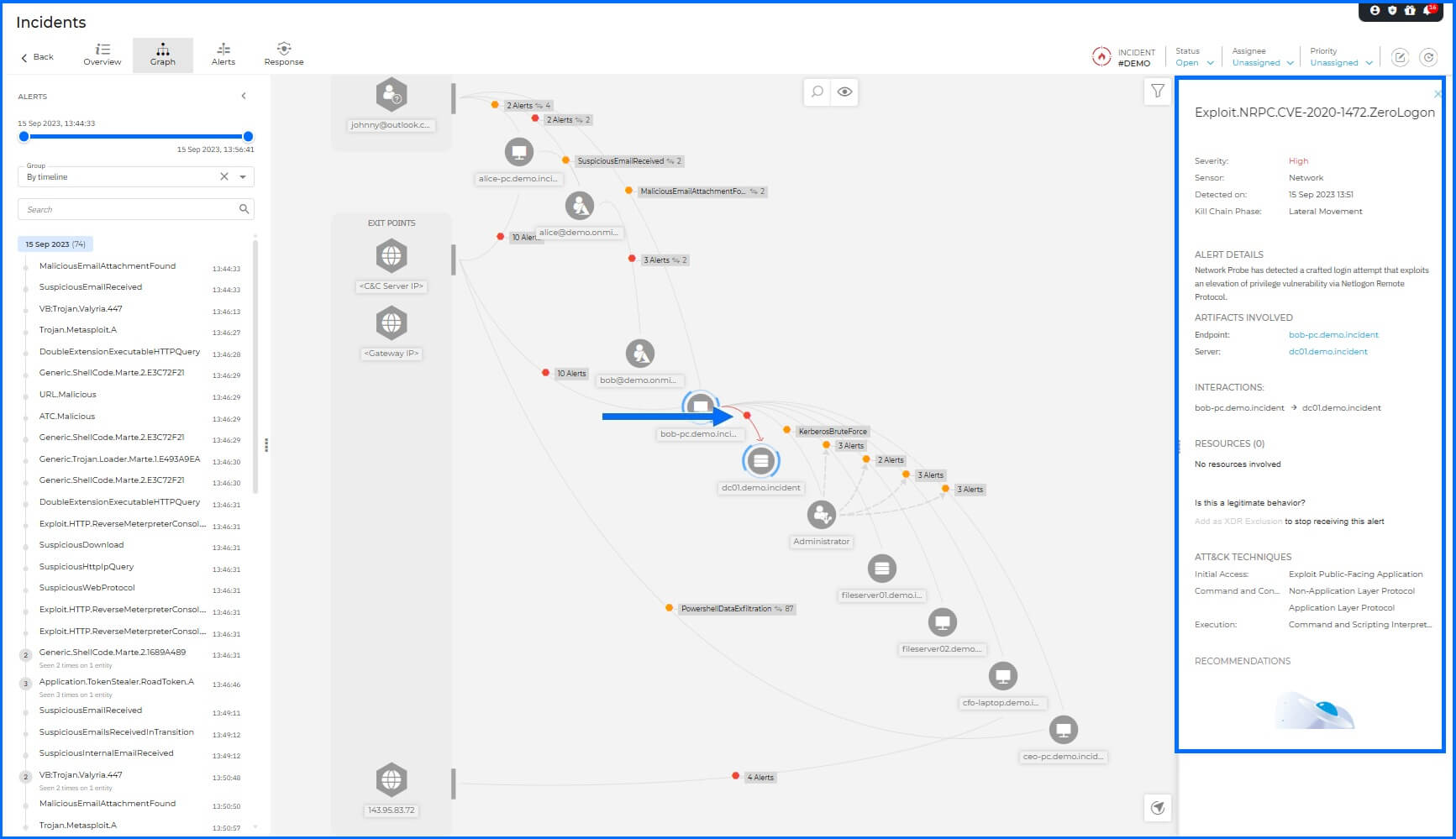
The sensor then catches the attack's pivot. When the attacker moves from the compromised workstation to the domain controller with a crafted Netlogon login, the ZeroLogon elevation-of-privilege exploit, the sensor raises Exploit.NRPC.CVE-2020-1472.ZeroLogon, marking the lateral movement in the incident graph as the connection between the two machines and naming the source endpoint and the targeted server.
 |
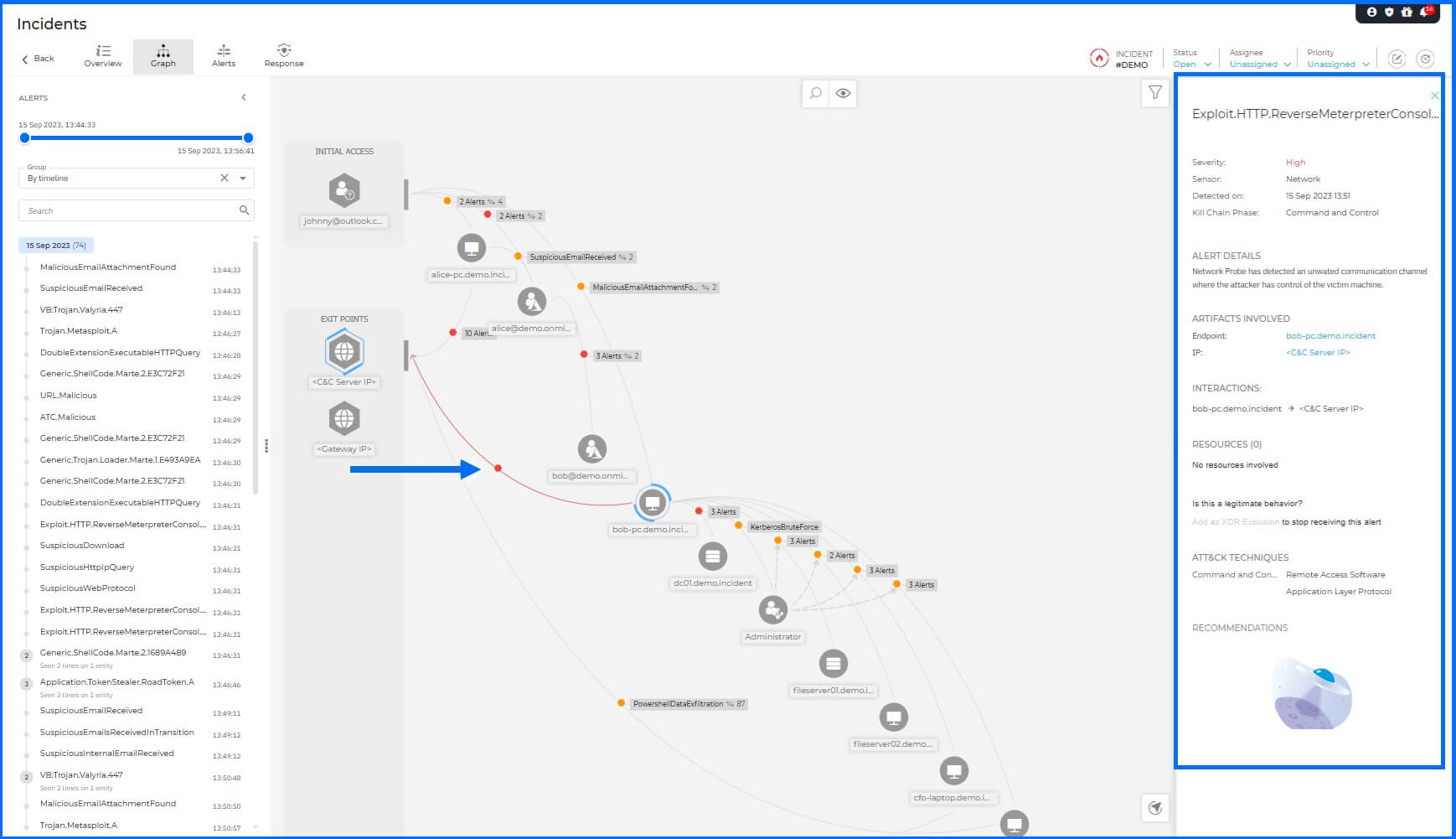
In the same minute, a second ReverseMeterpreterConsole alert appears: the newly compromised workstation has opened its own channel to the C2 server.
 |
Deployment and Configuration
The Network Sensor deploys as a dedicated virtual appliance, with prebuilt images available for vSphere, Hyper-V, Proxmox, and OVHcloud Private Cloud. The sensor can also be deployed on Azure Cloud from the Azure Marketplace, using the Azure virtual TAP (vTAP) to mirror traffic from the virtual machines you select.
Prerequisites, sizing, and full installation and configuration steps for both deployments are in the Bitdefender Support Center article The Network sensor.
Hands-on Scenarios
The following scenarios demonstrate how you can solve specific challenges using the traffic the Network Sensor monitors.
Catching a Brute-Force Attack Nothing Else Records
A legacy server or NAS with no agent logs nothing to GravityZone, and an attacker guessing credentials against it works in silence, so you need a detection that does not depend on the target at all. The sensor provides it from the mirrored traffic: a password-guessing run against the device's exposed RDP service raises the Attack.Bruteforce.RDP alert, naming the attacking source and the targeted system. Open the alert and check the source: when it is one of your managed endpoints, a compromised workstation pivoting deeper, pivot to that machine's process activity in the incident to find the tool driving the attempts, then contain from the managed side with an endpoint response action.
Uncovering a C2 Channel from a Device You Don't Manage
A contractor laptop or BYOD device compromised somewhere else joins your network and quietly phones home, and with no agent on it, nothing in your endpoint telemetry says so. The sensor sees the channel itself and raises the Exploit.HTTP.ReverseMeterpreterConsole alert, identifying the victim machine and the C2 server it reports to. Open the incident: the C2 address appears as an exit point in the graph. Block that destination at the perimeter first to cut the attacker's control, then use the victim's IP and network location from the alert to track down the physical device.
Common Mistakes and Misconceptions
"The Network Sensor replaces endpoint agents"
The sensor covers traffic between machines; it has no visibility into what runs inside a process on a managed endpoint. Endpoint agents handle execution, memory, and file-system activity. The Demo Incident makes this concrete: both layers raise alerts in the same attack chain. The endpoint agent on alice-pc catches the initial execution. The Network Sensor catches the ZeroLogon attempt from bob-pc. Neither replaces the other.
"Network Sensor alerts only trigger after an attack succeeds"
The ZeroLogon detection is the direct counter to this. The sensor raises the alert on the crafted Netlogon login attempts that characterize the exploit. Detection is behavioral and protocol-based: the sensor identifies the attack by what the traffic looks like, not by whether the domain controller was successfully compromised.
"Passive monitoring means the sensor cannot stop anything"
The sensor does not sit inline and does not block traffic directly. But "passive" describes the monitoring posture, not the response capability. Alerts the sensor raises surface in GravityZone incident timeline, and any managed endpoint identified in the alert chain can be contained with the platform response actions.