Managed Detection & Response (MDR) - Bitdefender Techzone
GravityZone integrates Managed Detection and Response (MDR) to provide 24/7 SOC monitoring via a follow-the-sun model. This architecture utilizes Pre-approved Actions (PAAs) to isolate hosts and neutralize accounts, backed by a Cybersecurity Breach Warranty.
In today's rapidly evolving cyber-threat landscape, organizations face increasingly complex and sophisticated security challenges. Traditional security measures alone are no longer sufficient to safeguard against the ever-changing tactics employed by cybercriminals. To effectively detect, respond to, and mitigate these threats, businesses require extensive expertise in the fields of security analysis and threat hunting but are faced with several challenges in staffing for these positions.
MDR services can be a game-changer by providing access to a team of experienced security analysts who continuously monitor systems for threats 24/7. MDR can identify and respond to suspicious activity, not only minimizing damage from cyberattacks but also freeing you up to focus on running your core business operations.
Organizations with existing in-house security teams can also benefit from MDR services. MDR can augment existing capabilities by providing additional expertise, 24/7 coverage, and access to advanced threat intelligence.
In this article, we will highlight Bitdefender MDR Service and explore its key capabilities, such as individual Threat Modeling and Rapid Incident Response, to show how it can address the challenges of building and maintaining a security posture for organizations of all sizes.
MDR Data Collection
Fast and accurate threat response relies on comprehensive data collection from a diverse range of data sources, which is the foundation of Bitdefender MDR.
Endpoint Detection and Response (EDR) agents are deployed on endpoints (workstations, servers) to collect data from BEST agent components such as Network Attack Defense or Fileless Protection and monitors endpoint activity, including running processes, network connections, registry changes, and user behavior. Additionally, LiveSearch allow for the detection of malicious patterns and signatures in files, memory, and network traffic, and enable the creation of custom rules to detect specific threats relevant to the organization.
To enhance visibility beyond endpoint data, Bitdefender Sensors can be leveraged. These sensors provide valuable information from various sources, including network activity, events from Productivity Applications, data collected from cloud platforms like Amazon Web Services (AWS), Microsoft Azure, and Google Cloud Platform (GCP), and many more. Depending on your license, the MDR team will enhance visibility using selected sensors. For further information on Bitdefender Sensors, please refer to this article here.
Furthermore, the MDR team leverages Bitdefender Threat Intelligence (TI). This real-time intelligence provides crucial context for security events, such as information on emerging threats, zero-day exploits, and the latest attack techniques. It includes intelligence at the tactical, operational, and strategic levels. TI data is integrated into the MDR platform to enhance threat detection, prioritize alerts, and guide incident response activities.
MDR Deployment
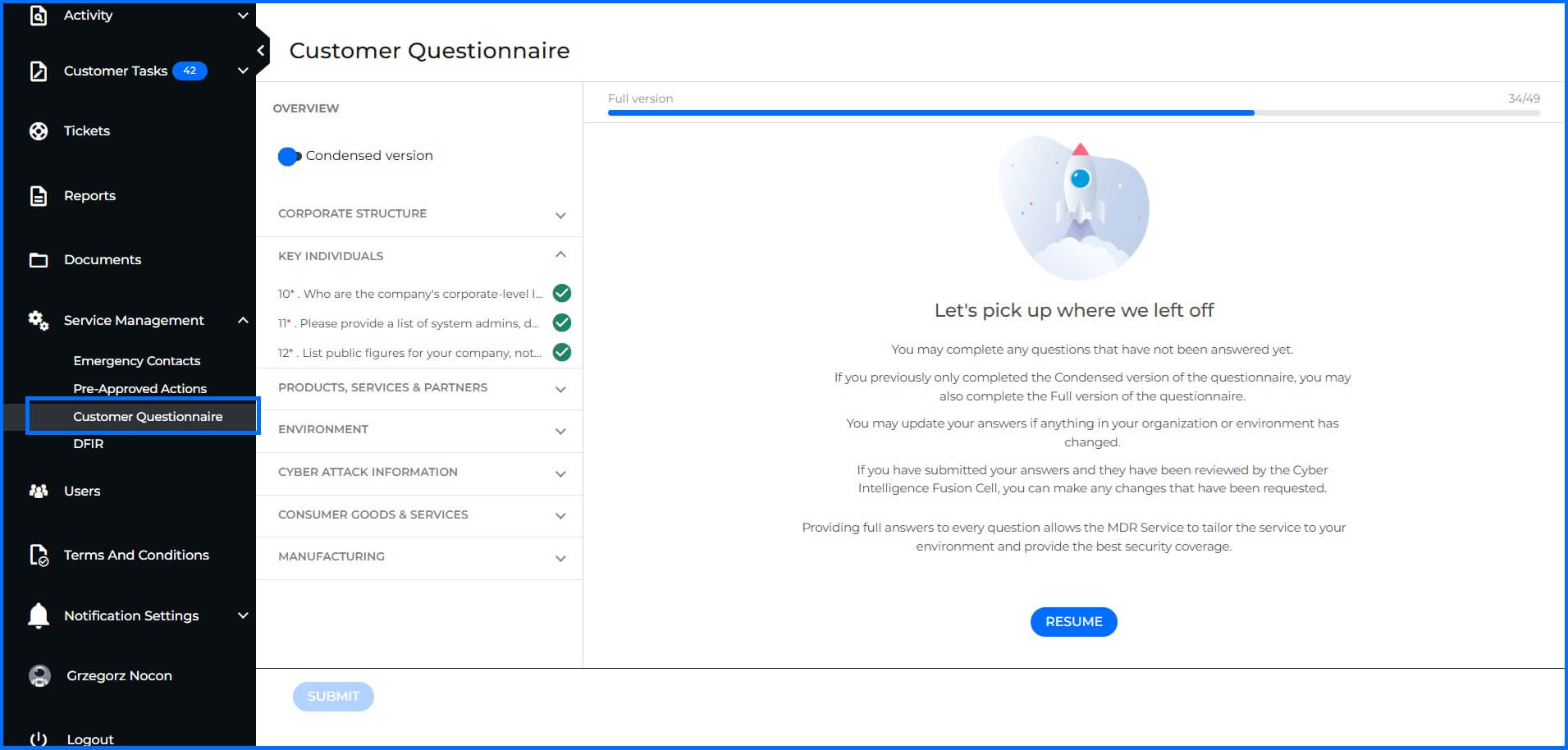
MDR deployment begins with data collection and analysis, which significantly influences the efficiency and effectiveness of the MDR service. This process involves gathering information such as company name, corporate structure, key individuals, products, and services, as well as information on partners, business affiliates, and data assessment. This allows for an assessment of potential threats, including Tactics, Techniques, and Procedures (TTPs), and Indicators of Compromise (IOCs). Full completion of the customer questionnaire is a prerequisite for the CTI team. Without this specific context, the team cannot develop the threat modeling or tailored hunting packages that define the service.
 |
Deployment of Bitdefender GravityZone technology can be easily performed by your internal IT team or a partner using the GravityZone console. Our Professional Services are included in both MDR service offerings and can help deploy GravityZone to ensure that all necessary configuration is correct.
When you decide to use the Professional Services, the deployment process typically includes the following steps:
A kickoff call to discuss your specific needs, expectations, and the scope of the project, outlining the services to be provided and the project timeline.
A comprehensive GravityZone configuration, including policy configuration, EDR and XDR Sensor deployment.
Post-installation verification to ensure successful deployment across all endpoints and to address any failed installations or issues encountered.
A final health check verification to ensure the optimal performance and effectiveness of the deployed solution.
MDR Service components
Effective threat prevention, detection, and response require a collaborative approach between Security Operations Center (SOC) analysts and Cyber Threat Intelligence (CTI) teams. Bitdefender MDR service reflects this principle, leveraging the expertise of a highly skilled team comprising:
Threat Research/Intel Analysts: This team focuses on gathering, analyzing, and disseminating threat intelligence, including information on emerging threats, vulnerabilities, and the tactics, techniques, and procedures (TTPs) employed by adversaries.
Detection Engineers: These specialists focus on developing and refining detection rules and signatures, continuously improving the ability of the MDR platform to identify emerging threats.
SOC Analysts: These analysts are responsible for 24/7 monitoring of security alerts, performing threat hunts, and conducting in-depth investigations of suspicious activity.
Threat Responders: These experts specialize in incident response and remediation, working to contain and mitigate the impact of cyberattacks.
To effectively address the diverse needs of organizations of all sizes and budgets, Bitdefender offers two distinct MDR services. Below we highlight their key features and benefits.
Bitdefender MDR | Bitdefender MDR PLUS | |
|---|---|---|
 | | |
24x7 SOC | | |
Pre-approved Actions (PAAs) | | |
Threat Hunting | | |
Expert Recommendations | | |
Incident Root Cause & Impact Analysis | | |
MDR Portal & Reporting | | |
Professional Services On-boarding | | |
| | |
24x7 Security Account Manager | | |
MDR team leverages Global Threat Intelligence | | |
Tailored Threat Modeling | | |
Brand and Intellectual Property Protection, | | |
Add-ons | Add-ons |
Bitdefender MDR delivers comprehensive cybersecurity 24/7 from three global Security Operations Centers (SOCs) using a follow-the-sun model: one in Texas (USA), one in Romania (EU) and one in Singapore (Asia Pacific). All SOCs use the same level of knowledgeable staff, processes, and technology to ensure unparalleled 24/7/365 global coverage for our customers. Our highly skilled, and certified security analysts, with backgrounds in organizations like the US military, NATO, and the NSA, operate from these centers, providing you and all customers with expert protection.
Cyber Threat Intelligence (CTI)
The CTI team provides the proactive approach of the Bitdefender MDR Plus service. By analyzing the global threat landscape and your specific business profile, they move security from a reactive stance to a prevention and detection strategy.
Tailored Threat Modeling
Threat modeling is a proactive foundation of the MDR Plus deployment phase and remains a continuous cycle throughout the service lifecycle. Our team gathers intelligence requirements regarding your environment, networks, key personnel, and business objectives to establish a security baseline. This baseline allows us to identify critical questions:
Who might target the business?
What are their motivations and capabilities?
Where are the potential attack vectors?
Why would they choose to target this specific organization?
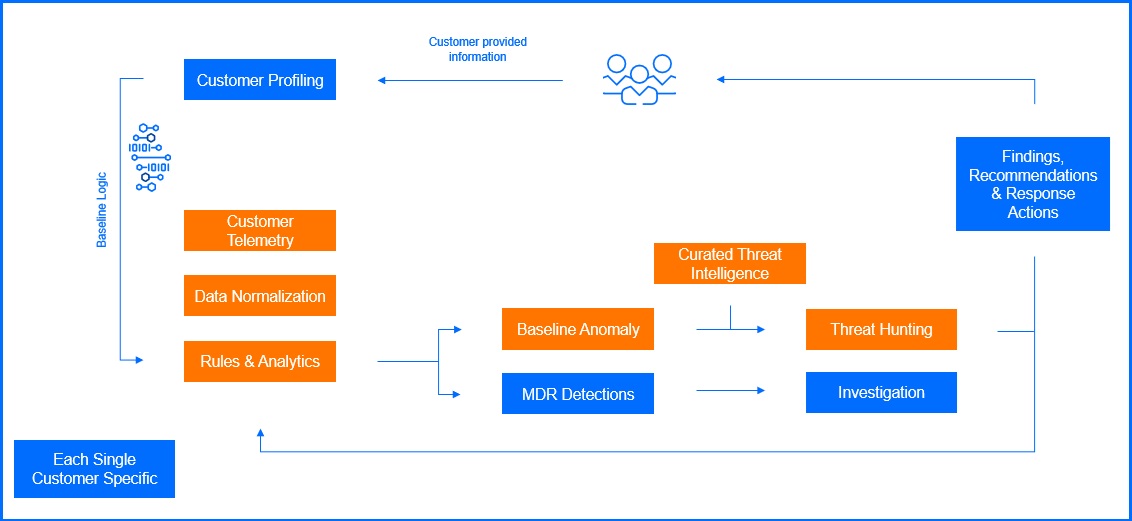 |
This is not a one-time task; as new threats emerge and business environments evolve, the analysis cycle repeats to maintain an accurate security posture. To translate this abstract intelligence into concrete protection, our team integrates several specialized functions into a unified strategy. This starts by identifying the systems and individuals most critical to your operations, allowing our analysts to implement high-priority processes known as Priority Target Monitoring.
Brand and Intellectual Property Protection, safeguard your reputation beyond internal perimeters. The CTI team actively monitors dark web forums, social media, and domain registries to identify early indicators of brand impersonation, typo-squatting, or unauthorized asset usage.
In an era of double extortion, we also deploy Digital Asset and Dark Web Monitoring to ensure that sensitive data is not being leaked and to detect credential exposure from info-stealing malware. As adversaries pivot their tactics, the CTI team constantly refines your unique Threat Model, ensuring your defenses remain aligned with a threat landscape.
All these functions provide a broad risk and threat context that serves as an early warning system, moving beyond identity-only monitoring to safeguard your entire digital footprint.
Threat Hunting Packages
To turn intelligence into active defense, CTI team serves as the bridge between raw intelligence and actionable protection. By continuously refining the detection rules and signatures used for Threat Hunting Packages, current industry trends and incident data are immediately operationalized.
Driven by the customer's specific threat landscape, these packages provide the SOC with up-to-the-minute data to search for threats within monitored hosts. Each package includes a Bottom Line Up Front (BLUF) summary that gives the customer immediate context and details regarding why the hunt was conducted. The core of a threat hunting package contains Indicators of Activity (IOAs), Indicators of Compromise (IOC’s), TTPs, or other specific leads that the analysts use to proactively scan the environment.
Security Operations Center (SOC)
The SOC acts as the operational part of the service, providing the 24/7 vigilance and protection required to stop attackers. Using Bitdefender technologies like EDR, XDR, PHASR, the SOC ensures rapid response to any identified telemetry through a follow-the-sun model. Bitdefender operates three global SOCs:
Texas (USA)
Romania (EU)
Singapore (Asia Pacific)
All SOCs use the same level of knowledgeable staff, processes, and technology to ensure unparalleled 24/7/365 global coverage for our customers. Our highly skilled, and certified security analysts, with backgrounds in organizations like the US D.O.D, NATO, and NSA, operate from these centers, providing you and all customers with expert protection.
Proactive Threat Hunting and Mitigation
The Bitdefender SOC proactively scans across protected environments, leveraging specialized hunting packages to identify threats within monitored systems. This ongoing hunting process is distinguished by two core workflows:
Risk-Based Threat Hunting: This workflow focuses on the execution of specialized leads generated from the global threat landscape. SOC analysts utilize the targeted Threat Hunting Packages to investigate specific vulnerabilities and emerging TTPs identified during the threat modeling phase, neutralizing potential threats before they can escalate.
Targeted Threat Hunting: Performed for each customer on a 2-week interval, this process involves deep anomaly detection based on events collected from endpoints, such as file manipulation, network connections, or registry key modifications. SOC analysts review the environment to search for and mitigate compromises that may not be highlighted by the BEST agent alone, identifying deviations from baseline behavior across user activity, application patterns, and network data. For example, a targeted hunt might involve analyzing endpoint logs for unusual "living off the land" command executions or attempts to modify critical system files. These efforts are specifically designed to address advanced threats, zero-day exploits, and insider risks
Through these combined hunting efforts, the MDR team significantly reduces the Mean Time to Detect (MTTD) and minimizes the dwell time of complex adversaries, including Advanced Persistent Threats (APTs).
Visibility can be expanded through our Security Data Lake, which grants the MDR service access to third-party telemetry from cloud services and supported firewalls, including Palo Alto Networks, Check Point, Cisco ASA, Fortinet, Juniper, pfSense, and SonicWall. By correlating firewall telemetry—such as traffic, VPN, and connection logs—with endpoint and identity data, our SOC gains full attack-path visibility to mitigate use cases like lateral movement, command-and-control traffic, and data exfiltration.
The Bitdefender MDR service does not operate in a silo; instead, it collaborates directly with Bitdefender Labs. This synergy allows for the development of new detections specifically designed to counter actor TTPs, as well as the implementation of advanced capabilities like automated response actions. By sharing anonymized threat intelligence, our teams continuously harden the GravityZone ecosystem, ensuring that insights from a single incident facilitate ongoing operational improvement and strengthen the defenses of the entire global install base.
MDR Incident Response
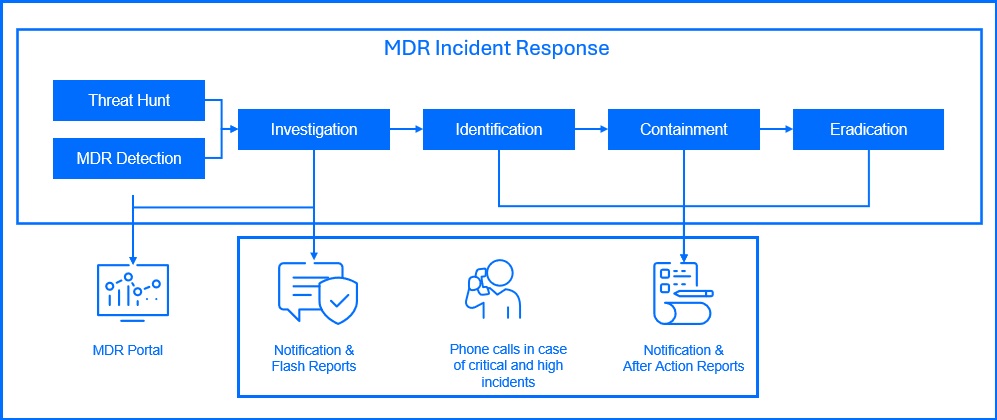
During the MDR deployment process, we will work with you to create a customized monitoring-response runbook. This runbook defines the team’s standard operating procedures for working with you on monitoring alerts and includes custom escalation procedures aligned with best practices and your specific business needs. In case of security incidents, the MDR team maintains constant communication with designated contacts within your organization throughout the incident response process, providing guidance and informing you of any pre-approved actions taken. Pre-approved actions may include:
Stop process. Terminate a process that has been determined to be malicious.
Block file. Block a malicious executable from running on the host.
Delete file. Delete a file that has been determined to be malicious.
Quarantine file. Move a suspicious file to a quarantine folder so that it cannot be used accidentally. The file will not be deleted.
Block port. Block the host from exchanging network traffic on one or more network ports that have been determined to present a risk. For example: port 80 or 443.
Block IP. Block the host from exchanging network traffic with one or more IP addresses that have been determined to be malicious. This action does not apply to servers.
Isolate host. Isolate the host from the network so that it may no longer make or receive connections with other systems.
Response shell. Access may be granted to run commands on the endpoint in order to investigate or mitigate malicious activity.
Delete email. Delete an email message from the inbox after it has been determined the message is malicious.
Disable user. Disable the user's ability to log in after determining their is malicious activity associated with the account.
Mark user as compromised. Mark the user as compromised in Active Directory. This action is only available for customers with the Microsoft E5 level license.
Force user credentials reset. After determining an account may be misused, the account will be set so the user must reset their password on the next login.
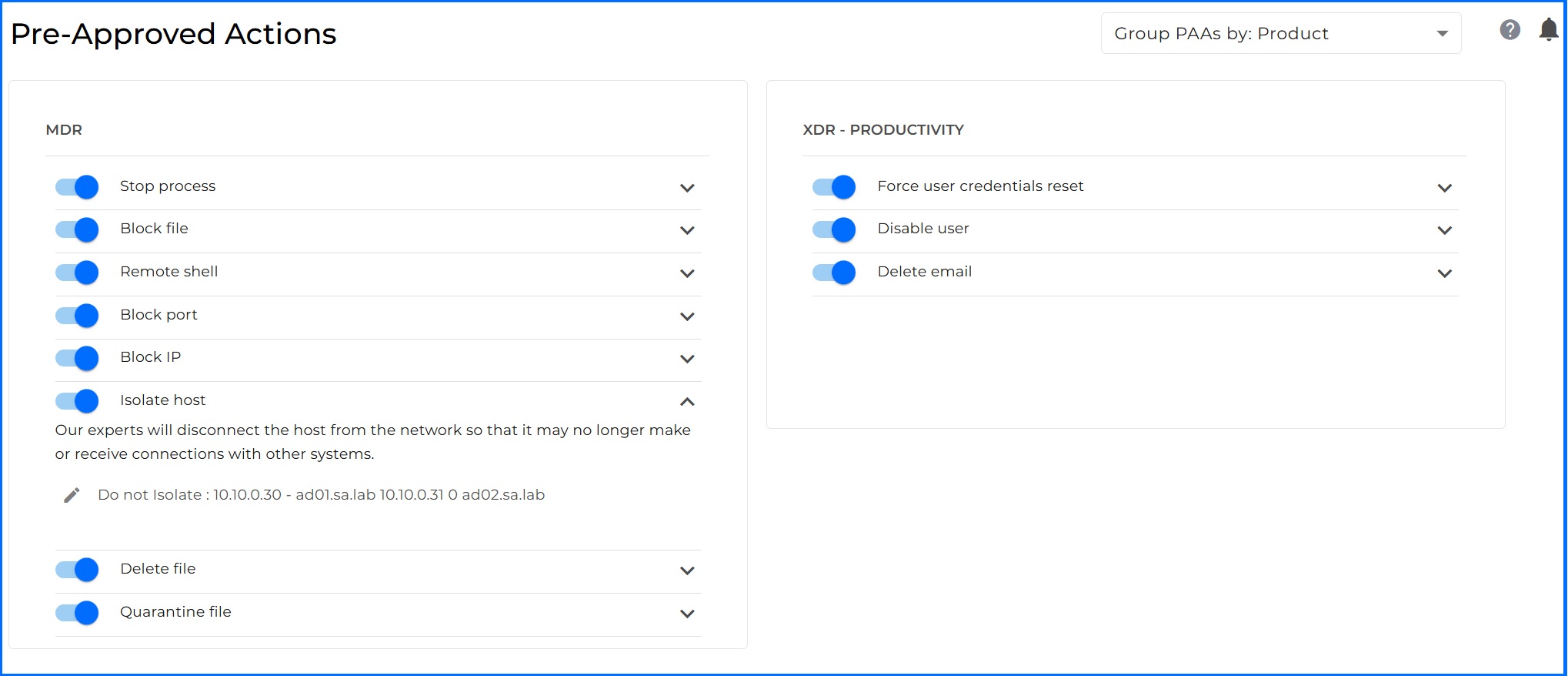
In MDR Customer Portal under each action, you can provide additional information for our MDR team. For example, if you do not want or cannot isolate a key service for the business in the Isolate host pre-approved action, you can add a note about not blocking specific hostnames.
For critical and high incidents, you will receive an email from our MDR team within 30 minutes of the incident to schedule a phone call to provide more information. Additionally, you will receive a phone call when the MDR team begins the incident investigation. All notifications and updates are described in detail within the EULA here.
After Action Reports are generated for completed incident investigations. They contain the details of the attack, a summary of the actions taken by the SOC and any recommendations on changes in the environment to help prevent similar incidents in the future.
Digital Forensics and Incident Response (DFIR) Partnership
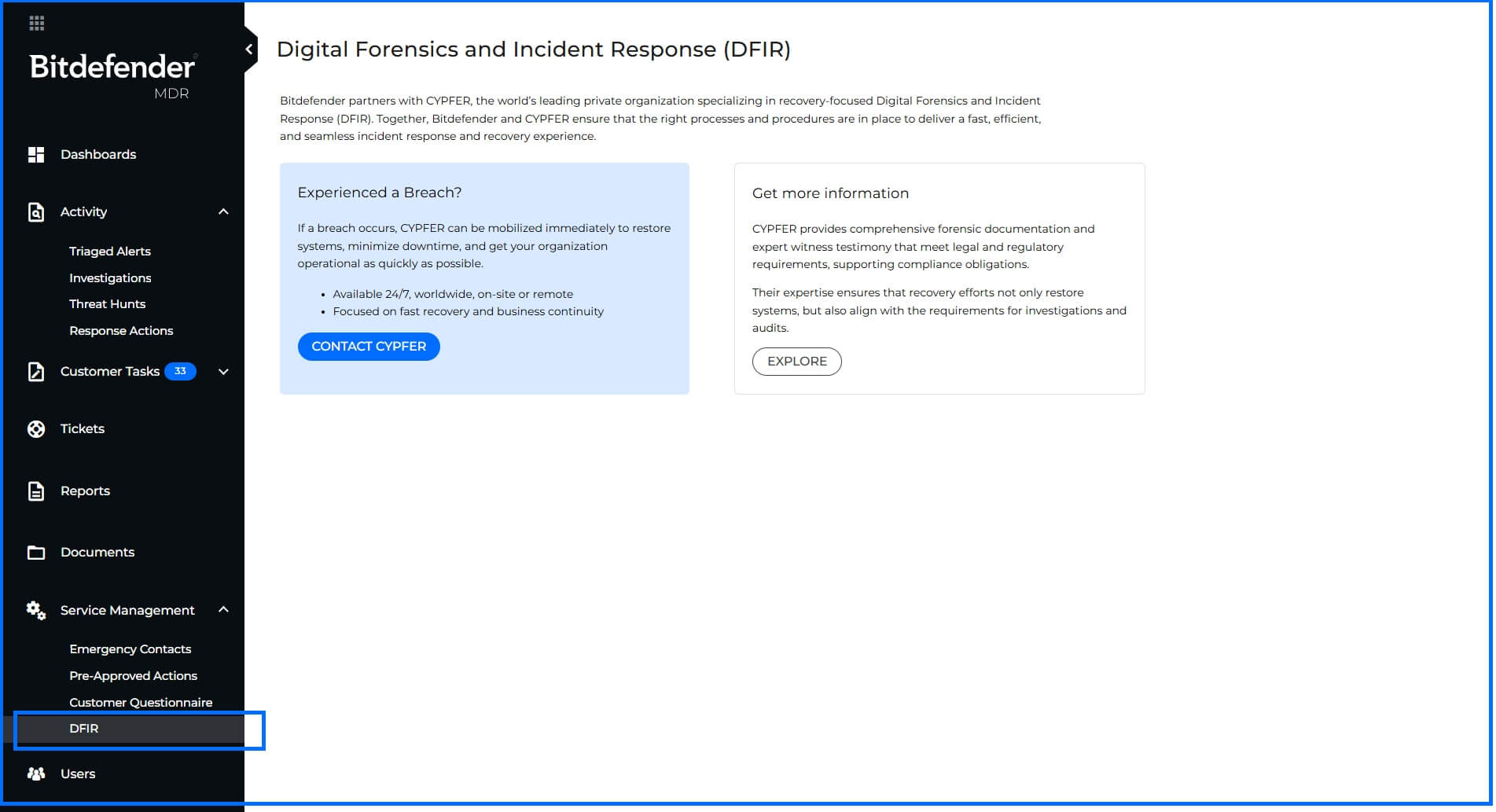
Bitdefender partners with CYPFER to extend Digital Forensics Incident Response (DFIR) services, ensuring a rapid, seamless, and integrated transition from MDR-led containment to comprehensive investigation and final recovery. This partnership integrates key workflows, enabling continuous collaboration between our teams and providing you with the quickest path to operational restoration. CYPFER performs 24/7 DFIR services globally, working on-site or remotely to gather forensic evidence, provide support, and restore your operations after incidents like ransomware or data exfiltration.
It is important to note that CYPFER DFIR is a separate, paid service, not included in your MDR license or the Cysurance Breach Warranty. Due to our established partnership, we recommend CYPFER as your primary DFIR provider, and you can contact them directly from the MDR Portal; however, you are free to choose any DFIR vendor.
 |
MDR Visibility and Reporting
Understanding your security posture requires access to comprehensive and actionable insights. You have direct access to all data related to the reports generated at the endpoint or sensor level within the GravityZone console.
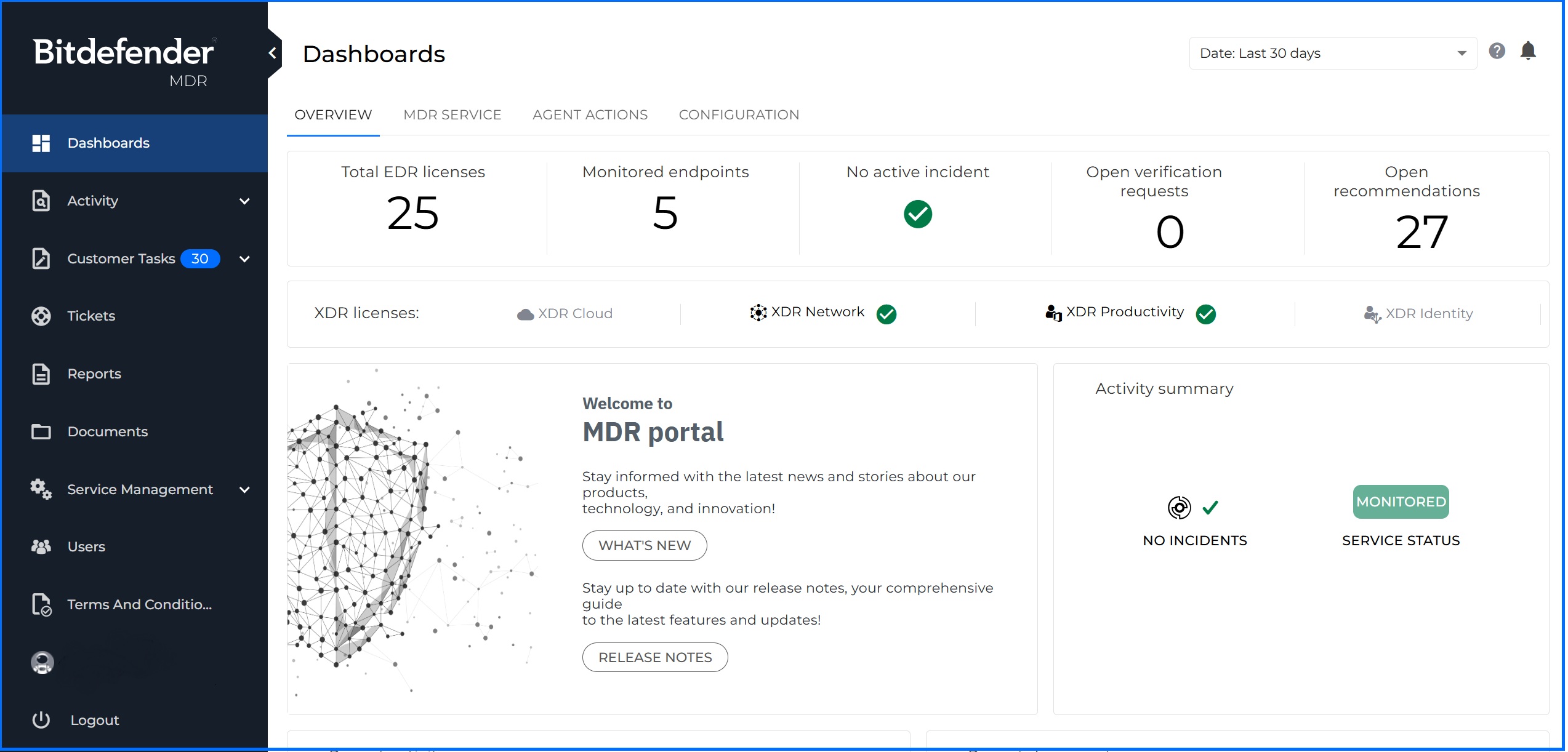
The Bitdefender MDR Customer Portal provides access to a Real-Time Dashboard summarizing telemetry from your environment and statistics regarding alerts, incidents, and MDR hunting activities. You have access to after-action and monthly reports that provide insights into security incidents, remediation efforts, and offer transparency into the MDR processes.
MDR Customer Portal
The MDR Customer Portal provides features that allow you to better keep track of the MDR investigations, threat hunts, reports, and cases, while also providing a tool for cross-communication with the GravityZone MDR SOC specialists. From the Bitdefender MDR Portal, you can review the following:
Dashboard: Quickly review graphs and statistics on activity, deployment progress, investigations, top impacted users and systems, active licensing, threat hunt data, and more.
Activity Section: Track investigations and threat hunt activity, including analysis results and recommendations.
Recommendations: Review recommendations on threat activity, hunts, and investigations delivered by the Bitdefender MDR.
Tickets: Open and monitor cases submitted to the MDR Security analysts.
Reports: Access the flash, after action and monthly reports delivered by the Bitdefender MDR team.
Documents: Exchange valuable information such as screenshots and logs with the MDR team.
Service Management: Complete or update service details.
Emergency contacts: Provide a list of people that the SOC team can reach out to in case of an emergency.
Pre-approved Actions: You can enable the SOC team to take certain actions without explicit approval, whenever needed.
Customer Questionnaire: Providing detailed answers to questions you will help build Threat Modeling.
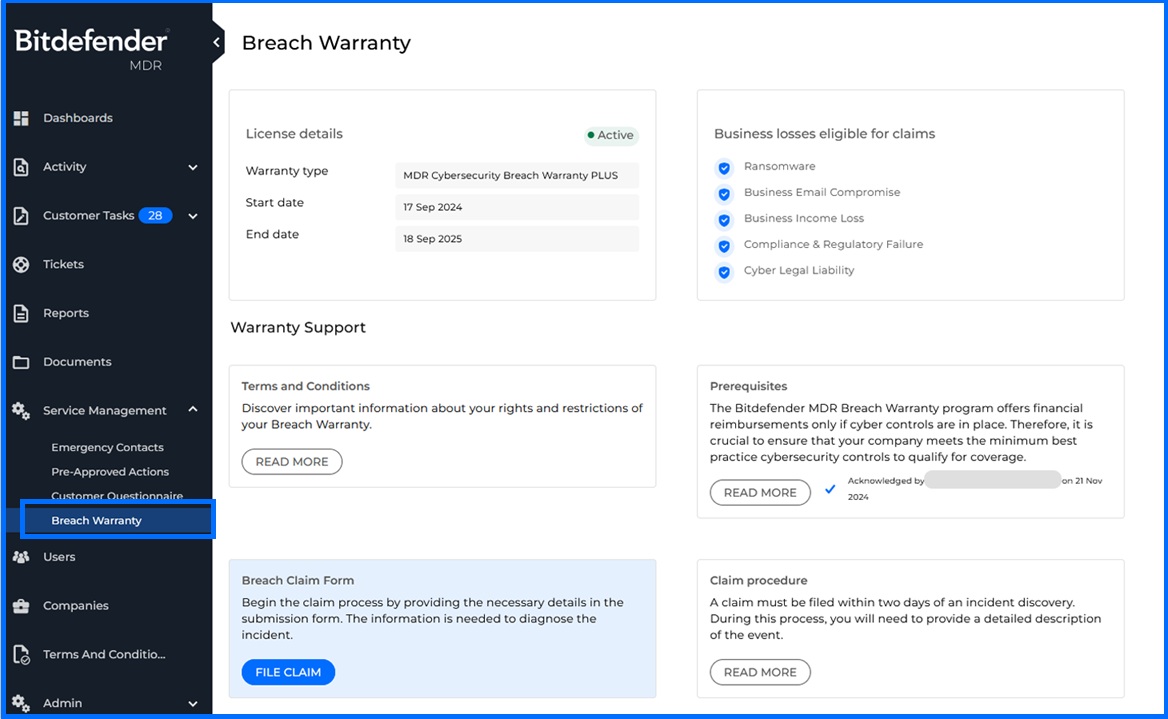
Cybersecurity Breach Warranty: You can access the Breach Warranty page to file a claim in case of any incident eligible for compensation. For detailed information about Cybersecurity Breach Warranty, please refer to our Bitdefender Support Center here.
Users: Create and manage user accounts with defined access levels:
Admin: Full access to the MDR Portal.
User: Can upload documents, submit tickets, and acknowledge investigations.
Read-Only: Can only read the data displayed in the portal.
Notifications
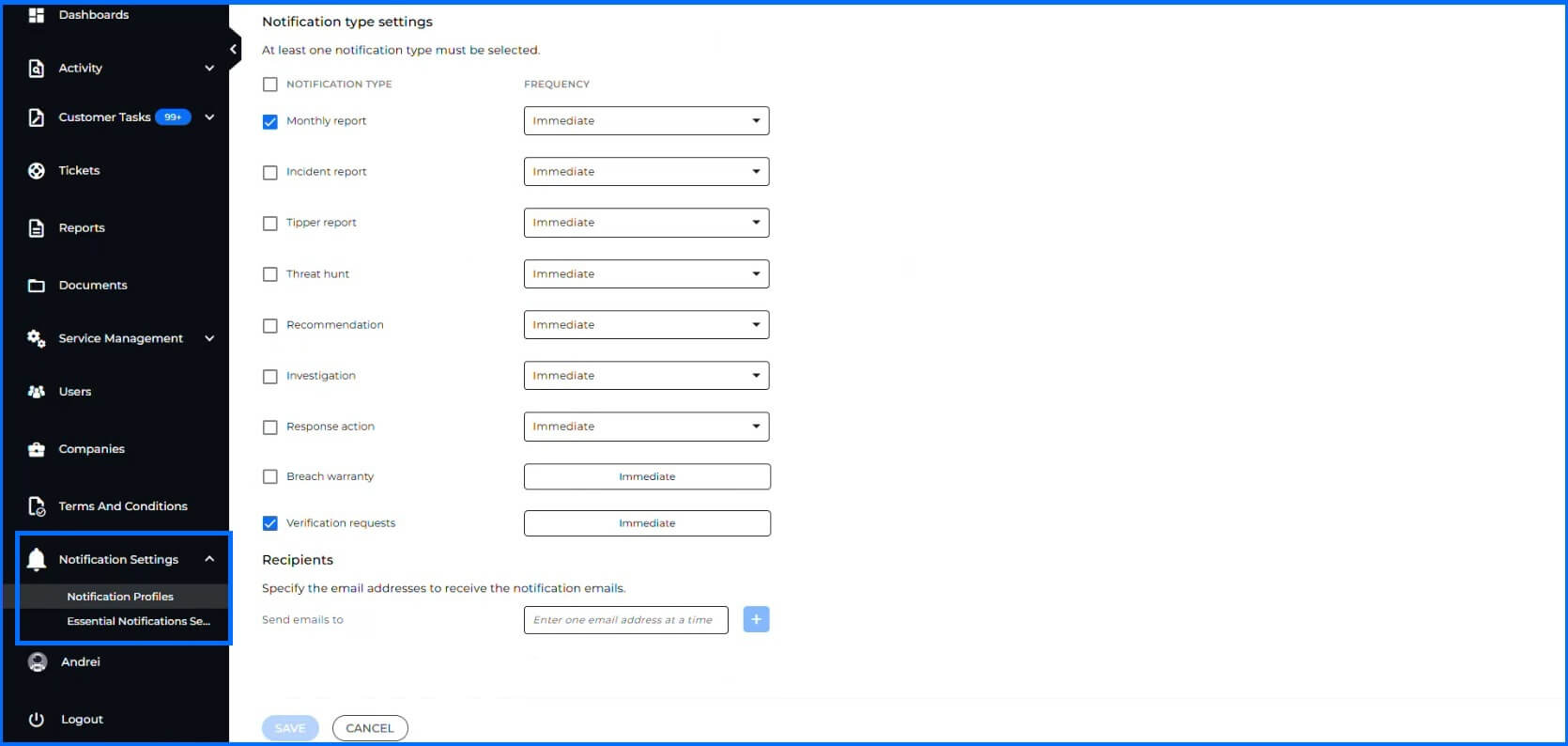
You do not need to consistently monitor the MDR Portal, you can configure email notifications to be sent to designated individuals within your company whenever a new incident, investigation, or report is generated. This ensures timely awareness of critical security events.
 |
Reports
Upon initial detection of a security incident, Flash Reports are generated to provide an early assessment of the situation. These reports serve as one of communication methods about suspicious activity detected in your environment. They include key points such as initially affected systems, the timeframe of the incident, a summary of what was detected, and actions taken by the Threat Response team.
Once the full investigation is concluded, you will receive After Action Report. This report details the precise sequence of events that unfolded during the breach attempt, including initial detection, subsequent actions taken, the response and recovery process, and the involvement of specific files, networks, and systems. The reports elaborate on the specific actions that were undertaken to identify, contain, and eradicate the threat, including steps such as the isolation of infected systems, patching of vulnerabilities, removal of malware, and any other measures taken to neutralize the threat and minimize its impact.

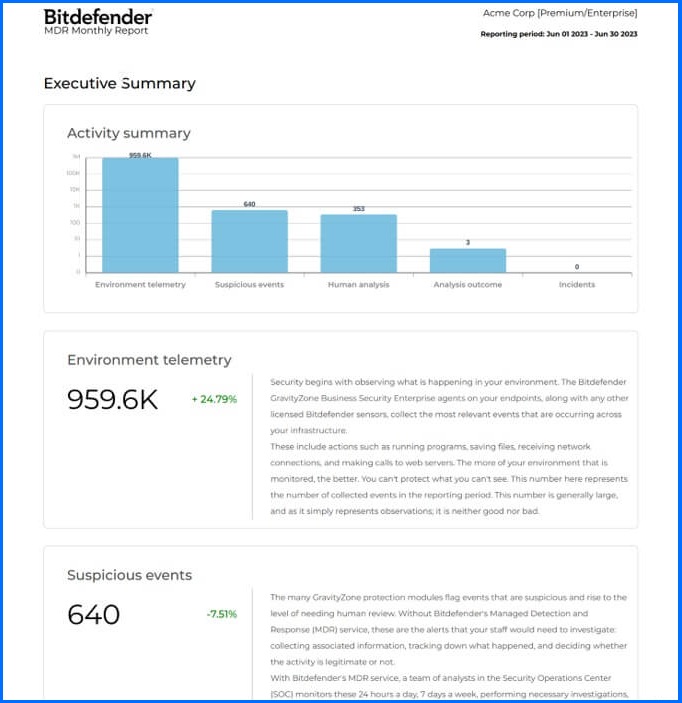
Our Monthly MDR Report provides a detailed snapshot of your security landscape. The report begins with an overview of general activities, such as agent and network activity, EDR alerts, and discovered threats. The case management section provides a detailed overview of all ongoing and closed security cases, outlining the nature of the threats, and steps taken for mitigation. The report closes with a thorough analysis of monthly security activity, highlighting vital statistics on threat detections, hunting endeavors, intelligence alerts, and case activities.
MDR Cooperation Model
The Bitdefender MDR SOC operates with your internal IT team in a Co-Managed Security model. This model ensures that you maintain full visibility, control, and decision-making, while the Bitdefender MDR team provides 24/7 monitoring, threat hunting, and incident response capabilities.
Your internal security team remains the primary owner of your policy configuration and manages your organizational assets. Bitdefender MDR team complements your staff by providing 24/7 continuous threat detection based on telemetry collected from your endpoints, servers, and cloud workloads. If you integrate a Bitdefender Security Data Lake, our detection also includes supported data from your third-party firewalls.
When a threat is detected, the Bitdefender MDR Team performs an investigation and analysis. The team maintains constant communication with your designated contacts throughout the incident response process, providing guidance and informing you of any pre-approved actions taken. Once the incident is contained, you manage the final remediation steps, utilizing either your internal IT team or your chosen Digital Forensics Incident Response (DFIR) service partner.
For full transparency, you have access to the MDR Portal that provides real-time visibility into your alerts and incidents, and also provides you with access to the MDR team regular reports.
Recommended Content
To understand the services available in Bitdefender offering, we recommend reading the next section, Services.
More Resources
Managed Detection and Response (MDR) official website: Managed Detection and Response (MDR)
To learn more about Bitdefender MDR services, please contact us through the MDR Inquiry Form
MDR Cybersecurity Breach Warranty: FAQ
MDR ROI Calculator: MDR ROI Calculator Webpage
Bitdefender MDR Guided Tour: MDR Guided Tour with Click & Discover
Defeating Cyber Attacks with MDR: RAAS Scenario