Active Directory Sensor – Bitdefender TechZone
2026-09-14
Active Directory Sensor detects credential attacks, reconnaissance, lateral movement, and log evasion, feeding signals to the Correlation Engine to correlate domain events with endpoint telemetry, trace attack chains in XDR incidents, and enable rapid response actions.
Active Directory is the authentication core of most Windows networks, the directory that decides which account can reach which machine, share, and service. That makes it a natural target for attackers: one guessed, forged, or replayed domain credential opens many machines at once, and an intruder using it moves between file servers and workstations while every action looks like ordinary authentication, standing out on none of the endpoints it touches. The Active Directory Sensor gives Bitdefender GravityZone eyes on the domain's own authentication activity, watching login requests, ticket handling, and directory changes for the signals that a compromise has started, and feeds those signals to the Correlation Engine for XDR.
What the Active Directory Sensor Collects and Detects
The Active Directory Sensor collects and processes login information from your on-premises Active Directory and turns it into detections that feed the GravityZone correlation engine. Its coverage reaches beyond end user accounts to the system and service accounts attackers abuse.
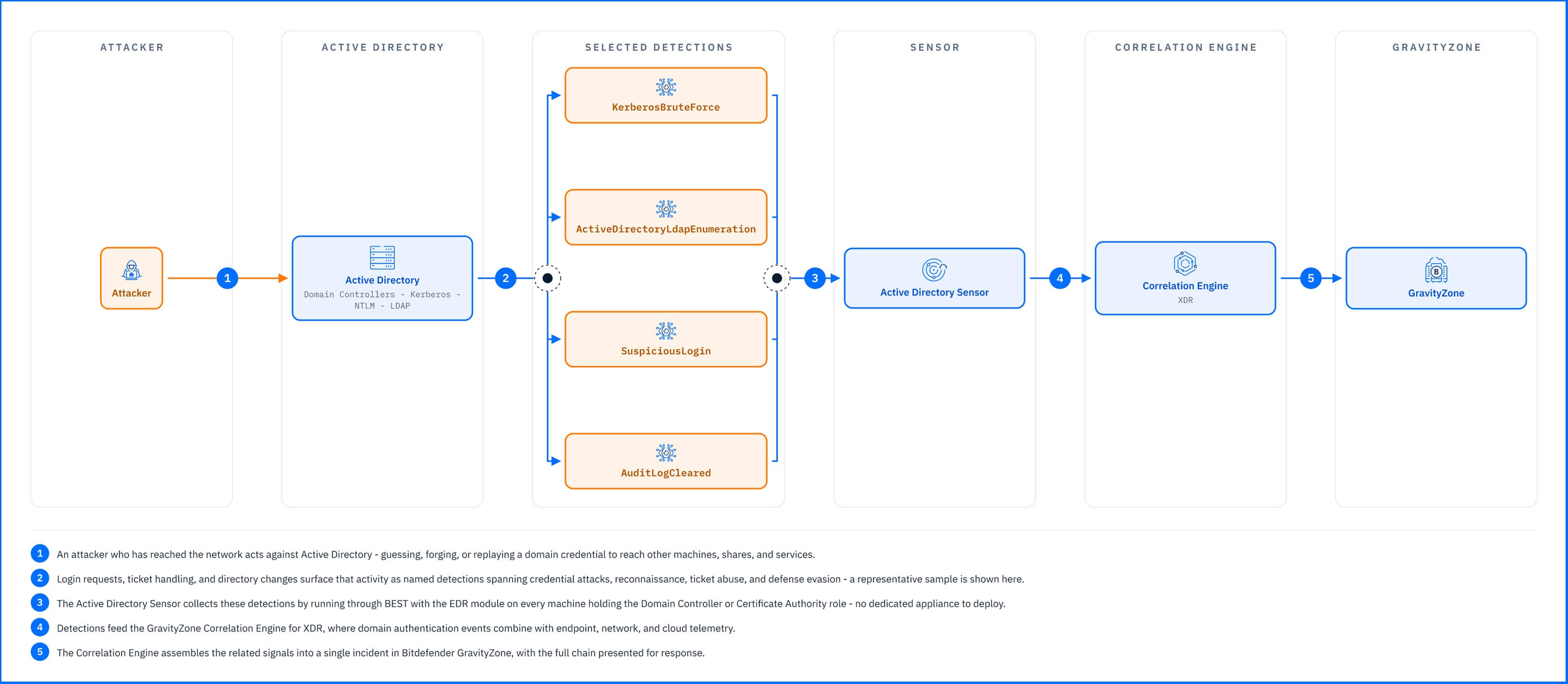 |
The detections below, grouped by what the attacker is trying to achieve, span the attack lifecycle from the first password-guessing attempt to the log clearing that tries to erase it afterward.
Credential attacks and password guessing. KerberosBruteForce is raised when a login through Kerberos, the Windows domain authentication protocol, is driven as a brute-force attack, where an attacker rapidly generates passwords or encryption keys to force access to an account. KerberosPasswordSpray catches the quieter variant, a few common passwords tried across many accounts to stay under lockout thresholds, and NTLMBruteForce extends the same coverage to NTLM, the older Windows authentication protocol that many networks still run alongside Kerberos. PossibleASREPRoasting is raised when attackers request Kerberos tickets for accounts without pre-authentication, a technique that bypasses the normal password verification step to crack credentials offline.
Reconnaissance and enumeration. ActiveDirectoryLocalGroupsEnumeration is raised when attackers enumerate local groups to discover which accounts have administrative privileges. ActiveDirectoryDomainSIDDiscovery flags attempts to discover the domain's Security Identifier (SID), a key piece of information attackers use to target accounts and understand the domain structure. ActiveDirectoryLdapEnumeration detects when attackers query Active Directory through LDAP to extract user and group information, mapping the directory before launching credential or privilege-escalation attacks.
Ticket abuse and lateral movement. SuspiciousLogin marks the sign-in that succeeds after a brute-force, when the granted ticket is used to reach another system. The sensor also identifies the reuse of stolen Kerberos tickets to move across the network, requests for tickets with deliberately weak encryption (a common sign of malicious intent), and replay attacks, where packets captured from the network are forwarded again to a service or application to authenticate as someone else.
Defense evasion. AuditLogCleared is raised when the security audit log is cleared, an attempt to erase the trail investigators would otherwise use to reconstruct the intrusion.
Everything the sensor detects feeds the Correlation Engine for XDR, where domain authentication events combine with endpoint, network, and cloud telemetry. A burst of failed logins on a domain controller and the process launch on the workstation that drove them become one incident rooted on the account they share, and Incident Advisor presents that chain in a single view rather than as separate alerts an analyst has to connect by hand.
Active Directory Detections in Practice
The GravityZone Demo Incident walks you through a complete ransomware attack chain, and the Active Directory Sensor surfaces its domain-credential stage. Two of its alerts appear in the incident graph, both tied to the Administrator account and the compromised workstation driving the activity.
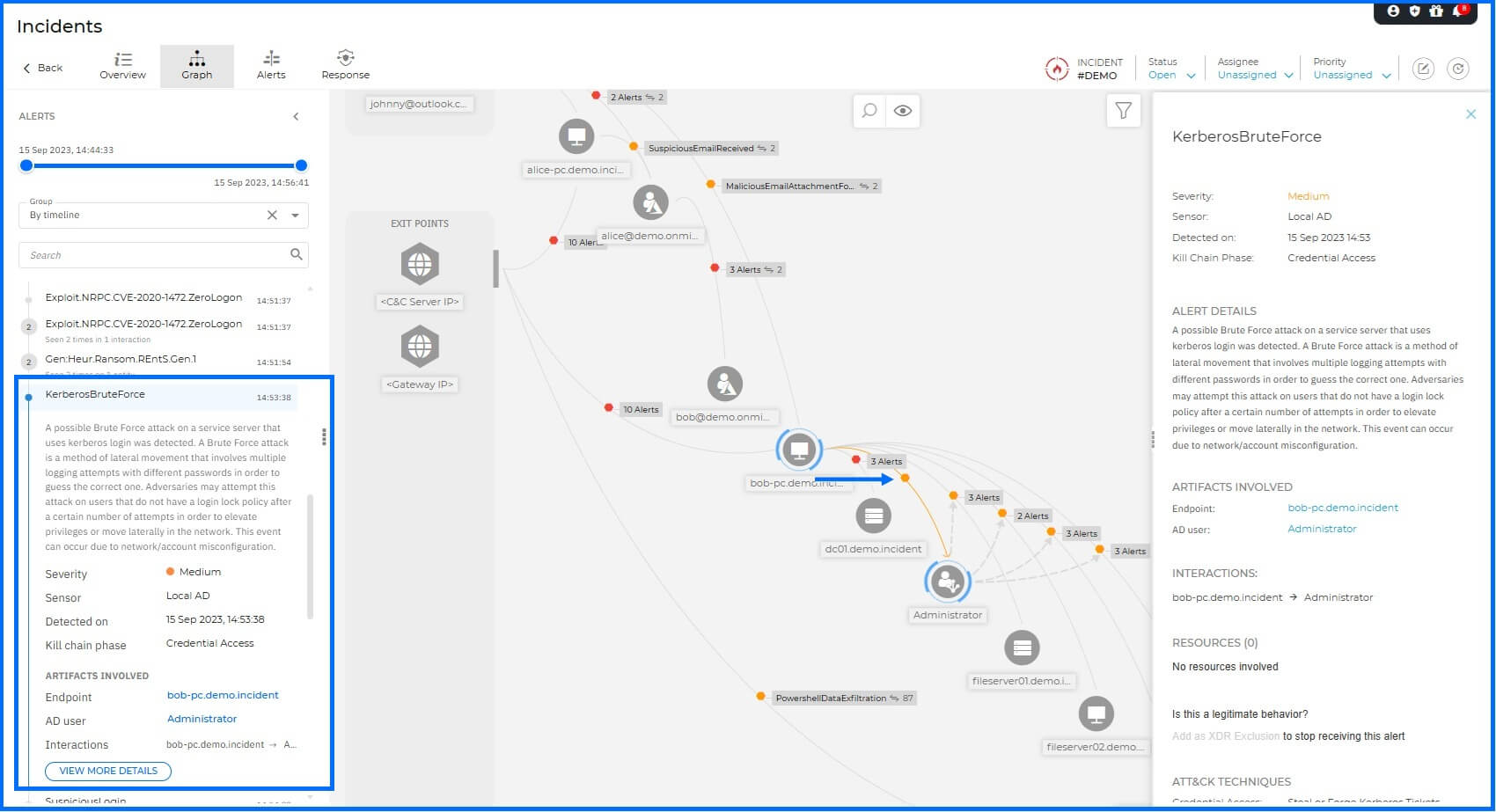 |
The sensor first raises KerberosBruteForce in the Credential Access phase, flagging a brute-force attempt against a service server that authenticates with Kerberos. The alert names the workstation the attempts originate from and the Administrator account they target, so the analyst knows which account is under attack while the attempts are still running.
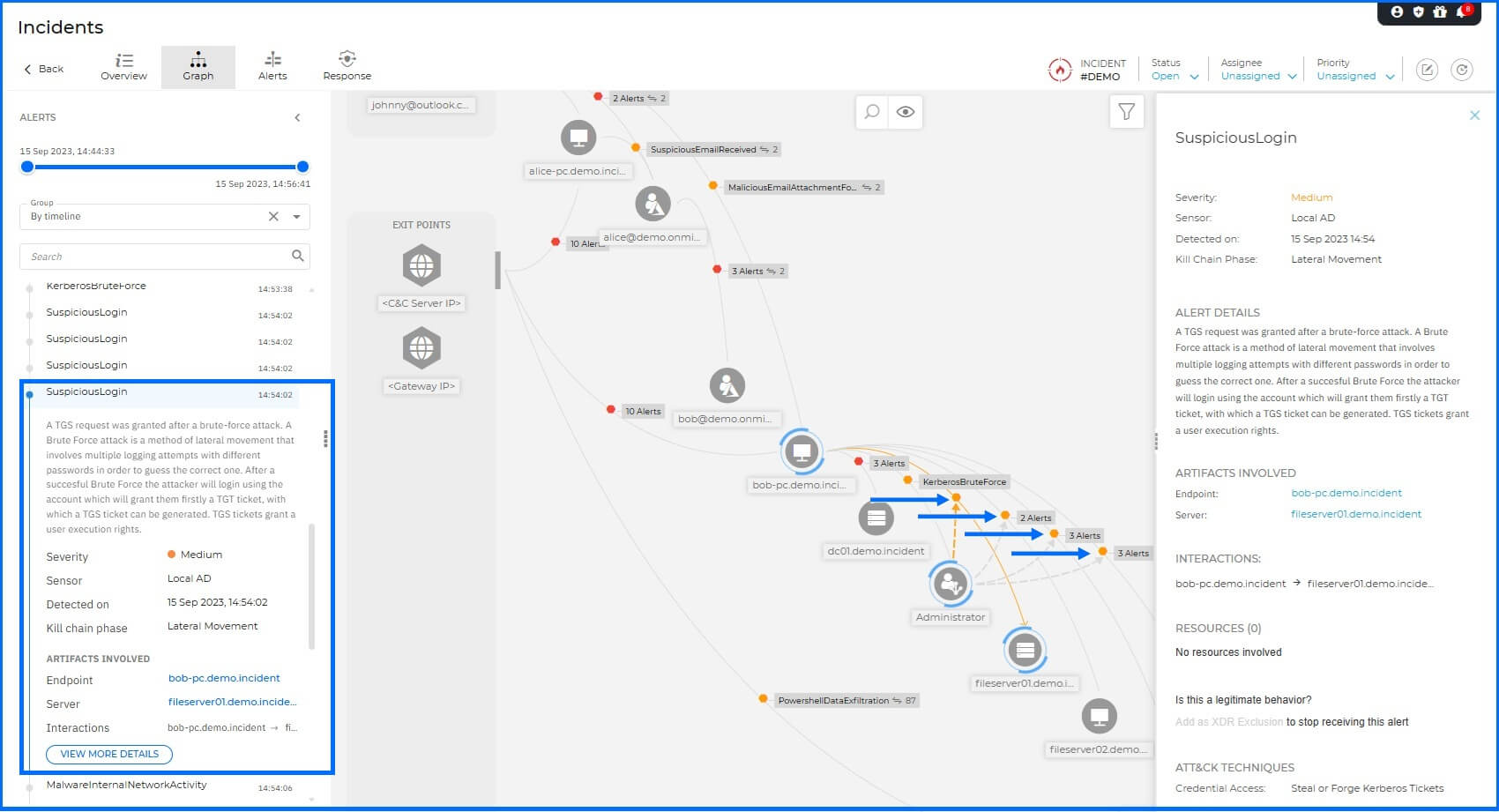 |
A minute later it raises SuspiciousLogin in the Lateral Movement phase, when a service ticket is granted off the back of that brute-force and the file server appears as the system reached. Read together, the two alerts trace the identity thread of the attack: guess a domain credential, then use the ticket it yields to reach a server. Because both belong to the same incident, an analyst sees the credential attack and the movement it enabled as one chain rather than two alerts to reconcile.
Response Actions
The Active Directory Sensor is one of the sensors that add response actions on the surface they cover. From within an Incident, the Threat Response actions available through the Active Directory integration let you act on the account behind the activity: Disable AD user cuts off the account's access, and Reset AD user password invalidates a credential the attacker has guessed or stolen. Both act on the user in Active Directory, and note that tickets already issued to the account remain valid until they expire, so the actions stop reuse of the credential rather than stop sessions already open. The full action table is in the Threat Response article.
Deployment and Configuration
The Active Directory Sensor requires no dedicated appliance: it runs through BEST with the EDR module active on every machine holding the Domain Controller role, the Certificate Authority role, or both. Prerequisites, the audit-policy settings the sensor relies on, and full integration steps are in the Bitdefender Support Center article The Active Directory sensor.
Hands-on Scenarios
The following scenarios demonstrate how you can solve specific challenges using the events the Active Directory Sensor monitors.
Stopping a Kerberos Brute-Force Against a Service Account
Repeated Kerberos login attempts against a service server raise KerberosBruteForce, the pattern of an attacker cycling passwords against an account with no lockout policy. Open the incident and respond from the same view: Disable AD user ends the account's access and Reset AD user password closes the window the attacker was working through, then review the account's recent authentication in Active Directory before re-enabling it.
Catching Lateral Movement on a Stolen Ticket
A brute-force succeeds and the ticket it earns is used to sign in to a file server, raising SuspiciousLogin under the lateral movement phase, the difference between a failed guessing run and a foothold in progress. Disable the account from the incident, reset its password, and review which servers the ticket reached, since a ticket already issued can outlive the password change
Investigating After an Audit Log Is Cleared
An attacker who reaches a domain controller often tries to erase their tracks before moving on, and AuditLogCleared shows the moment they do, marking the exact point in the intrusion where the attempt happened. Treat the alert as a timestamp, not a dead end: pull the incident's timeline for everything that happened on that domain controller before the clear, then disable the account from the incident and reset its password. The cleared log only erases what came after the wipe, not what the Correlation Engine had already captured before it.
Common Mistakes and Misconceptions
"The sensor blocks Kerberos attacks as they happen."
It detects and reports; the actions it adds, Disable AD user and Reset AD user password, are taken from the console after correlation. It does not sit inline on Kerberos traffic, and hardening the directory against ticket abuse is done in Active Directory itself.
"It connects to the directory like the cloud identity sensors."
The Microsoft Entra ID and Microsoft Intune sensors reach their directories through a direct cloud connection with nothing to install. The Active Directory Sensor is different: it reads on-premises Active Directory through BEST with the EDR module on your domain controllers, so its prerequisites and reach are tied to those machines.
"Disabling the account closes the incident."
Disabling stops the account, but what the attacker planted, a rogue domain controller, injected directory objects, or tickets already issued, persists until it is removed in Active Directory. The alert tells you which account to act on; the cleanup happens in the directory.
"Clearing the audit log removes the evidence."
Clearing the security audit log is itself a signal the sensor watches for: AuditLogCleared shows the moment the log is wiped, so the attempt to erase the trail becomes part of the trail. It doesn't restore what was already deleted, but it tells the analyst exactly when in the timeline the attacker tried to cover their tracks.