Atlassian Cloud Sensor – Bitdefender TechZone
2026-09-10
Atlassian Cloud Sensor monitors Atlassian Admin, Jira Cloud, Confluence Cloud audit events for account and permission abuse, no agents or appliances required. Detects brute force, impossible travel, malicious IPs, API token creation, administrative anomalies, and permission tampering. Integrates with XDR Correlation Engine.
Jira, Confluence, and the Atlassian Admin console sit at the center of how modern teams plan, document, and ship work, which makes a stolen developer or administrator account a direct path into project plans, credentials buried in tickets and pages, and the permissions that guard them, none of it visible to an endpoint agent. The Atlassian Cloud Sensor gives Bitdefender GravityZone eyes inside that environment, watching sign-ins, administrative changes, and content activity for the signals that a compromise has started—and hands what it sees to the GravityZone correlation engine for XDR.
What Atlassian Cloud Sensor Collects and Detects
The sensor retrieves audit events and logs from Atlassian Admin, with dedicated Jira Cloud and Confluence Cloud sensors adding context from those platforms and turns them into detections that feed the GravityZone correlation engine. It covers the attack lifecycle from the first password-guessing attempt to post-compromise persistence and data theft.
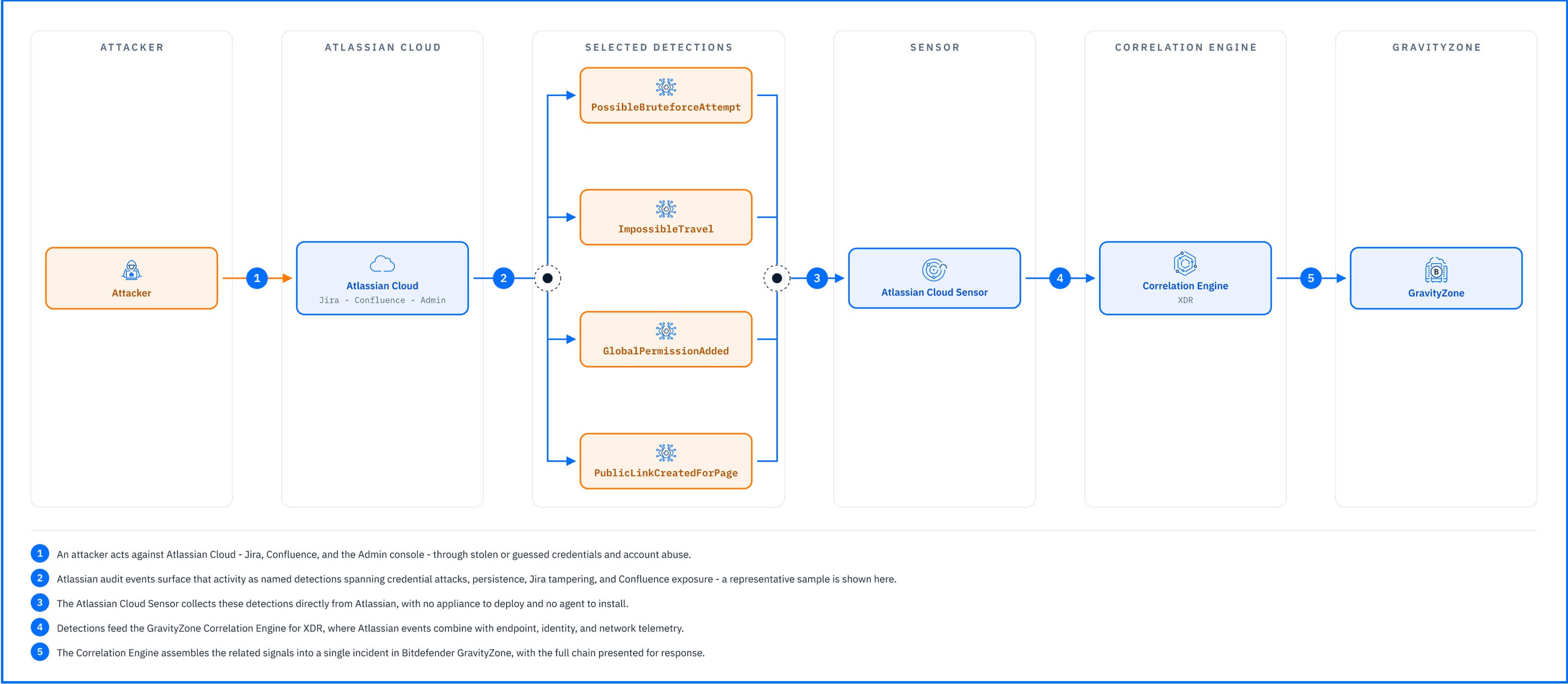 |
The detections below, grouped by what the attacker is trying to achieve, show the range.
Credential attacks and suspicious sign-ins. PossibleBruteforceAttempt is raised on repeated failed login attempts against a user, the trace of an attacker working through a password list until one succeeds. MaliciousIPFoundInEvent flags activity arriving from an address with a known bad reputation, the infrastructure attackers reuse across campaigns, and ImpossibleTravel identifies logins from locations no single person could travel between in the time available, the classic trace of a stolen password being used alongside its legitimate owner.
Persistence and privilege escalation. Once inside, attackers secure their access. The sensor detects the creation of API access tokens and invitations to external guests, the persistence and automation efforts that follow a successful compromise. PossibleAdministratorUserImpersonation flags an account acting like an administrator it is not, and Anomaly.UserAdministrativeActivity is raised when a user shows an unusual frequency of administrative activities within a day, the burst of changes that surrounds an attacker reconfiguring the environment.
Tampering in Jira. The sensor detects changes that rarely happen legitimately without a ticket of their own. GlobalPermissionAdded is raised when an account is granted a global permission, the quiet self-promotion that gives an attacker reach into every project at once. Adding or removing project administrators marks an attacker taking ownership of a project or locking its rightful owners out, and creating or modifying permission schemes and project roles rewrites the rules so that stolen access looks legitimate. Deleting a project can be the final step in a data destruction attempt.
Exposure and exfiltration in Confluence. Changes to user or group permissions widen who can read a space, the preparation step before its contents leave. PublicLinkCreatedForPage is raised when a public link is created for a page, turning internal documentation into content reachable by anyone with the URL, no account required. A space export packages an entire knowledge base for removal in a single action; performed without authorization, it signals a potential exfiltration attempt.
Everything the sensor detects feeds the Correlation Engine for XDR, where Atlassian events combine with endpoint, identity, and network telemetry; a suspicious login to Jira becomes part of the same incident as the account activity around it.
Detections in Practice
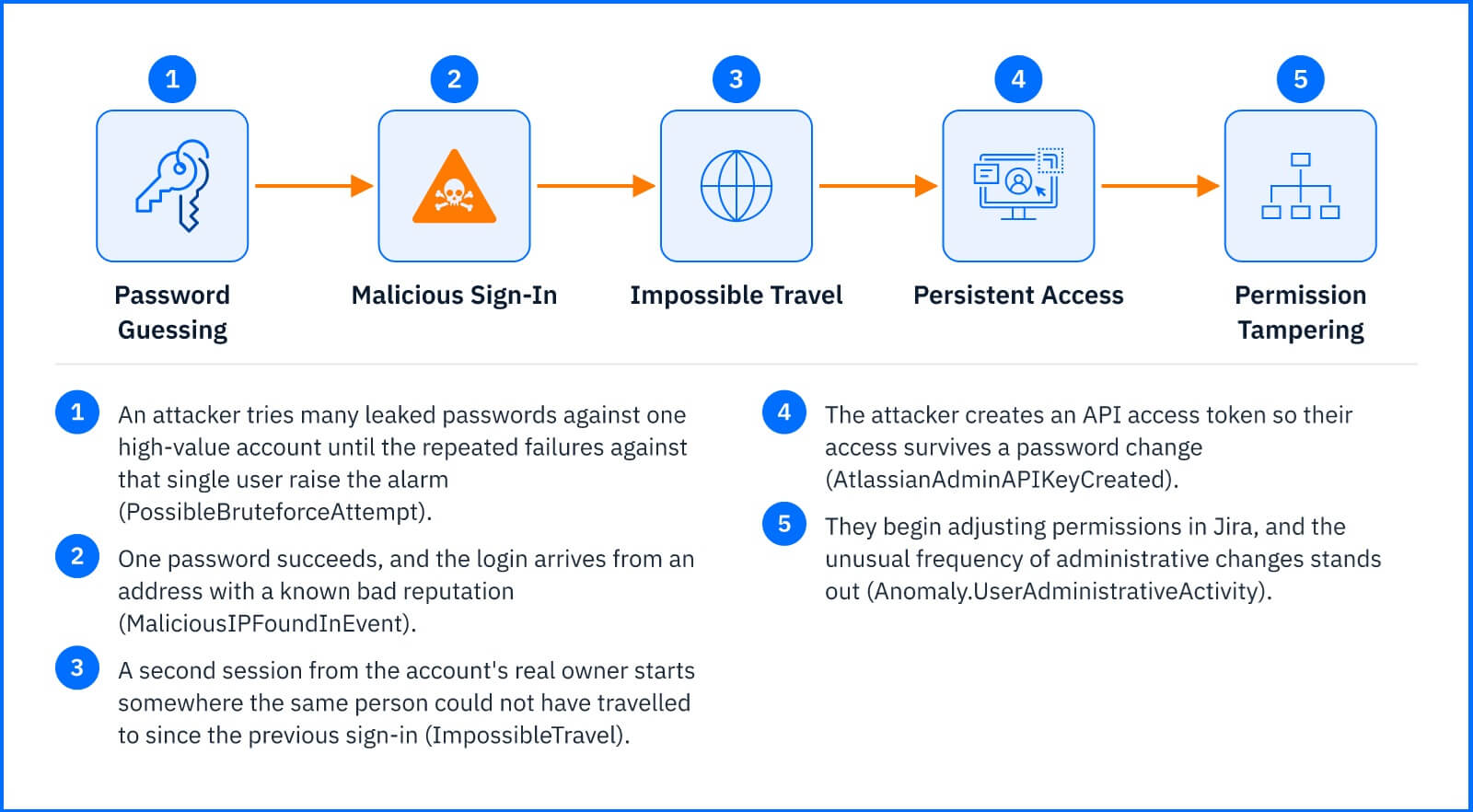
An attacker targets a high-value user with a batch of leaked credentials, trying many passwords against that single account; the repeated failures against the same user raise PossibleBruteforceAttempt. One password succeeds. The successful login arrives from an address with a known bad reputation, adding MaliciousIPFoundInEvent, and a second session from the account's real owner originates somewhere the same person could not physically have travelled to since the previous sign-in, raising ImpossibleTravel. The attacker creates an API access token, so their access survives a password change and starts adjusting permissions in Jira; the unusual administrative pattern raises Anomaly.UserAdministrativeActivity. Individually, each alert might deservea routine look. The correlation engine assembles them into a single incident with the compromised account at its root, and Incident Advisor presents the chain in one view, where the responder can disable the account directly.
 |
Response Actions
From within an incident, the Threat Response actions available through the Atlassian Cloud integration let you disable the Atlassian user behind the malicious activity, cutting the attacker's access. Note that disabling a user stops the attacker but leaves behind artifacts they created—API tokens, guest accounts, public links, and exported data—which persist until removed in Atlassian Admin itself. The alert tells you which account to act on; cleanup of what that account touched happens in the platform. The full action table is in the Threat Response article.
Deployment and Configuration
The Atlassian Cloud Sensor uses a direct connection between GravityZone and Atlassian Cloud; there is no appliance to deploy and no agent to install. The integration is defined in the GravityZone console and covers Atlassian Admin, with the dedicated Jira Cloud and Confluence Cloud sensors providing platform-specific events. Prerequisites and full integration steps are in the Bitdefender Support Center article The Atlassian Cloud sensor.
Hands-on Scenarios
The following scenarios demonstrate how you can solve specific challenges using the events the Atlassian Cloud Sensor monitors.
Stopping a Password-Guessing Campaign at the Door
A wave of failed logins against a single account raises PossibleBruteforceAttempt, and a successful sign-in that follows from a flagged address adds MaliciousIPFoundInEvent to the same incident. That pairing is the difference between noise and a breach in progress: the guessing worked. Open the incident and respond from the same view: Disable user - Atlassian ends the attacker's session, then reset the password and review the account's recent activity in Atlassian Admin before re-enabling it.
Securing Persistent Access with API Tokens
An attacker gains access to an administrative account through credential compromise. Rather than risk detection through repeated logins, they immediately create an API access token AtlassianAdminAPIKeyCreated so their access survives password resets and security audits. The token creation, combined with the earlier ImpossibleTravel or MaliciousIPFoundInEvent alerts, flags the account. Disable the Atlassian user immediately from the incident, then revoke all API tokens in Atlassian Admin, because a leaked token is a backdoor that persists until removed.
Interrupting Jira Tampering Before a Project Disappears
An account adds itself as project administrator, grants itself global permission, raises GlobalPermissionAdded, and begins deleting projects. The administrative anomaly puts the account at the center of an incident while the destruction is still underway. Disable the Atlassian user to stop further deletions, restore the affected projects from your Atlassian backup, and audit the permission schemes the account touched, because tampered roles left in place are a second incident waiting to happen.
Common Mistakes and Misconceptions
"The Atlassian Cloud Sensor patches Jira and Confluence vulnerabilities"
The sensor monitors Atlassian Cloud audit events for account and permission abuse; it is not a patching or blocking layer. The widely reported Confluence and Jira remote-code-execution flaws affect the self-hosted Data Center and Server products, which Atlassian states are separate from the Cloud platform this sensor watches. What the sensor covers is the abuse of no patch addresses: a legitimate account in the wrong hands.
"Atlassian coverage means Jira coverage"
The sensor retrieves audit events from Atlassian Admin and adds dedicated Jira Cloud and Confluence Cloud context. Permission changes, public page links, and space exports in Confluence are in scope alongside Jira activity, and the organization-level events, logins, tokens, and guest invites, cover both platforms at once.
"Disabling the user closes the incident"
Disabling the account stops the attacker, but the artifacts they created, API tokens, guest accounts, public links, and exported data, persist until removed in Atlassian. The alert tells you which account to clean up after, not that the cleanup is done.