Security for Mobile Sensor – Bitdefender TechZone
2026-09-25
Security for Mobile Sensor closes visibility for Android/iOS devices outside corporate networks. Forwards mobile detections to XDR Correlation Engine, correlating phishing, malicious apps, and device compromise with account activity and network telemetry for unified incident investigation.
Phones and tablets hold corporate credentials, read corporate mail, and sit outside the view of every other sensor. An attacker who phishes a user on a personal device, or who lands a malicious app on a phone that never touches the corporate network, leaves no trace on a managed endpoint and no record in a network capture. The Security for Mobile sensor closes that gap by forwarding the events and detections that GravityZone Security for Mobile raises on Android and iOS devices into GravityZone XDR, where they become part of the same incident as endpoint, network, identity, and cloud activity.
What Security for Mobile Collects and Detects
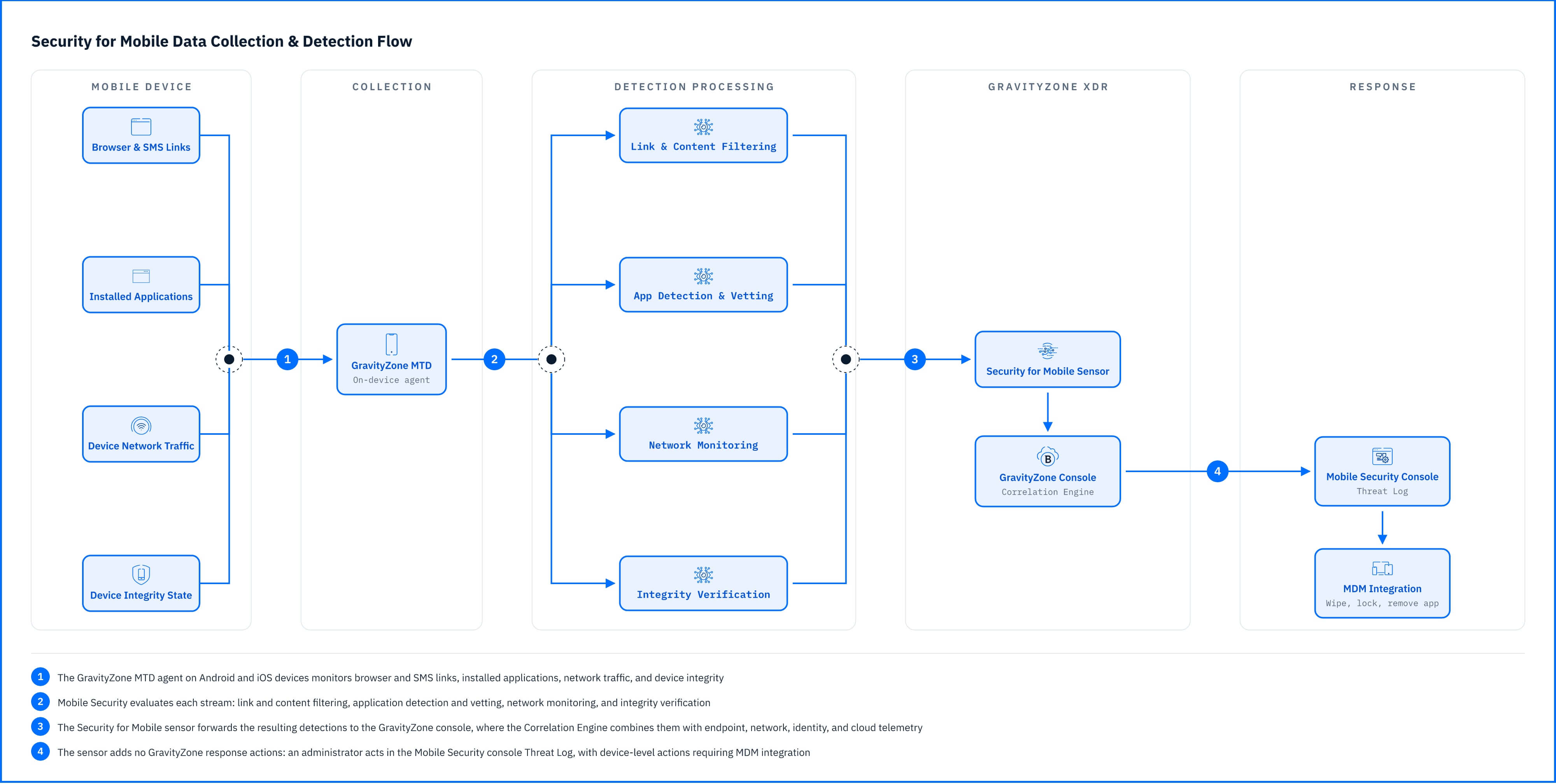 Fig. 1. How GravityZone Security for Mobile monitors Android and iOS devices and how the Security for Mobile sensor feeds those detections into the GravityZone Correlation Engine |
The sensor processes mobile device events collected from GravityZone Security for Mobile and turns them into detections that feed the GravityZone Correlation Engine for XDR. The detections below are grouped by what the attacker is trying to achieve. They are a selection rather than the full set, chosen to show the sensor's range, including:
Credential theft through malicious links. Mobile Security analyzes links in the browser and in SMS messages, so a phishing attempt that never reaches a corporate mail server is still visible. When a user opens a link that Mobile Security classifies as malicious, or one that your organization's web content filtering policy forbids, the sensor raises MaliciousLinkAccessed, recording that the user was blocked from reaching the destination.
Malicious applications and device takeover. Mobile Security identifies known malicious applications on managed devices and uses on-device machine learning to detect unknown threats. This is backed by an application verification engine that evaluates apps against more than 180 detection points. A known bad app present on a device raises SuspiciousAndroidApp. When an app moves beyond mere presence to drive a device through a full attack sequence, the sensor raises DeviceCompromisedByMaliciousApp, reporting a kill chain that started with a malicious app and ended with a compromised device.
Reconnaissance against the device. Mobile Security monitors network traffic on the device for the scanning an attacker performs before an exploit attempt, including rogue access points and Man-in-the-Middle conditions on untrusted networks. Scans may use IP, TCP, UDP, ARP, or other protocols. The sensor surfaces these as TCPScan and IPScan, each reporting a reconnaissance scan performed against the device using that protocol.
Loss of device integrity and weakened defenses. Mobile Security verifies device integrity by checking for elevated privileges, system tampering, and rooted devices. SystemTampering event is logged when security limitations have been removed, leaving the device compromised. DeviceRooted occurs when the device has been rooted, giving unauthorized access or elevated privileges on the system. Separately, GooglePlayProtectDisabled reports that Google Play Protect, the built-in Android security feature, has been turned off on the device.
Everything the sensor detects feeds the Correlation Engine for XDR, where mobile telemetry combines with endpoint, network, identity, and cloud telemetry. A blocked phishing link on a phone and the account activity that follows on the same identity become one incident rooted on the compromised credential.
Detections in Practice
A text message is the common opening. A link arrives by SMS pointing at a page that impersonates the corporate sign-on portal, and Mobile Security stops the user before the credential is typed: MaliciousLinkAccessed. The campaign does not stop there. A follow-up message shows the same user into installing an application from outside the official store, and the sensor names it: SuspiciousAndroidApp. Minutes later, the device's own defense was disabled with alert GooglePlayProtectDisabled,and the restrictions the manufacturer put in place come off: SystemTampering and then DeviceRooted. With the phone under its control, the application starts probing the network the phone happens to be sitting on, raising TCPScan and IPScan against hosts it has no business touching. DeviceCompromisedByMaliciousApp states the outcome plainly.
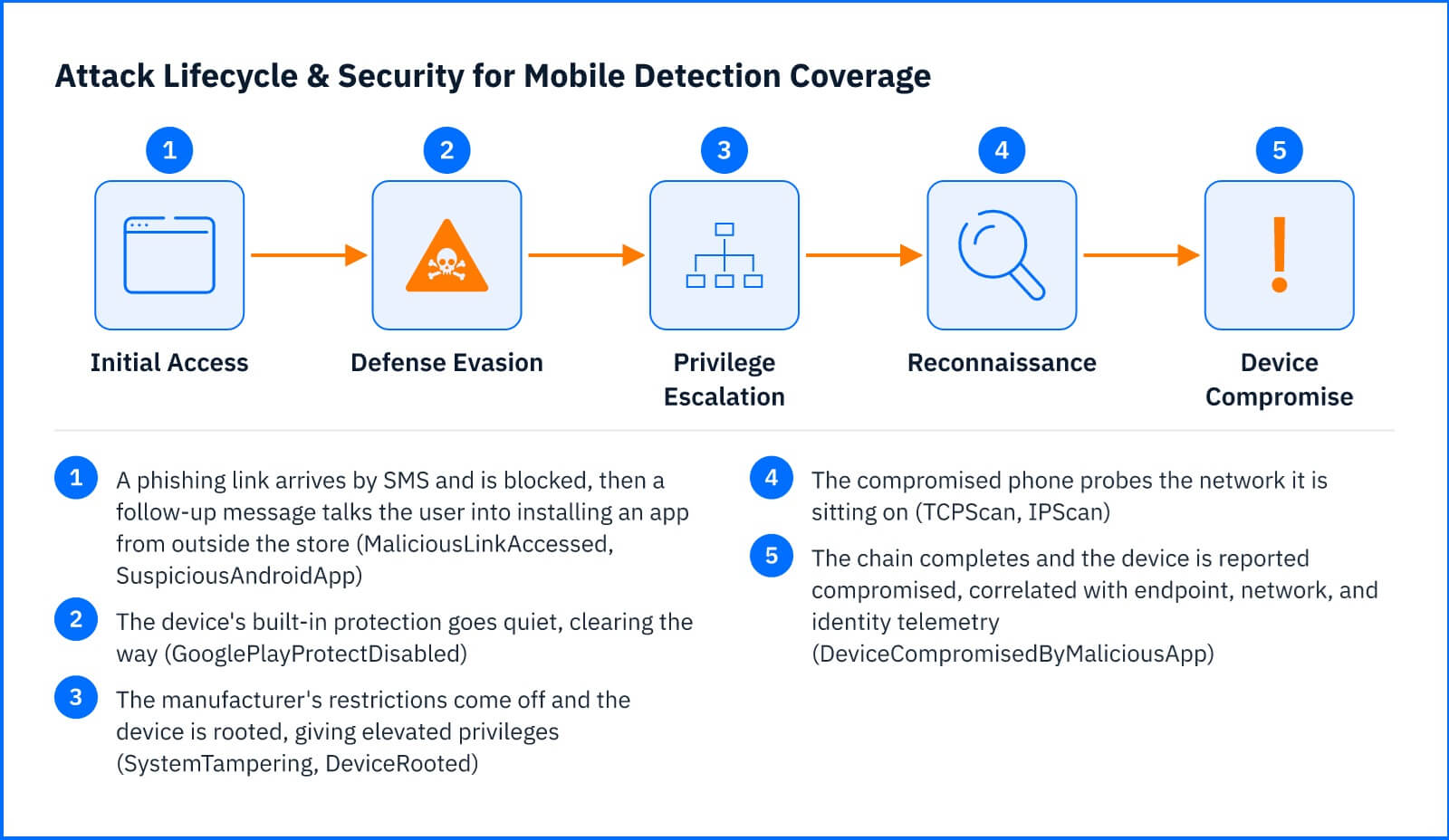 Fig. 2. Security for Mobile detection coverage across a mobile attack chain, from a phishing link or malicious app through device compromise |
Six moves on one phone, within an afternoon. Taken one at a time, they look like routine maintenance: a blocked link, an app to uninstall, a setting to switch back on. The Correlation Engine ties them to a single device and a single user, then joins them with what other sensors saw from the network side. The same account authenticating from an unfamiliar location, and the scanned hosts answering on a corporate subnet. What reaches Incident Advisor is one unified incident whose timeline begins on a device no endpoint agent was ever installed on.
Response Actions
The Security for Mobile sensor is not one of the sensors that add response actions to the GravityZone console. Responding to a mobile detection runs on two tracks:
Device Containment: The device itself is handled in the Mobile Security console. From the Threat Log an administrator can act on the threat and trigger MDM actions, and Mobile Security's own network responses can disconnect Wi-Fi, disable Bluetooth, or isolate the device from the network. Device-level actions, including wiping the device, locking it, and removing the application, require MDM integration.
Identity Containment: The account exposed on that device is handled through your identity and productivity integrations, which do carry console actions, such as the Active Directory Sensor to disable a domain account or the Azure AD and Office 365 integrations to disable an Entra user or reset their password. The full action table is in the Threat Response article.
Deployment and Configuration
The Security for Mobile sensor requires no dedicated appliance or agent of its own: it processes the mobile device events that GravityZone Security for Mobile already collects from the devices it protects, so the integration becomes active automatically once an active Security for Mobile license, an active license that includes the eXtended Detection and Response (XDR) feature, and a provisioned and active Mobile Security console are all in place. Prerequisites and full integration steps are in the Bitdefender Support Center articles The Security for Mobile sensor .
Hands-on Scenarios
The following scenarios demonstrate how you can solve specific challenges using the events the Security for Mobile monitors.
Tracing a Phishing Click to an Account Compromise
MaliciousLinkAccessed on its own tells you a user was blocked. Treat it as a lead, not a closed case. Open the incident in Incident Advisor and look at what else the Correlation Engine attached to the same user: authentications from new locations, mailbox rule changes, file access from unmanaged clients. The block prevented the credential from being submitted on that attempt, but it does not tell you whether the same campaign reached the user through another channel that was not protected. Response for the account itself runs through the identity and productivity sensors, which do carry console actions. On the mobile side, review the Threat Log in the Mobile Security console and confirm whether the source message or a related link was seen on other devices.
Containing a Device Compromised by a Malicious App
SuspiciousAndroidApp followed by GooglePlayProtectDisabled and then DeviceRooted or SystemTampering is a device you should stop trusting. The Security for Mobile sensor does not add response actions to the GravityZone console, so containment happens in Mobile Security. From the Threat Log you can act on the threat and trigger MDM actions, and Mobile Security's own network responses can disconnect Wi-Fi, disable Bluetooth, or isolate the device from the network. Device-level actions, including wiping the device, locking it, or removing the application, require MDM integration. Cleanup does not end there: any corporate credential or session token that lived on that device should be treated as exposed and reset through the relevant identity system, and re-enabling Google Play Protect is a separate step from removing the app.
Investigating Reconnaissance Scans Against a Mobile Device
TCPScan and IPScan mean something on the same network segment is probing the phone. The first question is where the device was. A scan on an airport or hotel network is a different problem from a scan on a corporate subnet. Check whether the same device also produced integrity alerts, which would suggest the phone is the scanner rather than the target, and check whether the network sensor saw comparable scanning from that segment. If the device is the target and the network is untrusted, the practical response is a policy one, applied in the Mobile Security console, rather than an action on the phone.
Common Mistakes and Misconceptions
"The Security for Mobile sensor blocks these attacks."
Mobile Security does the blocking, not the sensor. A MaliciousLinkAccessed alert reports that the user was already stopped from reaching the destination, but that prevention happened on the device, in the product, before GravityZone was involved. The sensor sits downstream of it: it forwards what Mobile Security saw so the Correlation Engine can connect it to the rest of the estate. It does not sit inline on mobile traffic, and it does not stop an app from installing or a device from being rooted.
"A factory reset cleans a rooted or jailbroken device."
It does not. A factory reset erases user data and leaves the operating system files untouched, so threats that have modified the OS, including Pegasus, a disabled SELinux, and jailbreak, survive it. Those cases require restoring factory firmware, not resetting the device. Handing a reset phone back to a user after a DeviceRooted or SystemTampering alert is how a compromised device returns to the fleet looking clean.
"Devices have to be enrolled in an MDM for the sensor to see anything."
Detection does not depend on enrollment. Mobile Security operates as a standalone mobile threat defense product and will raise the detections above on the devices it protects, which is part of why it fits BYOD situations that an MDM would make awkward. What enrollment buys you is the ability to act: wipe, lock, and application removal all require MDM integration. Unenrolled devices produce alerts you can investigate but not remediate remotely.
"Mobile phishing protection only covers the browser."
Mobile Security analyzes incoming messages as well as browser traffic, so links delivered by SMS are checked alongside links opened in a browser. This matters because SMS phishing bypasses every mail security control you own. A MaliciousLinkAccessed alert does not tell you the user was browsing the web; it tells you the user opened a link that Mobile Security judged malicious or that policy forbade, wherever that link came from.