Google Cloud Platform Sensor – Bitdefender TechZone
2026-09-17
GCP Sensor extends GravityZone into Google Cloud, detecting credential compromise, privilege escalation, data exfiltration, and audit deletion. Correlates with endpoint, network, and identity telemetry into unified XDR incidents for rapid response: disable account, reset password.
An attacker who reaches your Google Cloud environment never has to touch a managed endpoint. Someone holding a stolen credential or exploiting a misconfiguration can raise their own privileges, disable the controls that would have caught them, open storage to the internet, move the data out, and erase the record of having been there — all inside Google Cloud. The Google Cloud Platform Sensor gives Bitdefender GravityZone eyes on that blind spot. It collects and processes audit information about your Google Cloud resources and forwards it to the GravityZone console, feeding the Correlation Engine for XDR.
What the Google Cloud Platform Sensor Collects and Detects
The Google Cloud Platform (GCP) Sensor connects GravityZone directly to your Google Cloud environment and processes the audit records Google Cloud provides about activity on its resources. You decide the scope when you set the integration up: a single Google Cloud project, or your entire Google Cloud organization.
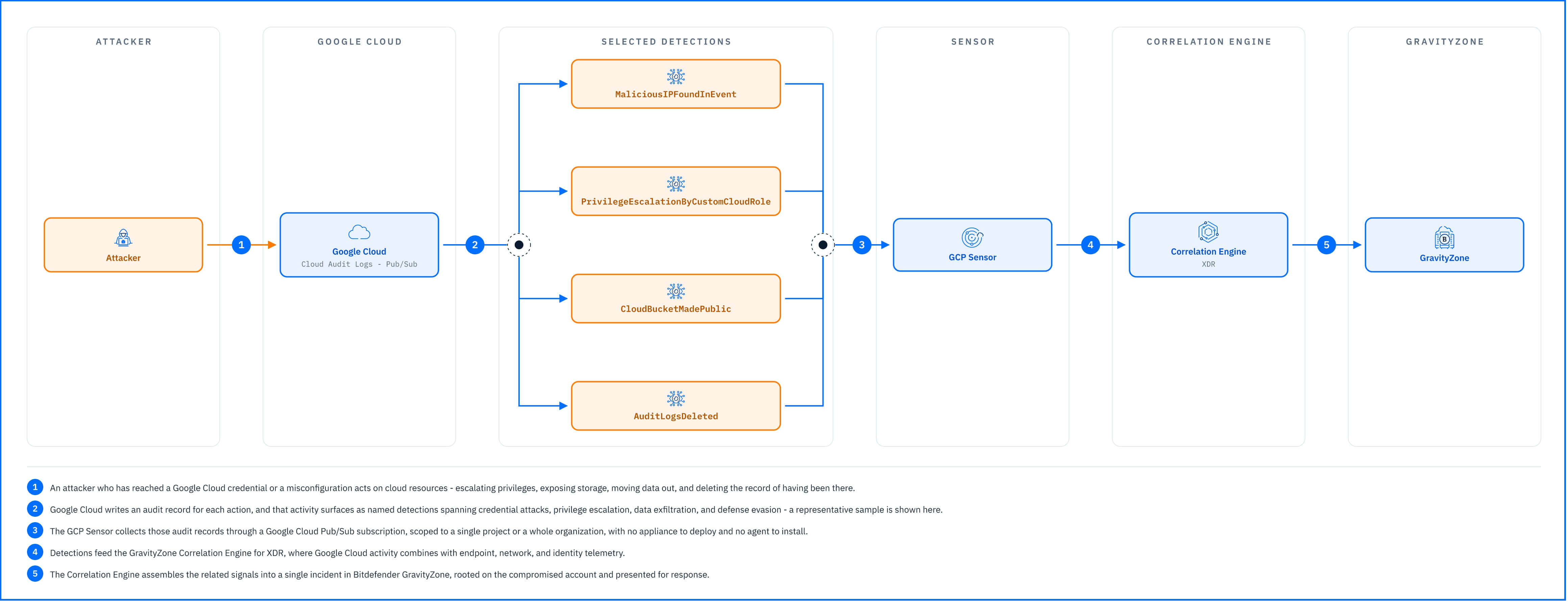 |
The detections below are grouped by attacker objective. They are a selection rather than the full set, chosen to show the sensor's range, including:
Credential attacks and suspicious sign-ins. MaliciousIPFoundInEvent flags activity arriving from an address with a known bad reputation, the infrastructure attackers reuse across campaigns. Anomaly.UserAdministrativeActivity is raised when a user shows an unusual frequency of administrative activity.
Persistence and privilege escalation. Once inside, attackers secure their access and expand their reach. ProjectAPIKeysAdded catches new API keys created for persistent programmatic access, and StartupOrShutdownScriptAdded flags a script attached to a compute instance to execute code automatically upon boot or shutdown. AnomalousIAMGrantAdded and IAMConfigurationModified catch unusual permission grants and changes to identity and access management settings, the reconfiguration that gives an attacker reach into multiple resources at once. RoleUpdated, ElevatedPrivilegesAssigned, and PrivilegeEscalationByCustomCloudRole catch role modifications and new high-privilege assignments, including a user updating a vulnerable custom role by adding a permission that enables privilege escalation on the cloud infrastructure. KubernetesClusterAdministrationRoleAssigned flags the same escalation pattern inside a Kubernetes cluster.
Data exfiltration. CloudBucketMadePublic and CloudInstanceMadePublic catch storage and compute resources being exposed to the internet, staging data or access for later retrieval. DatastoreExported identifies a datastore export, the action that moves data out of the environment for theft or analysis.
Defense evasion and covering tracks. AuditLogsDeleted catches the removal of audit log, deleting the record of what happened. FirewallRuleDeleted and SecurityPolicyDeleted flag security controls being torn down, and PossibleCloudVMWipedByEncryption flags a VM instance being encrypted and its disk encryption key deleted, preventing system recovery.
Everything the sensor detects feeds the Correlation Engine for XDR, where GCP activity combines with endpoint, network, and identity telemetry. A suspicious sign-in to GCP and the administrative changes that follow on the same account become one incident rooted on the compromised credential.
Detections in Practice
The sensor’s detections, mapped below to the attack lifecycle they cover, show how far a single compromised credential can reach inside GCP.
An attacker compromises a GCP user account through credential theft or phishing and signs in from a known malicious IP address, raising MaliciousIPFoundInEvent. When the attacker begins exploring the environment: unusual administrative activity raises Anomaly.UserAdministrativeActivity. Next, the attacker adds a new project API key for persistent programmatic access, triggering ProjectAPIKeysAdded, and escalates privileges by updating a custom role with an additional permission, raising PrivilegeEscalationByCustomCloudRole. With elevated access, the attacker makes a Cloud Storage bucket public to stage data for exfiltration, triggering CloudBucketMadePublic, then exports a datastore, raising DatastoreExported. Before leaving, the attacker deletes the audit log to cover their tracks, triggering AuditLogsDeleted.
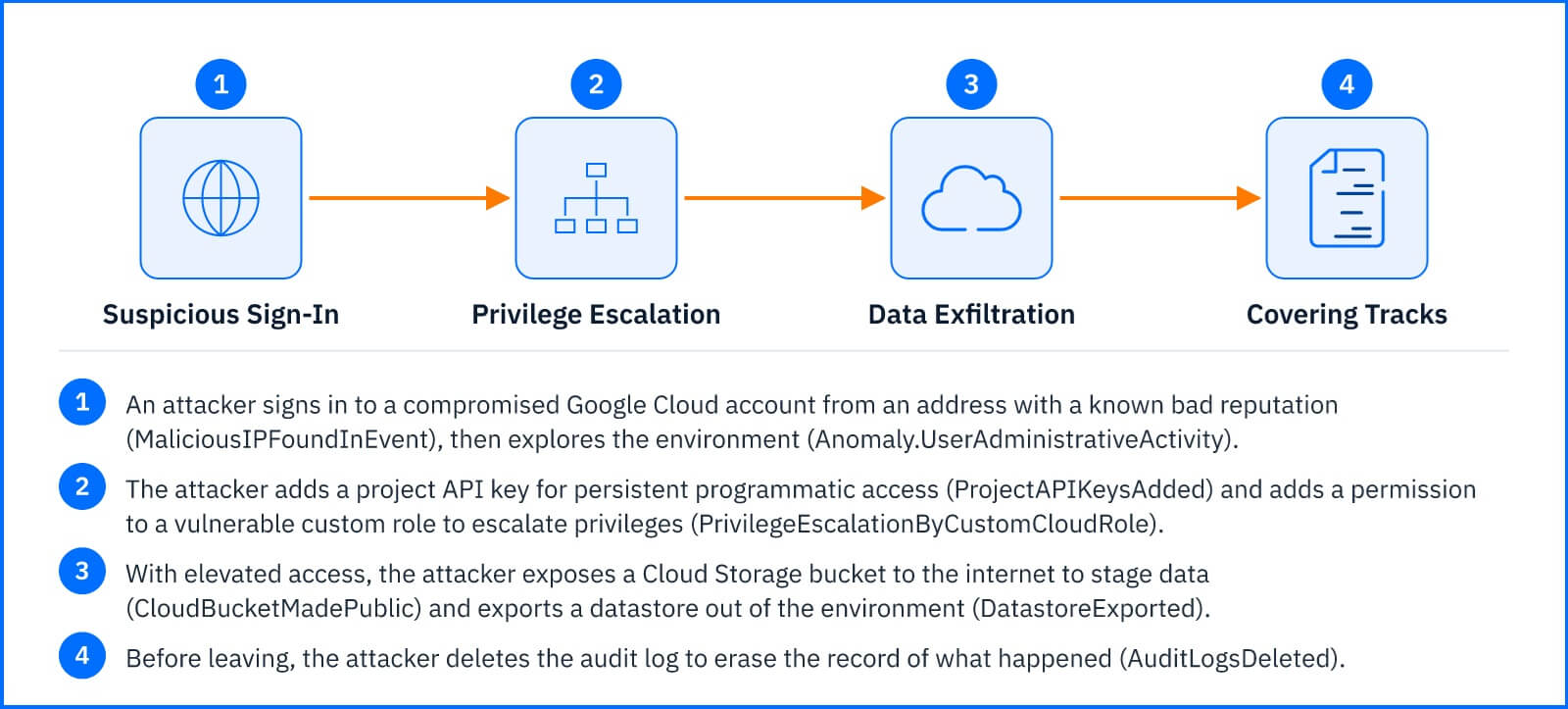 |
Individually, each alert might rate only a routine look, but the Correlation Engine assembles them into a single incident with the compromised account at its root. Incident Advisor presents the full chain in one view, letting the responder disable the account and audit what was accessed.
Response Actions
The GCP Sensor is one of the sensors that add response actions on the surface it covers. From within an incident, the Threat Response actions available through the Google Cloud Platform integration let you disable the Google user behind the activity or reset that user's password, cutting the attacker's access at its source.
Both actions work on the account, not on the cloud resources. Nothing in the incident view revokes an API key the attacker created, closes a bucket they made public, restores a firewall rule they deleted, or rolls back a custom role they modified. The full action table is in the Threat Response article.
Deployment and Configuration
The GCP Sensor requires a Google Cloud Pub/Sub subscription. You can configure the sensor to collect data from a single Google Cloud project or from your entire Google Cloud organization. Prerequisites, the Pub/Sub topic, and full integration steps are in the Bitdefender Support Center article The Google Cloud Platform Sensor.
Hands-on Scenarios
The following scenarios demonstrate how you can solve specific challenges using the events the GCP Sensor monitors.
Catching Privilege Escalation That Hides in an Existing Role
Creating a new administrator account is loud. Editing a custom role that already exists is quiet, and it leaves the attacker with more permissions than anyone reviewing the account list would notice. PrivilegeEscalationByCustomCloudRole flags exactly this: a permission added to a vulnerable custom role that opens the way to escalation. When it executes alongside ElevatedPrivilegesAssigned or AnomalousIAMGrantAdded on the same account, treat the escalation as in progress.
Open the incident to identify the account that made the change and check it against your change management record. Use Disable Google user or Reset Google user password from the same view. Then undo the escalation in Google Cloud: revert the custom role, remove the grants made with it, and look for API keys created in the same window, because those keep working after a password reset.
Closing Exposed Storage Before the Data Leaves
Public storage is a short line between a mistake and a breach, and CloudBucketMadePublic tells you when a bucket is reachable from outside. If DatastoreExported follows on the same account, the export is underway and the priority shifts from prevention to limiting what was taken.
Open the incident to identify the account and the resources named in the alerts, then Disable Google user to stop further access. The rest happens in Google Cloud: return the bucket to private, review its access logs to establish whether anyone outside reached it while it was open, and identify what the export covered.
Responding When an Attacker Deletes the Evidence
AuditLogsDeleted and SecurityPolicyDeleted are clear. Nobody removes audit log or a security policy as routine work, and both usually mean an attacker is clearing the activity record. Because the events reached GravityZone before the deletion, the incident still holds logs.
Open it and read the account's activity backwards from the deletion to find what it was covering. Disable Google user or Reset Google user password to cut the account off, then restore the logging configuration and the security policy in Google Cloud, treating every resource the account touched before the deletion important to review
Common Mistakes and Misconceptions
"The GCP Sensor blocks attacks as they happen."
It detects and reports. The sensor does not sit inline on Google Cloud activity and does not stop an action from executing, so a bucket that was made public was public, and an export that ran completed. What it gives you is the record and the correlation, fast enough to cut the account off before the next step. Preventing the action in the first place is the job of Google Cloud's own controls, configured in Google Cloud itself.
"Disabling the Google user closes the incident."
Disabling stops the attacker from using that identity, and it is the right first move. It does not undo anything they already did. API keys, modified custom roles, public buckets, deleted firewall rules, and startup scripts all survive the account being disabled, and several of them work as a way back in. The response actions cut off the account; cleanup of what the attacker left must be done on Google Cloud.
"The sensor sees everything happening in Google Cloud."
The GCP Sensor monitors Cloud Audit Log events forwarded through Pub/Sub. It does not see GCP resource configurations themselves (what a firewall rule allows, what a custom role’s permissions grant, whether a bucket is encrypted). It sees the actions: someone made a bucket public, someone exported a datastore, someone deleted the audit log. Auditing what the action changed requires reviewing the Google Cloud console directly.