Google Workspace Sensor – Bitdefender TechZone
2026-09-10
Google Workspace Sensor connects directly to Google Workspace (no appliance/agent) monitoring Gmail, Drive, and administrative events across the attack lifecycle—credential attacks, persistence, escalation, defense evasion, exfiltration. Feeds Correlation Engine for XDR incident assembly and Incident Advisor for guided response.
Most intrusions start with a phished account, and for a company running Google Workspace that account lives in Gmail and Drive, in Google's cloud, where no endpoint agent can follow. A stolen password there opens mail and files, and if the account holds administrator rights, it opens the console that controls every other account in the company. The Google Workspace Sensor gives Bitdefender GravityZone visibility inside that environment, watching sign-ins, administrative changes, mailbox activity, and file activity and turning them into detections that feed the Correlation Engine for XDR, to surface the signals that a compromise has started.
What the Google Workspace Sensor Collects and Detects
The sensor connects directly to Google Workspace and processes account activity, administrative events, and file operations, turning them into detections that feed the GravityZone correlation engine. It covers the attack lifecycle from the first password-guessing attempt to post-compromise persistence and data theft.
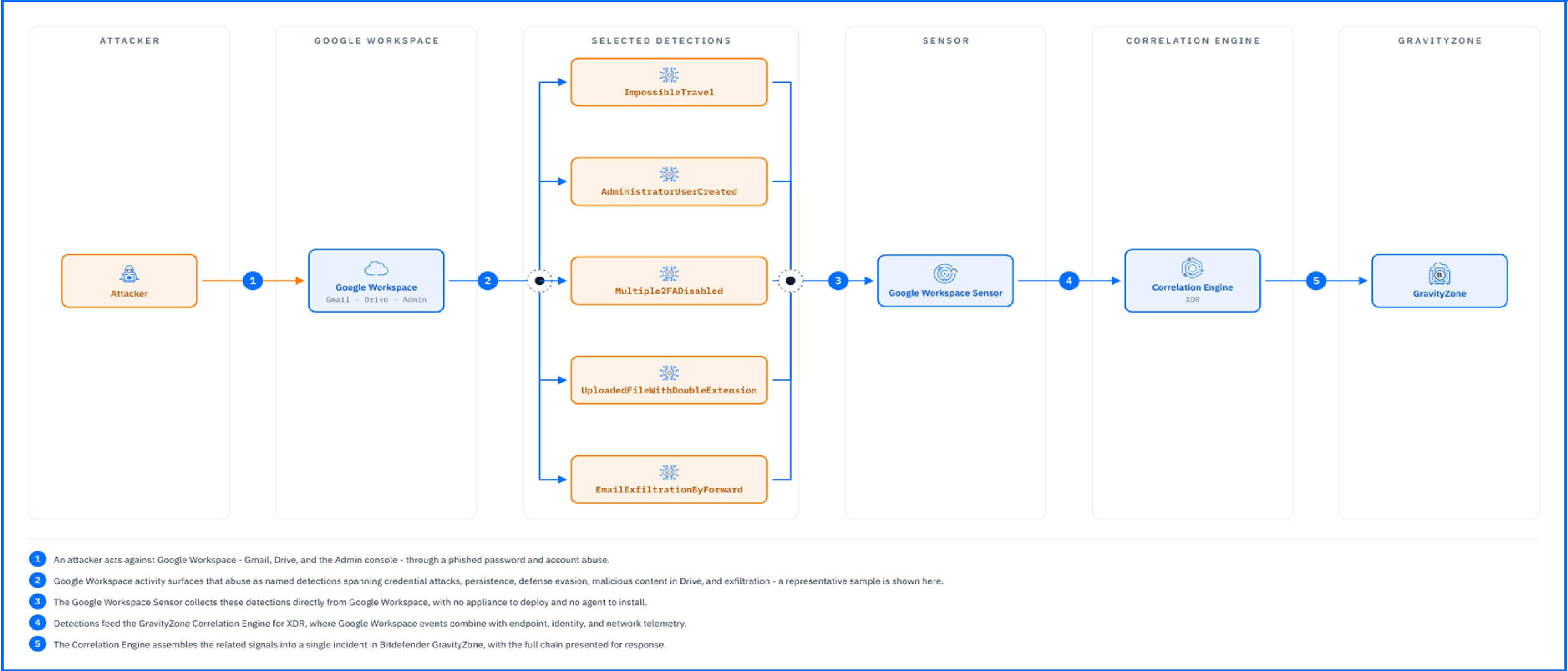 |
The detections below, grouped by what the attacker is trying to achieve, show the range.
Credential attacks and suspicious sign-ins. PossibleBruteforceAttempt is raised on unusual, repeated failed login attempts against Workspace accounts. ImpossibleTravel is raised when a user logs in from two geographically distant locations with insufficient time to travel between them, a definitive sign that a stolen password is being used from a different location than the legitimate owner.
Persistence and privilege escalation. Once inside, attackers secure their access. AdministratorUserCreated and UserAddedToAdministrativeGroup catch new or elevated administrator accounts. SuspiciousCustomPolicyDeployed flags policy deployments an attacker can use to weaken the environment quietly, and Anomaly.UserAdministrativeActivity is raised when a user shows an unusual frequency of administrative activities within a day.
Defense evasion. SecurityRuleDisabled catches the manipulation of security rules, and Multiple2FADisabled identifies coordinated two-factor authentication disablement coming from a single location, a strong sign that one actor is stripping protection from several accounts at once.
Malicious content in Drive. ExecutableFileUploadedToSharedDrive and UploadedFileWithDoubleExtension flag uploads attackers use to stage malware where colleagues will trust and open it. The sensor also watches for irregular file access patterns, including sudden and extensive file deletions.
Exfiltration. EmailExfiltrationByForward detects mail being siphoned out through forwarding, and SuspiciousFileShared catches files exposed outside their normal audience. More broadly, the sensor flags email usage anomalies such as excessive email sending or file sharing within a short period, and the unexpected acquisition of access to many mailboxes by a single user.
Detections in Practice
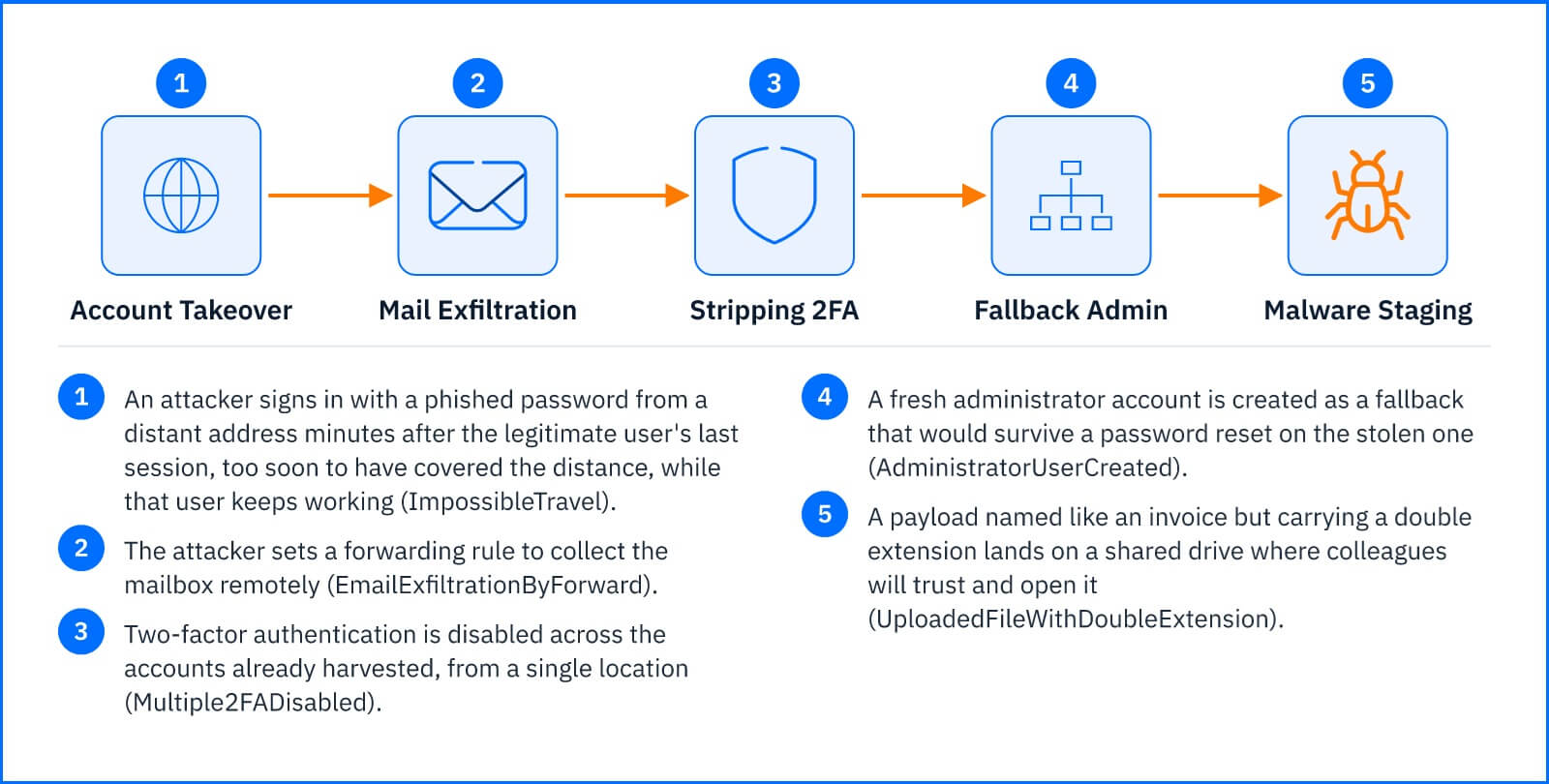
The following chain is illustrative, not a recording of a real incident, but every alert in it is one the sensor raises. An attacker phishes an employee's Google password and signs in from a distant address minutes after the legitimate user's last session, too soon for anyone to have covered the distance, so ImpossibleTravel appears while the legitimate user keeps working. The attacker sets a forwarding rule to collect the mailbox remotely, triggering EmailExfiltrationByForward, then disables two-factor authentication on the accounts already harvested and creates a fresh administrator account as a fallback, raising Multiple2FADisabled and AdministratorUserCreated. Finally, a payload named like an invoice but carrying a double extension lands on a shared drive, and the sensor raises UploadedFileWithDoubleExtension. Individually, each alert might deserve a routine look. The correlation engine assembles them into a single incident with the compromised account at its root, and Incident Advisor presents the chain in one view, where the responder can disable the account, reset its password, and delete the phishing email directly.
 |
Response Actions
The Google Workspace Sensor is one of the sensors that add response actions on the surface they cover. From within an incident, the Threat Response actions available through the Google Workspace integration let you delete a malicious email from Gmail, and for the account behind the activity, disable the Google user or reset the Google user's password, cutting the attacker's access at its source. Note that disabling a user stops the attacker but leaves behind artifacts they created - forwarding rules, guest accounts, public links, API tokens, exported data - which persist until removed in Google Workspace itself. The alert tells you which account to act on; cleanup of what that account touched happens in the platform. The full action table is in the Threat Response article.
Deployment and Configuration
The Google Workspace Sensor uses a direct connection between GravityZone and Google Workspace; there is no appliance to deploy and no agent to install. Licensing comes through the Bitdefender XDR Sensor - Productivity add-on, the same license that covers the Office 365 Sensor. Prerequisites and full integration steps are in the Bitdefender Support Center article The Google Workspace sensor.
Hands-on Scenarios
The following scenarios demonstrate how you can solve specific challenges using the events the Google Workspace Sensor monitors.
Cutting Off a Hijacked Account Before the Mailbox Walks Out the Door
An account signing in from geographically impossible locations while its owner works normally is the classic trace of a stolen password, and the first thing many attackers do with a mailbox is make it portable. When ImpossibleTravel appears and EmailExfiltrationByForward follows on the same account, open the incident and respond from the same view: Reset Google user password or Disable Google user to end the attacker's access, then Delete email Gmail on the phishing message that started it. The forwarding rule itself still needs to be removed in Google Workspace, so treat the alert as your pointer to which account to clean up.
Catching an Administrator Who Should Not Exist
Attackers who gain admin rights create their own: a fresh administrator account survives the password reset that evicts them from the stolen one. AdministratorUserCreated and UserAddedToAdministrativeGroup flag the moment of creation, and Anomaly.UserAdministrativeActivity flags the burst of administrative changes that typically surround it. Open the incident to see which account performed the change; if it has no matching change request, Disable Google user on both the new administrator and the account that created it, and review what else that account touched, the security rules and 2FA settings covered by SecurityRuleDisabled and Multiple2FADisabled being the first places to look.
Stopping Malware Staged Where Colleagues Trust It
A payload does not need to arrive by email when an attacker can place it in a shared drive that every teammate opens without thinking. ExecutableFileUploadedToSharedDrive and UploadedFileWithDoubleExtension flag the upload, naming the file and the account that placed it. Disable Google user or Reset Google user password on the uploading account to stop the staging, then treat every user with access to that drive as potentially exposed: their endpoints are where the Incidents Sensor picks up the investigation if anyone ran the file.
Common Mistakes and Misconceptions
"The Google Workspace Sensor filters mail and blocks uploads"
The sensor detects and reports; it does not sit in the mail flow and does not gate what lands in Drive. Acting on a detection, deleting the email or disabling the account, is a response step taken from the console. It complements Gmail's own filtering rather than replacing it, and it covers what filtering cannot: the account abuse that happens after a clean-looking message is delivered.
"Office 365 coverage extends to Google Workspace"
The two productivity sensors are separate integrations, each connected directly to its own platform. One Bitdefender XDR Sensor - Productivity license covers both, but a configured Office 365 Sensor sees nothing of Gmail or Drive. If your organization runs both platforms, connect both sensors.
"Every sensor provides the same response actions"
The available action list depends on which sensor integrations are defined in GravityZone. The Google Workspace integration adds the three actions in the Response Actions section and no others: there is, for example, no action for deleting a file from Drive, so a staged payload is removed in Google Workspace itself while the console handles the account.