Azure Sensor – Bitdefender TechZone
2026-09-17
Azure Sensor detects cloud infrastructure attacks—permission escalation, data theft, logging evasion—invisible to endpoint agents. Monitors Azure activity logs with no appliance or agent. Correlates Azure activity with endpoint, network, and identity telemetry for XDR-driven incident response and remediation.
Attacks on cloud infrastructure—permission changes, resource deletion, and unauthorized access—never touch a managed endpoint and are visible only from Azure's own audit stream, where no endpoint agent can follow. An attacker who compromises Azure credentials or exploits a misconfiguration can modify security rules, escalate privileges, export data, or erase evidence of their presence, all while remaining invisible to endpoint telemetry. The Azure Sensor gives Bitdefender GravityZone eyes on that stream. It ingests Azure activity logs from your Azure subscription and forwards them to the GravityZone console, feeding the Correlation Engine for XDR.
What Azure Sensor Collects and Detects
The Azure Sensor connects directly to your Azure environment and processes activity from Azure audit logs, turning them into detections that feed the Correlation Engine for XDR. It covers the attack lifecycle from initial access through persistence, privilege escalation, data theft, and covering tracks.
 |
The detections below, grouped by attacker objective, showcase the sensor's range:
Credential attacks and suspicious sign-ins. MaliciousIPFoundInEvent flags activity arriving from an address with a known bad reputation, the infrastructure attackers reuse across campaigns. ActivityFromAnonymousIP identifies actions originating from the Tor IP networks, and SuspiciousActivityAfterLogin flags anomalous behavior following a successful login.
Persistence and privilege escalation. Once inside, attackers secure their access and expand their reach. HighPrivilegeRoleAssignedToNewUser and UserAddedToAdministrativeGroup catch new or elevated administrator accounts. IAMConfigurationModified flags changes to identity and access management settings, the reconfiguration that gives an attacker reach into multiple resources at once. Anomaly.UserAdministrativeActivity is raised when a user shows an unusual frequency of administrative activities. OverlyPermissiveFirewallRuleAdded and AllPortsWhitelistedForIP catch attempts to open network access broadly, and CloudSSHKeyReplaced flags the replacement of existing SSH keys to maintain persistent backdoor access.
Data exfiltration. MultipleAttemptedVMSnapshotDownloads flags repeated attempts to download virtual machine snapshots containing disk images and running memory. CloudDiskExported catches exports of cloud disks, and CloudDatabaseExported identifies database exports, both actions that move data out of the environment for theft or analysis. These detections flag the preparation steps before data leaves the cloud.
Defense evasion and covering tracks. DiagnosticSettingDeleted catches the removal of diagnostic settings, disabling logging before an attack. CloudStorageAccountWipedByEncryption flags storage accounts being encrypted and the encryption kay being deleted and MultipleResourcesDeleted identifies coordinated deletion of cloud resources, erasing evidence of the intrusion.
Everything the sensor detects feeds the Correlation Engine for XDR, where Azure activity combines with endpoint, network, and identity telemetry. A suspicious login to Azure and the administrative changes that follow on the same account become one incident rooted on the compromised credential.
Detections in Practice
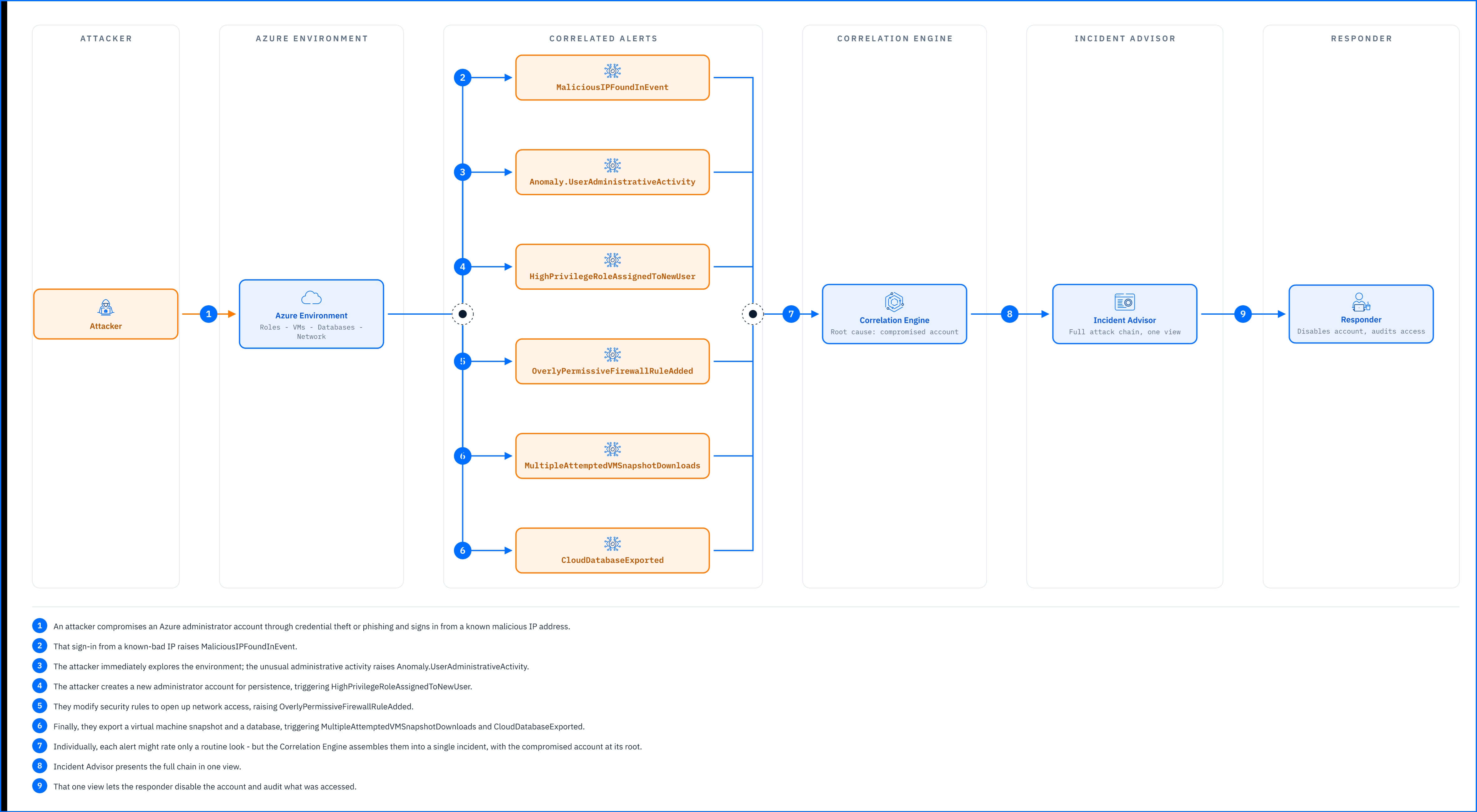
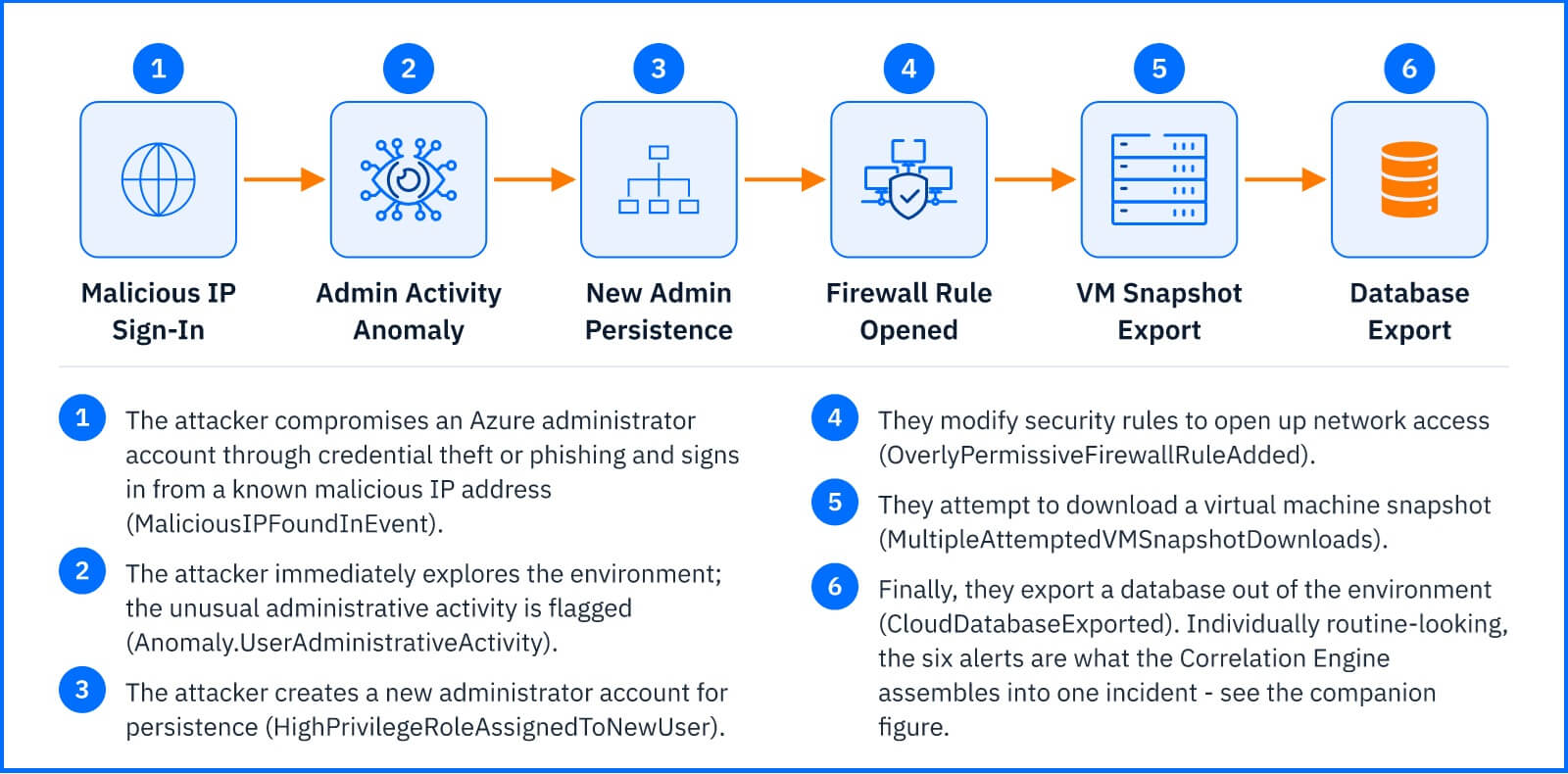
An attacker compromises an Azure administrator account through credential theft or phishing and signs in from a known malicious IP address, raising MaliciousIPFoundInEvent. The attacker immediately begins exploring the environment: unusual administrative activity raises Anomaly.UserAdministrativeActivity. Next, the attacker creates a new administrator account for persistence, triggering HighPrivilegeRoleAssignedToNewUser, and modifies security rules to open network access, raising OverlyPermissiveFirewallRuleAdded. Finally, they export a virtual machine snapshot and database, triggering MultipleAttemptedVMSnapshotDownloads and CloudDatabaseExported.
 |
Individually, each alert might rate a routine look, but the correlation engine assembles them into a single incident with the compromised account at its root. Incident Advisor presents the chain in one view, allowing the responder to disable the account and audit what was accessed.
Deployment and Configuration
The Azure Sensor requires no dedicated appliance or agent: GravityZone reads Azure activity through a service principal that it uses to pull events from your Azure subscription's activity logs. Prerequisites, the Azure audit logging services the sensor relies on, and full integration steps are in the Bitdefender Support Center article The Azure Cloud Sensor.
Hands-on Scenarios
The following scenarios demonstrate how you can solve specific challenges using the Azure Sensor.
Stopping Privilege Escalation at the Moment of Creation
A new administrator account creation raises HighPrivilegeRoleAssignedToNewUser, and unusual administrative activity in the same window raises Anomaly.UserAdministrativeActivity. This anomaly surfaces the compromised account before the attacker can escalate further. Open the incident to see which account performed the creation; if it has no matching request or ticket, the compromised account is likely responsible. Disable the account in Azure and audit what the new administrator account touched: security rules, SSH keys, resource modifications, all visible in the alert chain.
Catching Data Exfiltration Before It Completes
Repeated attempts to download virtual machine snapshots raise MultipleAttemptedVMSnapshotDownloads, and a successful database export raises CloudDatabaseExported on the same account within a short window. That pairing signals exfiltration in progress. Open the incident to identify the account and the resources targeted; disable the account immediately to stop further access, then review which snapshots and databases were exported and audit their contents for sensitive data.
Blocking an Attacker's Persistence Backdoor
An attacker replaces SSH keys, raising CloudSSHKeyReplaced, and creates a new privileged user, raising HighPrivilegeRoleAssignedToNewUser. Together, these actions establish multiple ways to regain access if the original compromised credential is revoked. Open the incident, disable both the compromised account and the new backdoor account, revoke the SSH keys in Azure, and audit login history to see if either account was used before you acted.
Common Mistakes and Misconceptions
"The Azure Sensor blocks attacks as they happen."
It detects and reports; it does not sit inline on Azure activity and does not prevent actions from executing. The sensor flags what happened so you can respond after the fact. Preventing Azure attacks requires Azure's native security controls: conditional access policies, role-based access control (RBAC), and resource locks configured in Azure itself.
"Disabling the account closes the incident."
Disabling stops the attacker from using that credential, but artifacts they created—new administrator accounts, SSH keys, modified firewall rules, exported data—persist until removed in Azure. The alert tells you which account to act on; cleanup of what the attacker left behind requires manual remediation in Azure.
"The sensor sees everything happening in Azure."
The Azure Sensor monitors activity logs from your subscription's audit stream. It does not see Azure resource configurations themselves (what a firewall rule says, what an SSH key contains, whether a storage account is encrypted). It sees the actions: someone created a rule, someone replaced a key, someone deleted a resource. Auditing what the action changed requires reviewing the Azure console and your backups.
"All Azure activity creates an alert."
The sensor detects specific anomalies and suspicious actions. Routine administrative work—users logging in, resources being created by scheduled automation, policies being updated as part of normal governance—does not trigger detections. The alerts flag what deviates from baseline behavior or matches known attack patterns.