CSPM+ Cloud Security Sensor – Bitdefender TechZone
2026-09-29
CSPM+ Cloud Security Sensor enriches incident investigations with cloud posture context via Incident Advisor's Associated Risks widget, showing configuration weaknesses that enabled attacks. Separates cloud findings from endpoint risks. Requires XDR, CSPM+ sensor, and configured cloud accounts.
When an attacker reaches a cloud resource, the useful question is rarely only what they did once they got there. It is how the resource was reachable at all: an over-permissive role, an access key that was never rotated, a compute instance published with an external IP. Those conditions live in your cloud provider's configuration rather than in any alert, so an investigation that ends at the detection ends one step short of the cause. The CSPM+ Cloud Security sensor closes that gap by attaching your cloud posture findings to the incident.
What CSPM+ Contributes to an Incident
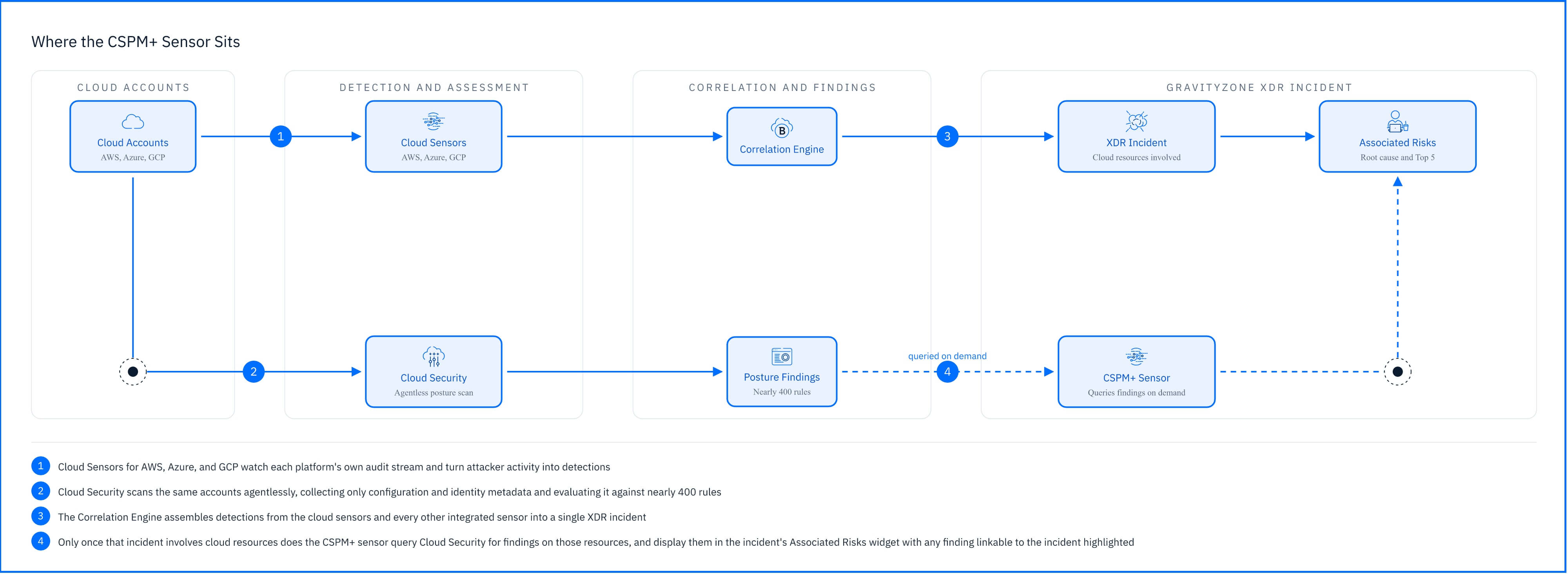 |
The CSPM+ sensor collects telemetry from your GravityZone Cloud Security instance and uses it to supply cloud platform posture context to GravityZone XDR incidents and to risk information. What it contributes is the configuration state surrounding the resources an attack touched: the standing conditions that made the resource reachable, rather than a record of what the attacker did.
That reverses the usual direction. A detection sensor pushes telemetry into the Correlation Engine; CSPM+ is queried by it. Once an incident involving cloud resources exists, the integration asks Cloud Security for findings on those resources and renders them in the Incident Advisor's Associated Risks widget, highlighting any finding that ties to the incident directly. It is enrichment applied after correlation, not an input to it.
Detection across those same environments is the job of the Cloud Sensors for AWS, Azure, and GCP, which do feed the Correlation Engine. Those sensors tell you an attacker deactivated logging or created access keys; CSPM+ tells you the account had no password policy and the role carried more permissions than it needed.
Posture Context in Practice
Consider an incident that begins on an endpoint. A user opens a malicious attachment, credentials are stolen, and those credentials belong to a developer who also holds an AWS identity. When the AWS Sensor reports activity on that identity from an unfamiliar source, the Correlation Engine joins the endpoint compromise and the cloud activity into one incident, because the same account appears on both sides.
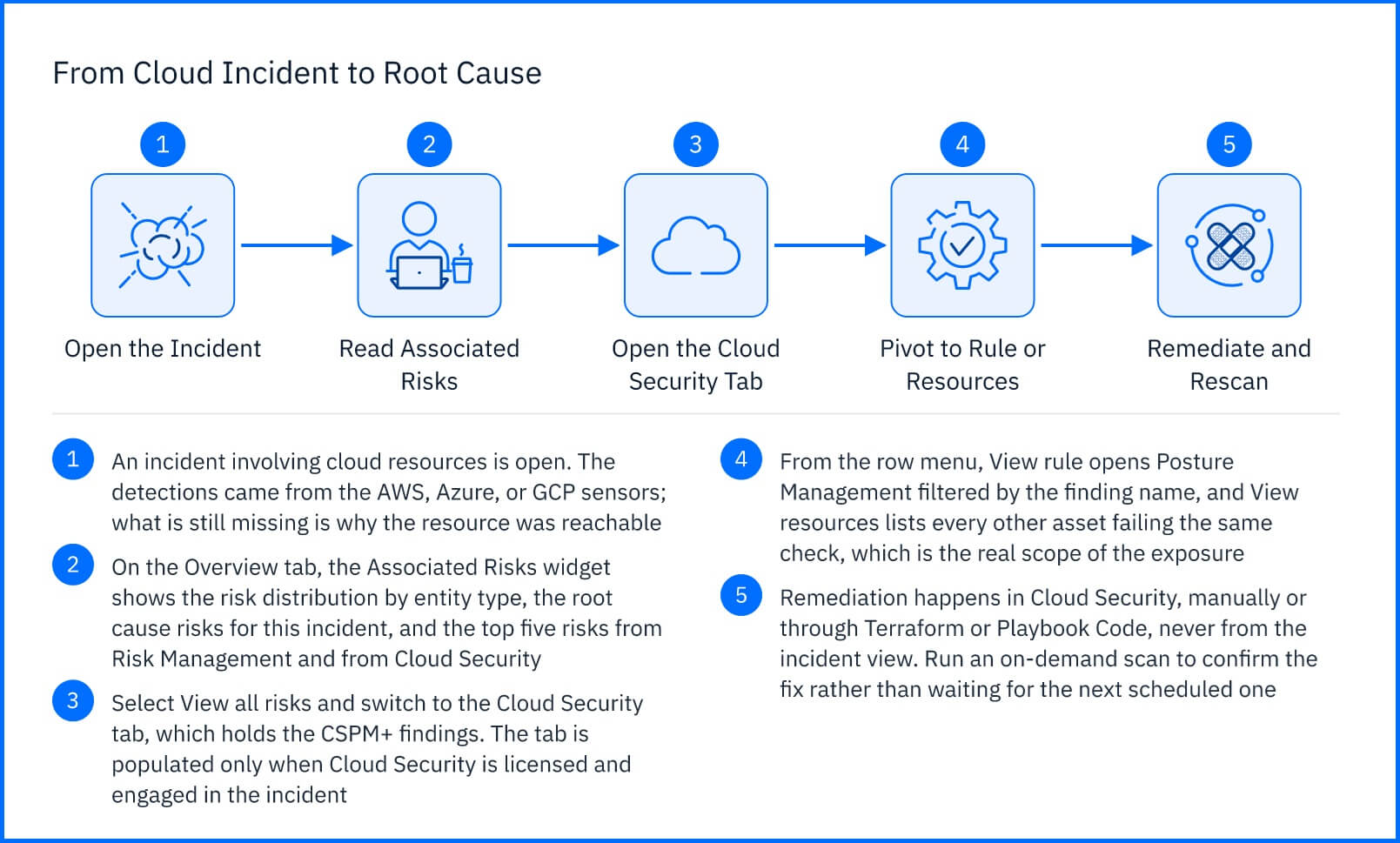
At that point the investigation knows what happened but not why it was possible. On the incident's Overview tab, the Associated Risks widget summarizes the risks attached to the incident's entities, separating the endpoint side from the cloud side and listing cloud identity types such as AWS user and GCP user. Its Top 5 risks from Cloud Security section holds what CSPM+ found, and appears only when Cloud Security is licensed and engaged in the incident.
The Cloud Security entries might show that the identity's account fails the IAM Password policy rule, or that a compute instance in the same account is configured with an external IP. Neither is an attack, and neither would ever generate an alert. Read against an active incident, they are the conditions that let the attack progress, and they are the difference between closing a ticket and removing the reason the ticket existed.
Deployment and Configuration
The CSPM+ sensor has no software to install. It requires four things: an active license that contains the eXtended Detection and Response (XDR) feature, an active license for the CSPM+ sensor, an active GravityZone Cloud Security license, and your cloud accounts configured in the Cloud Security console. When all four conditions are met, the integration becomes active automatically and appears in the Sensors Management grid. Onboarding the cloud accounts themselves, including the CloudFormation, ARM, and manual options for each provider, is covered in the Cloud (CSPM+) article and in the Bitdefender Support Center.
Hands-on Scenarios
 |
Tracing a Cloud Incident Back to the Rule That Allowed It
An incident involves an AWS or GCP identity and you want to know which configuration weakness made it possible. In the Associated Risks widget, look at Top 5 risks from Cloud Security for any finding highlighted as linked to the incident, then select View rule from its row menu. That opens Posture Management > Rules filtered to the finding, where Check Details give you the severity, the affected resources, and the remediation instructions. Nothing is fixed from the incident view: remediation, whether manual, Terraform, or Playbook Code, happens in Cloud Security.
Finding Every Other Resource Exposed by the Same Misconfiguration
One compromised resource almost never means one misconfigured resource. From the same row menu, select View resources instead. This pivots to Posture Management > Resources filtered by resource type and finding details, listing every other asset in the onboarded accounts that fails the same check. Treat that as the real scope: the incident named one resource, the pivot tells you how many more are waiting in the same condition. After remediating them, run an on-demand scan to confirm the fix rather than waiting for the next scheduled one.
Separating Cloud Exposure from Endpoint Exposure in One Incident
Incidents that cross from an endpoint into a cloud account produce two kinds of risk, and the fixes belong to different teams. The Associated risks panel splits them: the Risk Management tab holds endpoint and user risks, pivoting through View resource findings and View findings, and the Cloud Security tab holds the CSPM+ findings. Use Root cause risks to decide which side started the incident, then route each list to whoever owns it, typically the endpoint team on one side and the cloud or DevOps team on the other.
Common Mistakes and Misconceptions
"CSPM+ detects attacks in my cloud accounts."
It does not. CSPM+ reports conditions rather than events: what is misconfigured, not what someone did. Threat detection across AWS, Azure, and GCP is the job of the Cloud Sensors for those platforms.
"The CSPM+ sensor feeds the Correlation Engine like the other sensors do."
It is queried after an incident already exists, not before. A posture finding on its own will never create an incident or raise the severity of one.
"Remediating the finding closes the incident."
Fixing the misconfiguration removes the condition that allowed the attack, but it does nothing about what the attacker already did. Access keys they created, permissions they granted themselves, and data they reached all persist until they are dealt with directly. The finding tells you what to fix; the incident still tells you what to clean up.
"If I have a cloud subscription, the findings will appear."
It takes all four: XDR in the license, a CSPM+ sensor license, a Cloud Security license, and cloud accounts configured in the Cloud Security console. Missing any one leaves the Cloud Security section of the Associated Risks widget empty, and an empty section looks identical whether your posture is clean or the integration was never completed.