AWS Sensor – Bitdefender TechZone
2026-09-16
AWS Sensor monitors compromised AWS identities via leaked access keys and assumed roles through CloudTrail, detecting activity invisible to endpoint and network agents. Covers discovery, privilege escalation, logging evasion, and data exfiltration. No appliance; supports single-account and Control Tower deployments, correlates with endpoint, identity, and network telemetry for XDR.
Almost everything that happens in an AWS account occurs through the API: users, roles, and services create resources, grant permissions, and change configurations by making control-plane calls. AWS records every call in CloudTrail and tracks state changes through AWS Config.
That makes the account a natural target. One leaked access key or assumed role lets an attacker stand up infrastructure, widen their permissions, switch off logging, and copy data to accounts they control - and none of it touches a managed endpoint or crosses a network an agent can see. Every step looks like a routine API call, making that audit stream the only place it leaves a trace.
The AWS Sensor gives Bitdefender GravityZone eyes on that stream. It ingests CloudTrail and AWS Config activity from a single account or an entire AWS Control Tower organization and forwards it to the GravityZone console, feeding the Correlation Engine for XDR.
What AWS Sensor Collects and Detects
The sensor collects configuration changes and API events drawn from AWS CloudTrail and AWS Config. In AWS Control Tower environments, the sensor integrates directly with the Management and Log Archive accounts, extending coverage across every account in the organization.
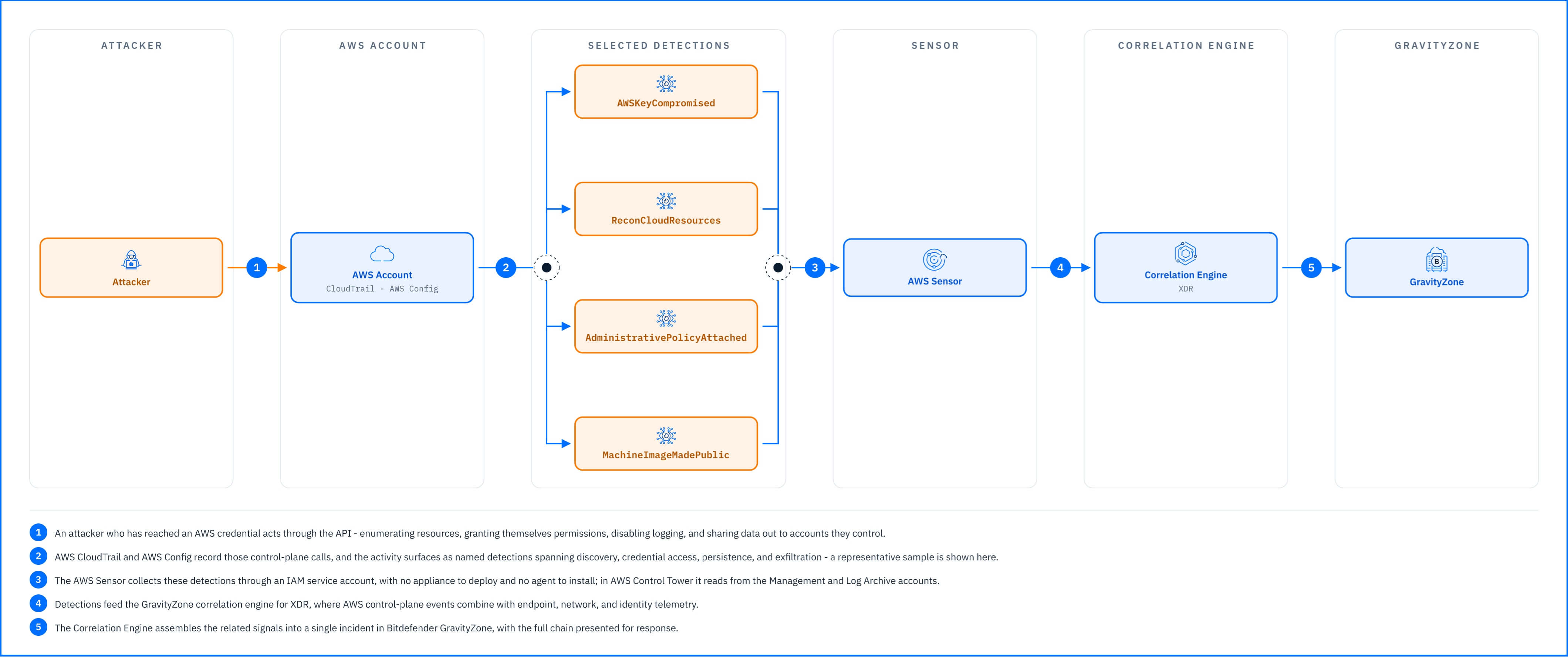 |
The detections below are a sample of that coverage, grouped by what the attacker is trying to do:
Discovery: ReconCloudResources is raised when a single principal enumerates many services in a short window—listing S3 buckets, IAM users, EC2 instances, and security groups to map an unfamiliar account. AWSCodeBuildDiscovery covers the same pattern against the build pipeline, while CertificatesListed flags bulk reads of the certificate store.
Credential Access: PossibleDistributedBruteforceAttemptForUser is raised when sign-in failures against one user arrive from many source addresses in a short amount of time. AWSKeyCompromised triggers when AWS detects a leaked access key in a public repository. MultipleSecretsManagerSecretsRead catches a principal pulling consecutive secrets out of AWS Secrets Manager.
Privilege Escalation & Persistence: RootAccessKeyCreated is raised when an access key is minted for the account root—an identity that should almost never carry one. AdministrativePolicyAttached and UserAddedToAdministrativeGroup catch an IAM user being granted administrator permissions, while AppSyncApiKeyCreated and ServiceSpecificCredentialsCreated flag new long-lived credentials designed to maintain access after password or key rotations.
Defense Evasion: MonitoringServicesDisabled is raised when CloudTrail logging is stopped or a trail is deleted. S3AccessLoggingDisabled is generated when server access logging is turned off on a bucket, and BucketEncryptionDeleted flags the removal of default bucket encryption. AWSEventBridgeRuleDisabled flags when an EventBridge alert rule is switched off.
Collection & Exfiltration: MachineImageShared flags a machine image opened outside the organization. SnapshotPublicAccessUnblocked detects the removal of account-level public snapshot blocks, enabling future public exposure. S3ReplicationModified detects changes to S3 bucket replication configuration, which could redirect or replicate bucket contents to an unauthorized destination, and CloudDatabaseMadePublic detects a managed database exposed to the public internet.
Impact: CloudDeletionProtectionDisabled is raised when resource deletion guards are removed. KMSKeyDisabled activates when an encryption key is disabled or scheduled for deletion, and MultipleResourcesDeleted flags rapid resource teardowns.
Detections in Practice
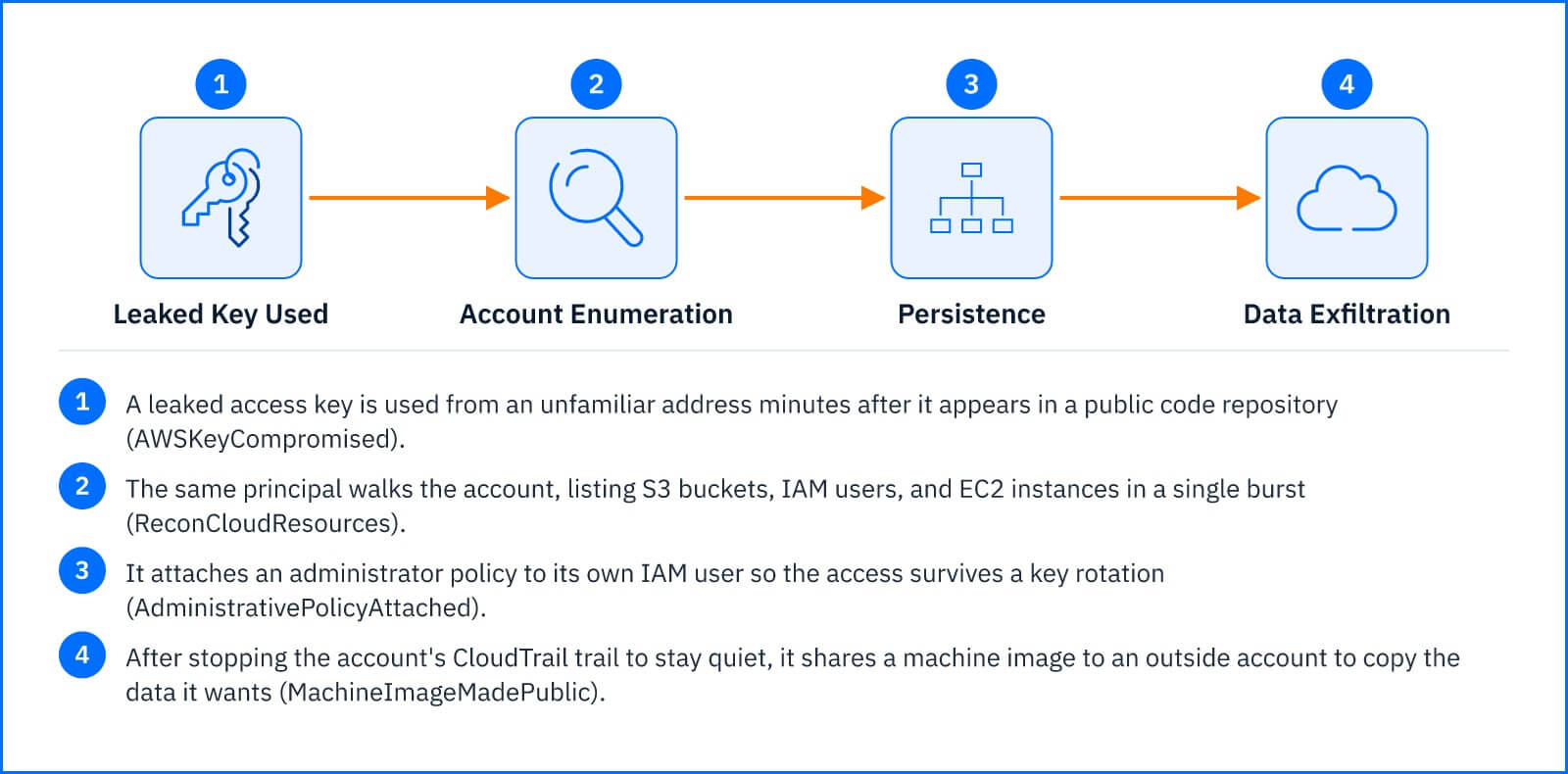
A leaked access key is the common opening. The key appears in a public code push and is used minutes later from an unfamiliar address: AWSKeyCompromised. The same principal then walks the account, listing buckets, roles, and instances in one wave: ReconCloudResources. It reads a run of secrets out of Secrets Manager (MultipleSecretsManagerSecretsRead), attaches an administrator policy to its own IAM user so the access survives a key rotation (AdministrativePolicyAttached), and stops the account's CloudTrail trail to go quiet (MonitoringServicesDisabled). Finally it shares a machine image to an outside account to copy the data it wants (MachineImage Shared).
Six control-plane calls, each unremarkable on its own. The Correlation Engine ties them to a single IAM principal and presents them as one incident with a clear start and end—instead of six alerts an analyst has to thread together by hand.
 |
Response Actions
The AWS Sensor integration provides a targeted response action against the identity behind the activity. From within an incident, Disable AWS IAM account blocks the compromised IAM user from making further API calls. Keep two key operational requirements in mind:
Permissions: The action is only available if the integration was provisioned with the incident-response IAM policy. In AWS Control Tower deployments, it works exclusively from the Management account.
Scope of Mitigation: Disabling the user prevents new API calls, but it does not undo historical changes. Temporary credentials issued via AWS STS remain valid until expiration. Access keys, attached policies, public images, replication rules, and security-group modifications must be reverted manually within AWS.
Deployment and Configuration
The AWS Sensor requires no dedicated appliance or agent: GravityZone reads AWS activity through an IAM service account that it uses to pull events from an S3 bucket and an Amazon SQS queue in your account. Prerequisites, the AWS CloudTrail and AWS Config services the sensor relies on, and full integration steps are in the Bitdefender Support Center articles The AWS sensor (single-account environment setup) and The AWS sensor (Control Tower setup), the second for multi-account organizations governed by AWS Control Tower.
Hands-on Scenarios
The following scenarios demonstrate how you can solve specific challenges using the AWS Sensor.
Containing a Leaked Access Key
AWSKeyCompromised, especially when it is followed by ReconCloudResources from the same principal, means an access key is in someone else's hands. Open the incident and use Disable AWS IAM account on the user the key belongs to. Then, in AWS, delete that user's access keys so a rotation does not simply hand the attacker a fresh working key, and review CloudTrail for what the key did while it was active.
Unwinding a Privilege-Escalation Foothold
AdministrativePolicyAttached or UserAddedToAdministrativeGroup on an account that earlier tripped a credential alert is an attacker making the access permanent. Use Disable AWS IAM account on the principal that performed the grant. Disabling it does not detach the policy or remove the group membership; an administrator has to do that in IAM, along with deleting any access keys or AppSyncApiKeyCreated keys created during the session.
Stopping Data Exfiltration Through a Public Image
MachineImageMade Shared or SnapshotPublicAccessUnblocked means a disk image has been shared outside the organization. Use Disable AWS IAM account on the principal that changed the sharing setting, then in AWS set the image or snapshot back to private and check whether it was copied while it was exposed. If S3ReplicationModified fired in the same incident, remove the replication rule as well.
Common Mistakes and Misconceptions
"The AWS Sensor blocks malicious API calls."
It does not sit in the API path. It reads CloudTrail and AWS Config after the fact and reports. Blocking the principal happens from the GravityZone console with Disable AWS IAM account once the Correlation Engine has assembled the detections into an incident, not at the moment the call is made.
"Any AWS integration can disable an IAM user from GravityZone."
Only if the integration was configured with the incident-response IAM policy. Without those extra permissions, the sensor still generates incidents, but the response action is unavailable. In AWS Control Tower deployments, the action works only from the Management account.
"Disabling the IAM user closes the incident."
Disabling stops new API calls from that user, but temporary STS credentials it issued stay valid until they expire, and anything it created, extra access keys, attached policies, public images, replication rules, or a stopped trail, remains in place until an administrator removes it in AWS. The alert tells you which principal to act on; cleanup happens in the account.
"One CloudTrail trail is enough for full coverage."
The sensor needs a multi-region trail and AWS Config with globally recorded resource types included. A single-region trail, or a Config recorder scoped to a few resource types, leaves whole categories of activity, in other regions or against global services like IAM, with no record for the sensor to read.