Attack Path Analysis – Bitdefender TechZone
2026-10-15
Bitdefender GravityZone Attack Path Analaysis correlates vulnerabilities, misconfigurations, account risks, and internet exposure into routes an attacker could follow to your critical assets, and which single fix breaks the most routes.
Bitdefender GravityZone Attack Path Analysis is a prioritization layer that sits on top of the risk data GravityZone already collects. It correlates vulnerabilities, misconfigurations, account risks, and internet exposure into a map of the steps an attacker could take to reach a high-value asset, such as a server or a container. Each route is drawn as a graph in which user accounts sit beside workstations, servers, and cloud resources, and every hop is labeled with the technique that makes it possible.
Why Severity Scores Miss the Full Attack Path Analysis
Sorting the findings list by severity is a sound way to triage. The highest-scoring items are usually the most dangerous in isolation, and working down from the top is defensible. The limitation lies in the words "in isolation": a severity score rates one finding at a time, but an attacker uses findings in combination.
Consider a medium-severity vulnerability on a workstation used by someone with privileged access, paired with a credential stored on that machine that is accessible to any program running under that user account (such as a password saved in a script, file, or browser profile). Neither finding reaches the top of the patch queue on its own. Together, however, they create an active attack route from a single phishing email to a critical server. Both weaknesses were already detected; what was missing was the connection between them—and, with it, the clear order in which to fix them.
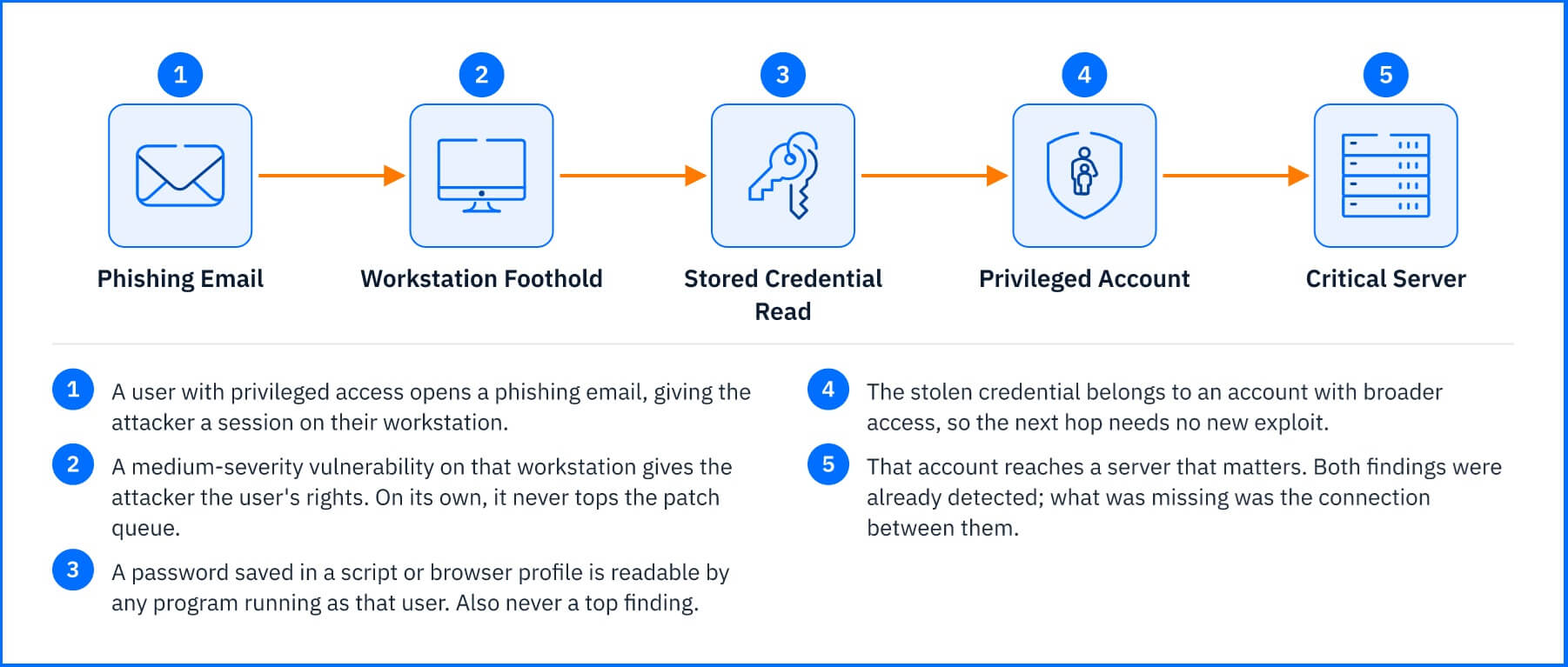 Fig. 1. Two findings that never reach the top of a severity-sorted queue, chained into one route to a critical server. |
How Attack Path Analysis Works
Attack Path Analysis reads the inventory and findings held in GravityZone and asks one core question: how an attacker could reach a valuable asset from an initial entry point, and through which specific steps. The result is a set of distinct attack paths, each ending at a high-value target and visualized as a directed graph.
Nodes, Edges, and Risk Factors
The circles on the graph, called nodes, represent the entities an attacker can compromise or transition through. Nodes are not limited to physical or virtual machines; a path can contain:
Accounts. User identities, shown with their account type, email, and department. An account exposed to phishing is often the first node on a path.
Resources from your inventory. Workstations, servers, and cloud resources such as security groups and load balancers.
Derived resources. Elements that are not inventory items in their own right but explain how an attacker moves, for example an SMB file-sharing service running on a server, which can serve as an entry point. The node shows which real resource it depends on.
The arrows connecting nodes, called edges, are labeled with the specific mechanism an attacker would leverage to move from one step to the next. Selecting an edge opens a detailed description of the transition, including the associated CVEs and security findings that make the move possible. This relationship is what separates a connected path from a static list: every hop identifies the exact weakness enabling it.
Four risk factors appear as badges on paths and nodes, so you can see what makes each one dangerous:
Public exposure. The asset has vulnerabilities or configurations that expose it to attacks from the internet, or External Attack Surface Management (EASM) flagged it as exposed.
Exploitable CVE. A vulnerability that attackers are known to use, or that is easy to exploit with publicly available tools.
High-severity CVE. A vulnerability with a risk score of 70% or higher.
Critical asset. A mission-critical asset, such as a server running core systems or holding sensitive data, whose compromise would cause severe financial, operational, or reputational harm.
Node outlines are color-coded by severity (yellow for low, orange for medium, red for high), and the final target asset displays an aggregated risk score ranging from 0 to 100.
On complex paths, the graph automatically collapses intermediate nodes into grouped segments labeled with the total node count. Grouping is strictly a visual optimization: grouped nodes retain their individual properties, locations, and telemetry, and can be expanded at any time to inspect individual hops.
The graph also keeps alternative routes to the target visible. Enabling the Shortest Path control highlights the most direct attack vector, while secondary branches remain visible to ensure you maintain visibility over redundant exposure routes.
Each path tracks its creation and last-updated timestamps, allowing you to distinguish newly emerged attack vectors from persistent exposure. Note that Attack Path Analysis models potential exposure calculated from scan and inventory telemetry, rather than live threat activity: it shows what an attacker could achieve, rather than active exploitation in progress.
Reading the Demo Attack Path Analysis
Bitdefender GravityZone includes a pre-configured demo attack path that illustrates the structure of a live environment.
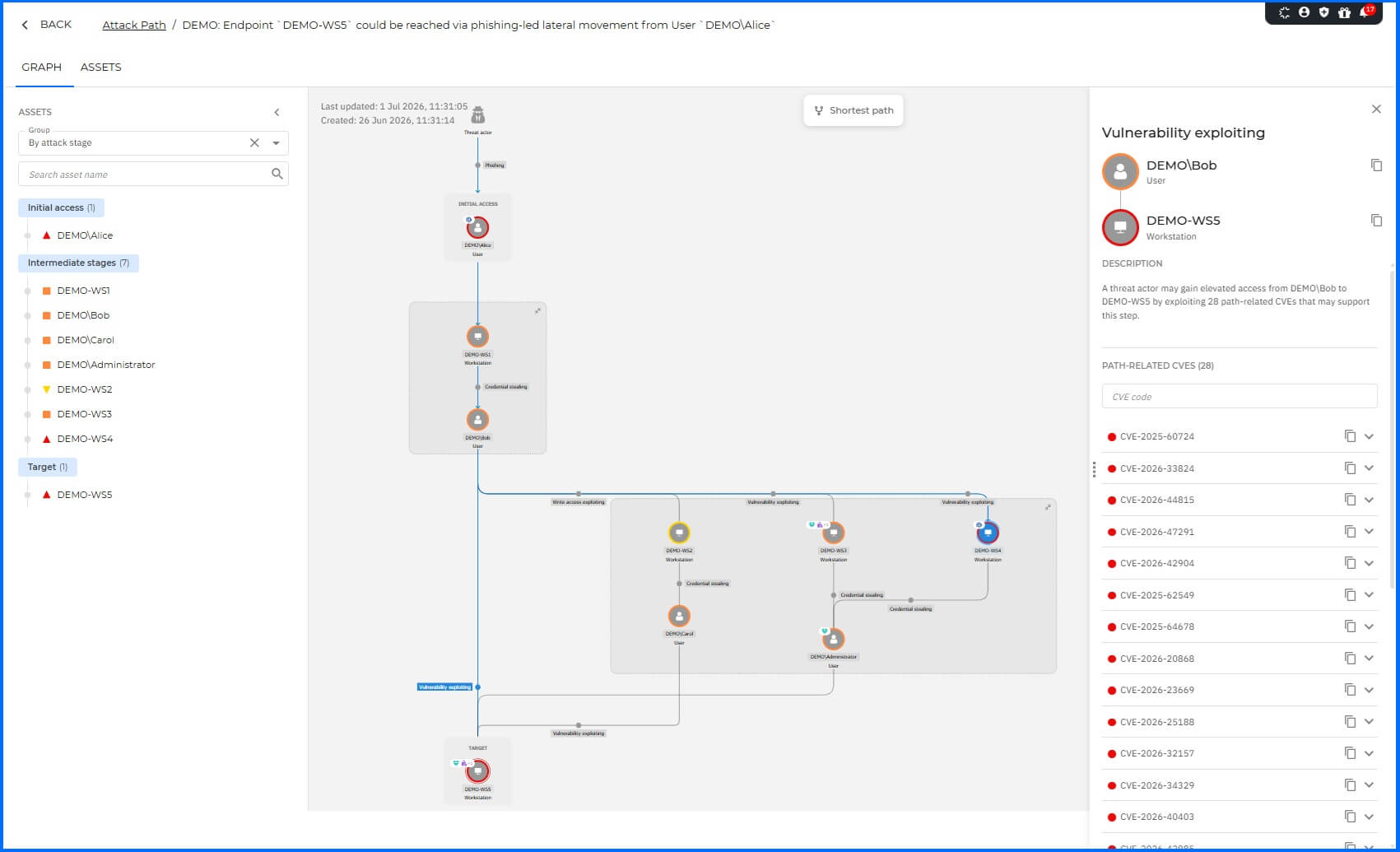 Fig. 2. The demo attack path in the Graph tab, with the Assets panel grouped by attack stage. |
The path originates at the user account DEMO\Alice, flagged as the initial entry point due to heightened phishing risk. From there, it moves to the workstation DEMO-WS1, which exhibits an exploitable vulnerability alongside an endpoint misconfiguration. On that host, locally stored credentials provide the attacker with access to a secondary, higher-privileged account: DEMO\Bob.
From DEMO\Bob, the attack vector branches to three additional endpoints (DEMO-WS2, DEMO-WS3, and DEMO-WS4) - each containing vulnerabilities and misconfigurations that can be leveraged for lateral movement and privilege escalation - before culminating at the target asset, DEMO-WS5, which contains 28 High and Critical CVEs.
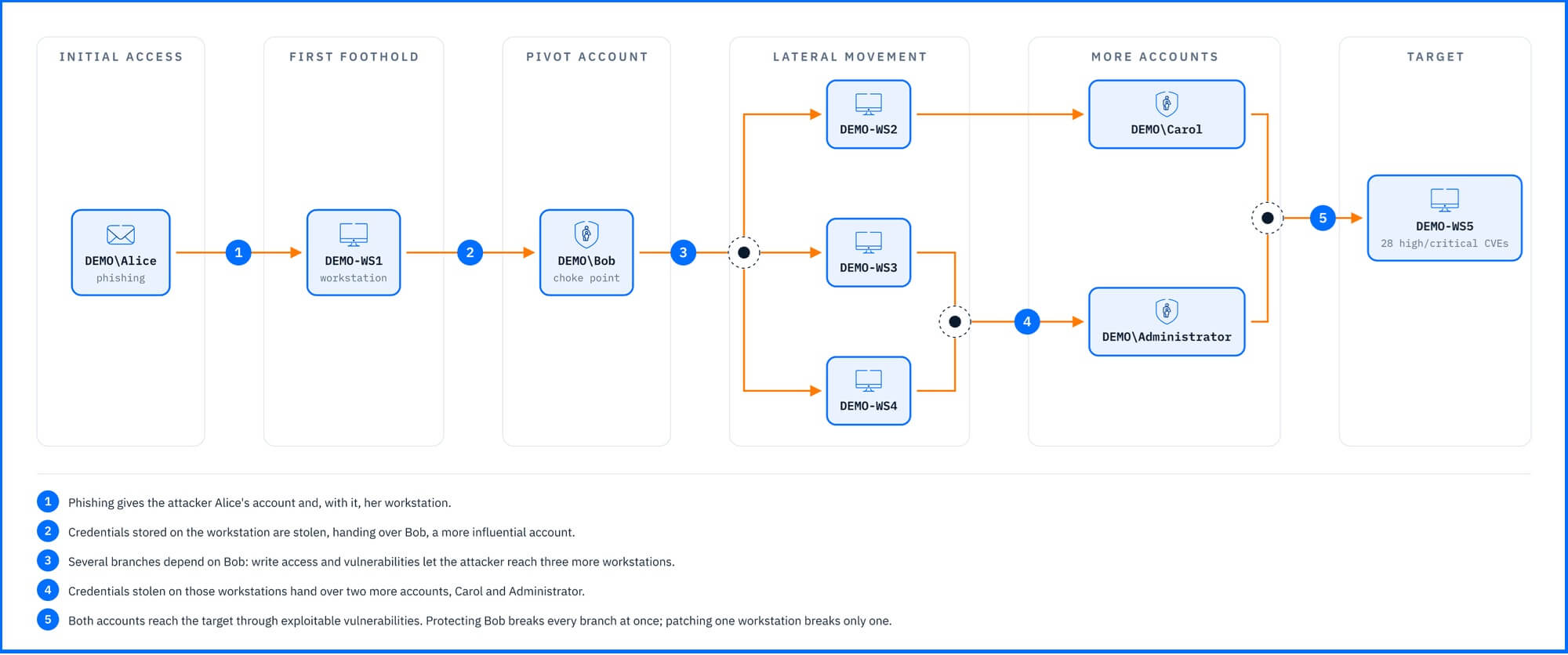 Fig. 3. The demo attack path: DEMO\Bob is the choke point between the entry account and the target. |
DEMO\Bob functions as a strategic choke point: a critical node upon which multiple downstream exposure routes depend. Securing this single identity disrupts every secondary branch simultaneously—a outcome that patching downstream machines individually cannot match.
This illustrates the core value of attack path prioritization: while the highest-scoring individual findings sit on the end target, the remediation action with the widest systemic impact sits several hops upstream on a user identity.
What Attack Path Analysis Chains Together
An attack path is only as complete as the exposure points it connects. Attack Path Analysis correlates several distinct classes of telemetry and risk data, including:
Vulnerabilities: CVEs affecting workstations, servers, and cloud workloads. Each node displays only the specific vulnerabilities relevant to that execution hop, highlighting the exact flaw enabling the movement rather than flooding you with the asset's entire patch backlog.
Endpoint Misconfigurations: Security settings that fall outside traditional CVEs but increase an asset's attack surface—such as orphaned local administrator accounts or disabled security controls. These surface as path-related findings on non-cloud assets.
Identity & Account Risks: Weaknesses tied to user credentials, such as heightened phishing exposure or unencrypted passwords stored on a local machine. These identity-based hops enable lateral movement without requiring zero-day exploits or complex payload delivery.
Internet Exposure: External services and assets identified by External Attack Surface Management (EASM) as exposed to the public internet. This expands path modeling beyond internal footholds, uncovering attack vectors that originate directly from the outside.
Cloud Infrastructure: Assets across connected AWS, Azure, Google Cloud Platform (GCP), and Kubernetes environments - complete with Cloud Account IDs and regions - integrated seamlessly alongside Windows, Linux, and macOS endpoints.
GravityZone Console Integration
Attack Path Analysis is integrated across three primary areas of the GravityZone console, each designed to answer a specific operational question:
The Attack Path Analysis Inventory (Risk Management > Attack Path)
Core Question: "Which routes exist, and which should I prioritize first?"
Overview: The central grid lists one path per row, displaying its name, risk factor tags, target asset, target risk score, asset type, platform, and last-updated timestamp.
Filtering & Views: You can filter the inventory by Risk Factors (e.g., isolating paths combining Public exposure with Exploitable CVE), Asset Risk Score, Platform, or Asset by Position (locating paths where a given asset serves as the Initial Asset, Target Asset, or an intermediate node). Paths requiring ongoing tracking can be saved to the Watchlist tab alongside the All Attack Paths view.
Detailed Path Inspection: Opening a path reveals two dedicated views:
Graph Tab: Answers "How would the attacker reach the target?" Displays the visual topology alongside an Assets side panel that groups assets by attack stage, risk factor, asset type, or name. Selecting any node exposes its specific Path-related CVEs, Path-related findings, Path-related account risks, and Public exposure risks, with direct links to the corresponding entity on the Resources or Accounts management pages.
Assets Tab: Provides an itemized tabular list of the target asset and all intermediate nodes along the path.
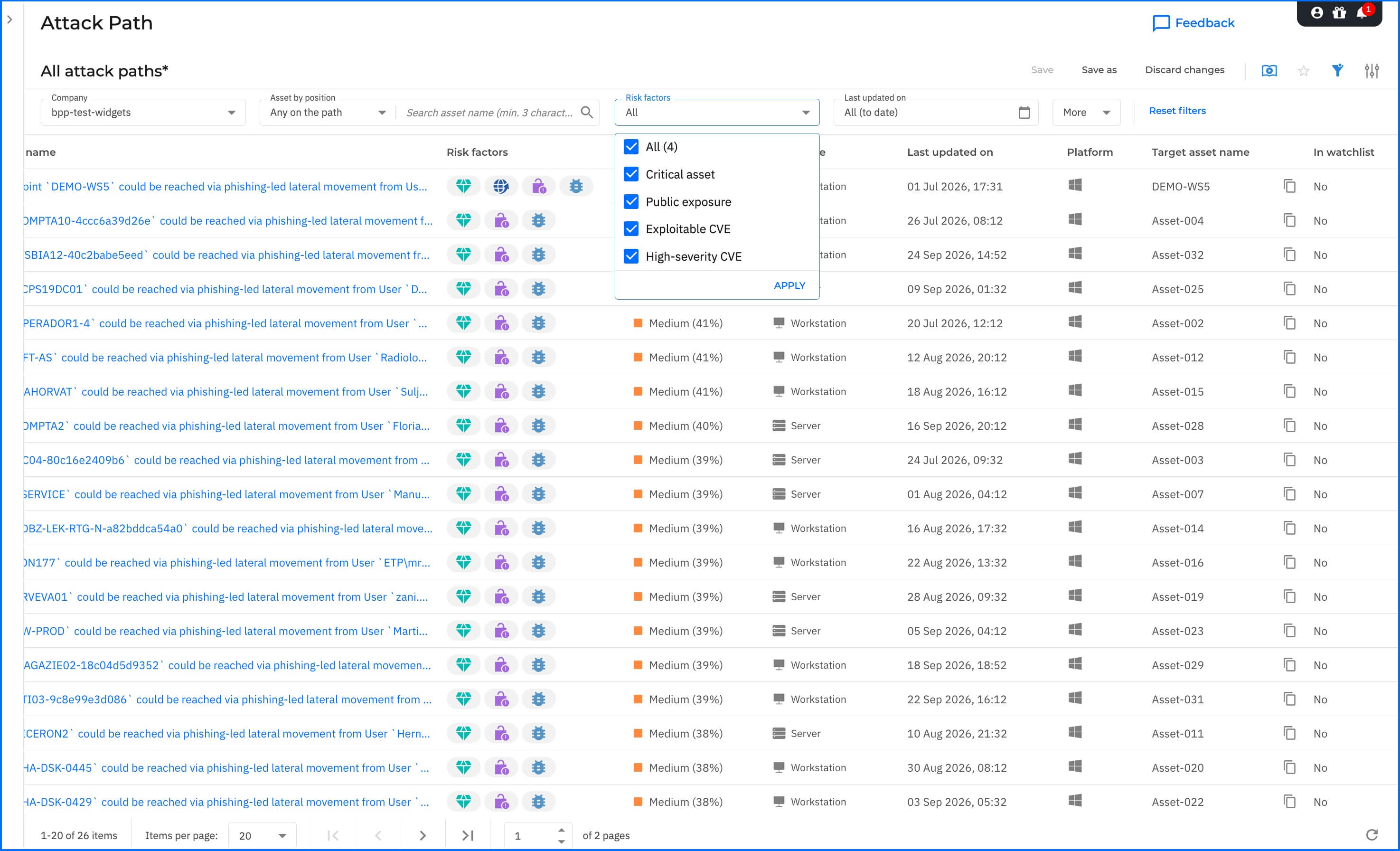 Fig. 4. The Attack Path page, filtered by risk factor. |
The Executive & Security Dashboard (Monitoring > Executive / ASM Dashboard)
Core Question: "Is exposure improving or deteriorating over time?"
Key Widgets: New Attack Paths, Open Attack Paths Over Time (tracking net-new vs. resolved paths), Top 5 Attack Path Destinations, Top 5 Attack Path Entry Points.
Finding Choke Points: The Top 5 Entry Points widget serves as a rapid discovery tool for strategic choke points—instantly identifying single accounts or assets that initiate multiple distinct exposure routes.
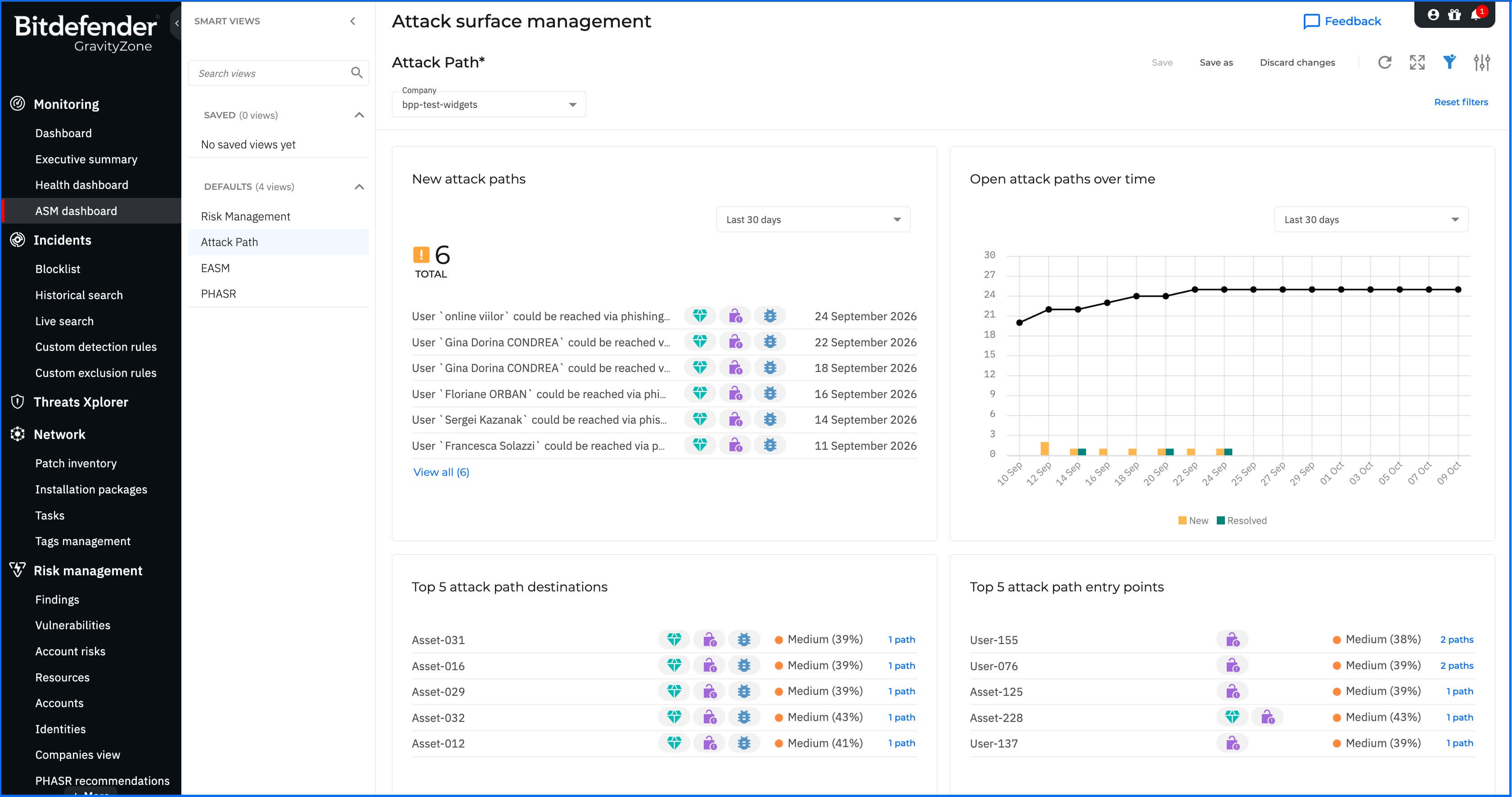 Fig. 5. The Attack Path Analysis view of the ASM dashboard. |
SOC & Incident Response Workflows
For Security Operations Center (SOC) analysts, an attack path represents a modeled hypothesis of how an intrusion could progress:
Proactive Hardening: Before an incident occurs, entry points and edge mechanisms highlight high-risk identities and endpoints that require stricter policy controls, MFA enforcement, or elevated monitoring.
Incident Investigation: During an active investigation, cross-referencing a compromised asset against existing attack paths instantly highlights potential blast radiuses and next-hop lateral movement targets.
Framework Correlation: Path techniques map directly to standard MITRE ATT&CK® tactics, such as Phishing (T1566), Unsecured Credentials in Files (T1552.001), and Lateral Movement (TA0008). Selecting View Metadata on any node provides raw JSON output for seamless query building in Search or correlation in Incident Advisor.
Where Attack Path Analysis Stops
Attack Path Analysis identifies which weaknesses combine into a viable attack route and pinpoints the specific remediation action that disrupts the largest number of exposure paths. It models exposure, it does not automatically remediate vulnerabilities, nor does it monitor active threat execution.
Complementary GravityZone technologies build upon Attack Path Analysis insights to deliver remediation and active detection:
Patch Management: Deploys software updates to resolve the specific CVEs enabling individual path hops.
Endpoint Risk Management: Tracks, policies, and remediates security misconfigurations associated with path findings.
User Risk Management: Surfaces the identity risks, such as credential exposure and password reuse, that turn an account into a high risk point.
External Attack Surface Management (EASM) discovers and analyzes the internet-facing assets that become external entry points.
EDR and XDR: Monitor live runtime telemetry across endpoints, identities, networks, and cloud workloads to detect and block active intrusions that attack path models predict.
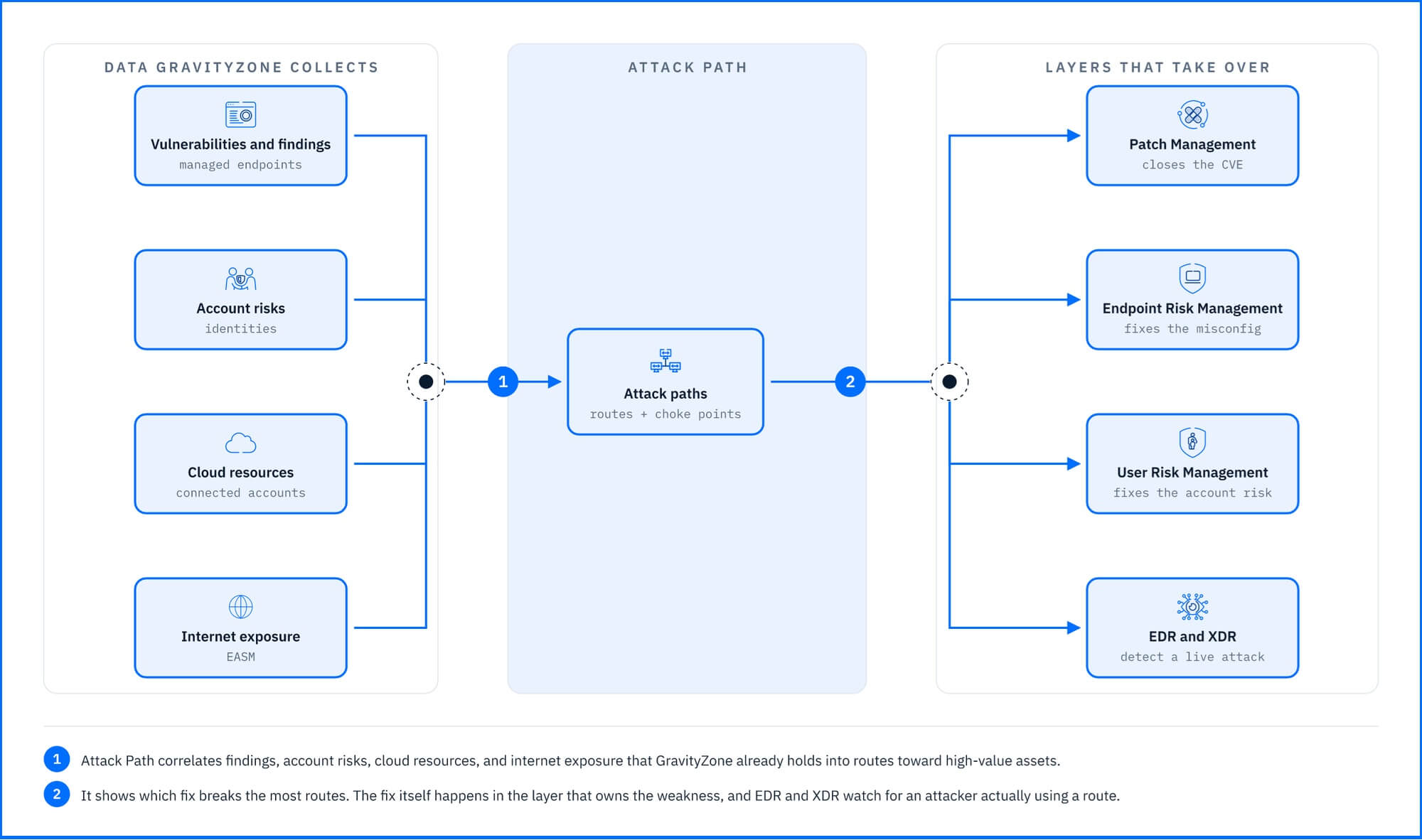 Fig. 6. Attack Path correlates data GravityZone already collects, and other layers close or watch the routes it finds. |
Deployment and Configuration
There are no additional endpoint agents or modules to deploy: attack paths are synthesized automatically from telemetry GravityZone already collects, including Endpoint Risk Management findings, identity risk factors, connected cloud infrastructure data, and EASM inventory. Enabling a broader set of these telemetry sources results in more comprehensive attack path visibility; specifically, external attack vectors originating from the internet require an active EASM integration.
Once licensed, attack paths populate automatically on the Risk Management > Attack Path page and within the Executive / ASM Dashboard. Before environment-specific paths are generated, you can enable the interactive demo path via the display options menu (Show demo attack path) to familiarize yourself with graph controls and node relationships.
For detailed system requirements, platform prerequisites, and full configuration options, see the Bitdefender Support Center.
Hands-on Scenarios
The following scenarios demonstrate how to solve specific security challenges using Attack Path workflows.
An account that matters more than the critical CVE
A modeled path ends at a file server marked as a critical asset, and the most prominent finding on it is a high-severity CVE. Standard triage protocols suggest patching the server first. However, checking the Top 5 Attack Path Entry Points on the ASM dashboard shows that a single user account initiates four separate attack paths. Opening any of those paths in the Graph tab reveals a recurring vector: heightened phishing exposure on the user identity leads to a workstation where locally stored credentials hand the attacker a second account with broader privileges.
Fixing that one account closes four attack routes, whereas patching the server closes only one. Selecting View Account directly from the node allows you to review its identity risks in User Risk Management and purge the cached credentials from the workstation. While the CVE on the file server still gets remediated through Patch Management, it is no longer the immediate blocker for the week.
A public service that connects the internal findings
Every finding along a path was already logged in Risk Management, but none appeared urgent in isolation because they were confined to internal machines. Filtering the Attack Path page by Risk Factors for Public Exposure together with Exploitable CVE reveals why those internal findings matter: an internet-facing service serves as the initial entry node, bridging directly into internal servers before reaching a high-value asset.
The Public Exposure Risks section on the entry node details what EASM discovered, and selecting View EASM Assets leads directly to the external infrastructure. Instead of trying to patch every downstream internal server at once, closing or restricting the exposed service removes the entry point that makes those downstream weaknesses reachable—achieving faster overall risk reduction.
Proving Closed Routes, Not Just Closed Tickets
After a month of remediation work, leadership asks whether the environment is genuinely safer or simply better patched. Adding the paths that end at mission-critical servers to the Watchlist allows you to track progress in Open Attack Paths Over Time on the ASM dashboard, which separates newly emerged paths from resolved ones.
A declining count of open paths provides clear evidence of risk reduction, showing that complete routes to key assets have been broken rather than just individual patch tickets closed. When a net-new route appears in New Attack Paths, the dashboard clarifies whether it represents an unmapped entry point or a new path to an existing target, giving you a clear starting point for the next planning cycle.
Common Mistakes and Misconceptions
"An attack path indicates an active breach."
An attack path is a structural map of potential exposure, not an indicator of compromise. Attack Path models lateral movement based on scan telemetry and asset inventory rather than live runtime execution. A newly discovered path reflects a fresh combination of unpatched vulnerabilities or misconfigurations—not an active intrusion. If you suspect suspicious activity on an asset within a path, validate runtime behavior in Incidents and Search.
"Every node on the graph represents a physical or virtual machine."
Nodes are not limited to endpoints. User identities are distinct nodes, as are derived resources such as an active SMB file-sharing service. In the interactive demo path, the remediation action with the widest impact targets an account identity rather than a host. Scanning the graph exclusively for servers and workstations causes analysts to overlook key identity choke points.
"Remediating the shortest path eliminates the threat."
The Shortest Path control highlights the most direct vector to a target asset, but it is rarely the only route. Secondary branches remain visible on the graph because breaking a single hop on the shortest vector may leave the target vulnerable via alternative paths. Before applying a fix, verify whether the target node sits at an intersection common to all routes or merely on the shortest one.
"A collapsed node group represents a cluster of related assets."
Grouping intermediate nodes into collapsed segments is strictly a visual layout optimization for complex topologies. Grouped nodes do not necessarily share a network segment, physical location, or security policy, nor does the collapsed group carry an aggregate risk score of its own. Expanding the segment reveals individual hops alongside their specific risk factors.
Recommended Content
To learn more about the technologies included in the Prevention layer, we recommend reading the next article Compliance Manager.
More Resources
Attack Path Analysis documentation: Bitdefender Support Center
How to interpret the demo attack path: Bitdefender Support Center
Discover the full potential with our dedicated video masterclasses: Bitdefender Masterclass